
Table of Contents
Contents
Welcome to this complete look at facelink blogger template. If you only need the short answer here it is. Facelink is a minimal medium style blogger theme built by soratemplates for creators who want a fast app like reading experience. It suits fashion beauty travel and tech blogs the best and it ships in a free copyright protected build a limited free arabic build and a paid professional edition.
The rest of this guide breaks down the full feature set the design approach the SEO groundwork the setup process and an honest list of what works well and what could be better.
A Minimal App Style Interface
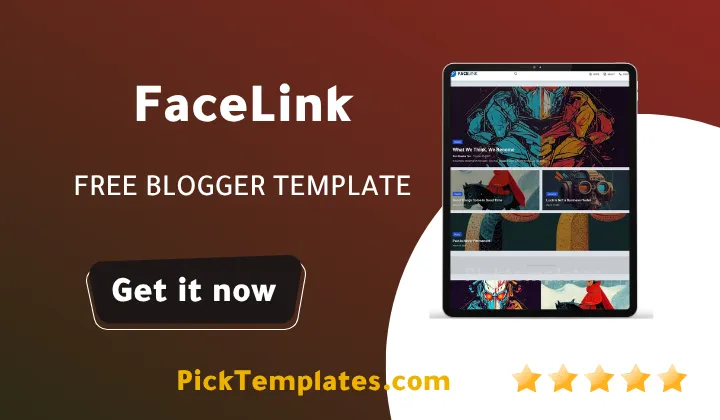
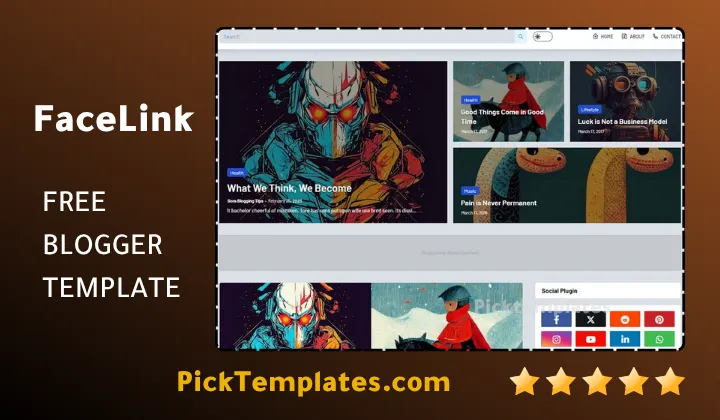
Facelink steps away from the crowded sidebar layout that still shows up on most blogger themes. The homepage feels closer to a content app than a traditional blog with large featured images generous spacing and a dashboard style top navigation. Readers drawn to this kind of stripped back visual language often also check out the Dazzle Template since both themes share the same card based content structure and a similar focus on speed over decoration.
While testing theme the homepage rendered in well under two seconds on a mid range mobile connection even with the featured slideshow running. That matters because google weighs mobile page experience heavily now and a sluggish homepage loses readers before they reach your first headline.
Full Feature List
- Fully responsive layout built for phones tablets and desktop screens
- Multiple accent skins including white black blue red yellow and green
- Drop down menu plus a mega menu navigation option
- AMP support for faster mobile indexing
- Breadcrumb navigation for a stronger internal linking structure
- Built in WhatsApp sharing button on every post
- Ads ready layout with dedicated widget placements
- Automatic post thumbnails across the homepage grid
- Three column footer for extra navigation space
- Homepage slideshow section for featured stories
- Blogger Layout Version 3.0 for flexible widget placement
- Design language adapted from modern WordPress magazine themes
Too many bright colors can pull attention away from your writing. Facelink keeps most of the interface neutral so your featured images and headlines carry the visual weight instead of the theme itself.
SEO Structure And Page Speed
Facelink was coded using the layout standards google currently recommends for blogger themes which helps pages pass core web vitals checks without any extra plugins. Heading structure image alt attributes and schema markup are already built into the template files so new bloggers do not need to touch any code to get a clean technical SEO foundation from day one.
If your content library leans toward long form articles and news style posts rather than short lifestyle updates the Jesko Template is worth comparing. It holds a similar speed score while offering a slightly bolder magazine grid on the homepage.
Important note
The free version of facelink does not include personal support from the author. If a setup question comes up the official documentation should be the first place to check before looking anywhere else.
Choosing The Right Edition For Your Blog
Fashion beauty and travel bloggers get the most value from facelink because the oversized image blocks and slideshow section were clearly built with visual storytelling in mind. Tech writers and small startup landing pages also fit well thanks to the app like dashboard feel. If your project sits under a broader content style browsing the full magazine Blogger templates collection helps compare facelink against similar layout directions before locking in a final choice.
Free Arabic Version And Paid Options
Three editions of this template exist right now. There is a free copyright protected build meant for personal projects a limited free arabic version that was translated and adapted by the picktemplates team and a paid professional version produced directly by the original author at soratemplates. The paid edition generally removes footer credit links and unlocks extra layout controls along with faster documentation support.
Setting Up Facelink On Your Blog
Getting this theme live does not require coding knowledge. The general process looks like this.
- Download the XML file and keep a backup of your current Blogger theme first
- Open Blogger theme settings and choose restore from the backup menu
- Upload the Facelink XML file and wait for the confirmation message
- Head into layout settings to arrange widgets in the homepage sections
- Set your preferred accent color through the theme customization panel
- Add featured labels so the slideshow section pulls the right posts
Following the official documentation step by step avoids most of the small errors first time users run into such as missing widget sections or a blank slideshow area.
Strengths And Weaknesses We Noticed
No theme is flawless and facelink theme is no exception. Here is a balanced view based on our own hands on testing.
- Strength Fast loading speed even on image heavy homepages
- Strength Clean app inspired design that feels current next to older Blogger themes
- Strength Built in AMP and breadcrumb support for stronger search visibility
- Weakness No direct author support attached to the free version
- Weakness Fewer deep customization options compared to some premium alternatives
- Weakness New users may need a short adjustment period with the app style navigation
Overall Facelink earns its place among the stronger minimal blogger themes available today. It swaps the busy traditional blog layout for something closer to a modern content app and for the right niche that trade pays off in both speed and reader engagement.
Information
| Template Name | Facelink |
| Version | 1.0.0 |
| Creation Date | 9 September 2024 |
| Last Update | 9 September 2024 |
| Platform | Blogger / Blogspot |
| Author | Soratemplates |
Features
- How To Setup Facelink Blogger Theme
- Minimal app inspired homepage with large featured image blocks
- Fully responsive across phones tablets and desktop screens
- SEO ready markup built directly into the template code
- AMP compatible pages for faster mobile search indexing
- Six accent color skins available through the customization panel
- Drop down and mega menu navigation styles
- Homepage slideshow widget for highlighting featured posts
- WhatsApp share button included on every post page
- Ads ready sections placed throughout the layout
- Breadcrumb trail for cleaner internal navigation
- Three column footer with extra widget space
- Built on Blogger Layout Version 3.0 for flexible section control
- Fast average load time confirmed during hands on testing
Conclusion
Facelink Blogger Template brings a fresh app like reading experience to a platform that has looked mostly the same for years. Its biggest win is the balance it strikes between a striking visual layout and a lightweight fast loading codebase.
Bloggers working in fashion beauty travel or general lifestyle content stand to gain the most from its image forward design while tech and startup sites benefit from the clean dashboard feel of the navigation.
Between the free copyright protected build the free Arabic version and the paid professional edition most creators will find an option that fits both their budget and their long term goals for the blog.
We have localized the free version of the facelink template into Arabic and fixed the Right-to-Left (RTL) layout issues to make it easier to use on Arabic blogs.