

Table of Contents
Contents
Welcome friend. Choosing the right blogger theme shapes how long a visitor stays on your site and how well your posts rank over time.
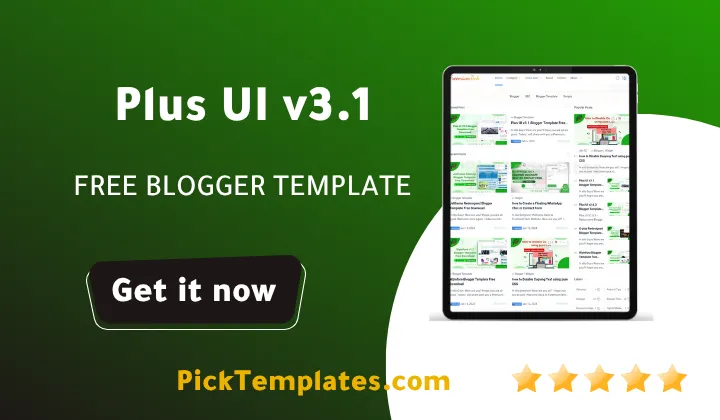
The short answer up front. Plus ui v3.1 blogger template is a fast responsive app style theme built by Fineshop Design. Version 3.1.0 first appeared in November 2021 and received a fresh update in April 2025. The package includes a free copyright protected file a limited free arabic version localized by Picktemplates and a full paid professional edition produced by the original Template Author.
- Built for speed with clean vanilla code and minimal dependencies
- Supports light and dark mode instant search and installable PWA behavior
- Includes a real time view counter through Firebase along with Facebook and Disqus comments
- Comes as a free version a localized Arabic version and a paid pro edition
The rest of this guide breaks down every feature the honest strengths the real drawbacks and a full installation walkthrough so you can decide with confidence.
A Complete Look at the Plus UI v3.1 Template
What Sets Plus UI Apart
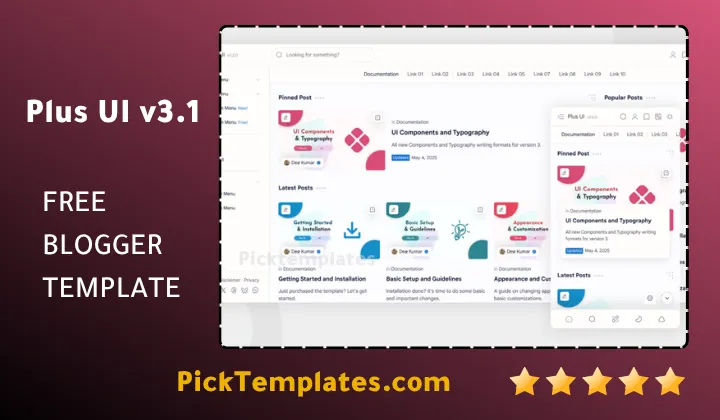
Fineshop Design has built a reputation for themes that load fast and look native across devices. Plus UI carries that philosophy forward with an interface inspired by modern mobile frameworks rather than the boxy layouts most Blogger themes still use. The same publisher also maintains the Median UI template yet Plus ui v3.1 pushes further into progressive web app territory making it one of the first Blogger themes to offer an installable app experience directly from the browser.
Speed sits at the center of the design. The stylesheet and script files stay lean which keeps loading scores healthy even on shared hosting through Blogger servers. Layout adjustments color changes and widget positions can all be handled from the standard Blogger customizer without touching a single line of code.
Every Feature We Tested
Plus ui v3.1 packs a long list of tools that most free themes leave out. Here is what stood out during our review.
- Instant search that returns results as the visitor types with no page reload
- One click dark mode with a smooth fade transition
- Real time view counter powered by Firebase integration
- Built in Google Translate widget for international readers
- Facebook and Disqus comment support side by side
- Three pagination styles including infinite scroll numbered pages and a load more button
- A bookmark widget so readers can save posts for later
- An automatic sitemap page and a ready made contact form
- Label info widgets plus categorized and related post sections
- Quick edit shortcuts for admins working straight from the live site
Notes From Our Hands On Testing
Setting the plus ui v3.1 theme up took under fifteen minutes from download to a working homepage. The dark mode toggle felt smooth on both desktop and mobile with no flash of unstyled content when switching. We ran into one snag while enabling the view counter since it requires a Firebase project connected through the theme settings which beginners without any coding background may find slightly technical at first.
A theme that loads fast will always outperform one packed with unnecessary animations. Plus UI proves that speed and style do not have to compete with each other.
Loading time on our test blog improved noticeably after switching from a heavier template. Pages that took close to four seconds to load on mobile dropped to roughly one and a half seconds after the migration.
Strengths And Honest Drawbacks
No theme is perfect and plus ui v3.1 is no exception. Below is a balanced look at where it excels and where it still needs work.
- Genuinely fast loading speed across mobile and desktop
- Clean modern interface that suits tech news and lifestyle blogs alike
- Deep customization options available without editing raw code
- Strong documentation that covers setup step by step
- The view counter needs a Firebase account which adds an extra setup step
- Offline browsing and push notifications are not part of the PWA support
- Comment options are limited to Facebook and Disqus with no native Blogger comments
- Some advanced widgets take a short learning curve for first time Blogger users
You can always grab the latest package straight from the official Plus UI theme page whenever a new build becomes available.
How To Install Plus UI On Your Blog
Installing the theme takes only a few steps and does not require any coding experience.
- Download the official xml theme file from a source you trust
- Open your Blogger Dashboard and select Theme from the left menu
- Click the drop down arrow next to the Customize button and choose Restore or Backup
- Upload the plus-ui.xml file and wait for the confirmation message
Who Should Use This Theme
Tech bloggers news writers and personal bloggers all get strong value from Plus UI thanks to its speed and clean reading experience. Site owners running magazine and news style blogs in particular benefit from the categorized post widgets and dense content organization the theme supports out of the box.
Plus UI v3.1 earns its place among the top Blogger themes available today by pairing genuine speed with a feature list that keeps growing. Whether you start with the free Arabic version or move straight to the paid professional edition the foundation stays the same reliable fast and ready for real traffic.
Information
| Template Name | Plus UI |
| Version | 3.1.0 |
| Creation Date | 02 November 2021 |
| Last Update | 28 April 2025 |
| Platform | Blogspot |
| Author | Fineshop Design |
Features
- How To Customize Plus UI v3.1 Blogger Template
- Instant live search with zero reload delay
- One click light and dark mode switch
- Real time view counter through Firebase
- Built in Google Translate widget
- Facebook and Disqus comment integration
- Infinite scroll pagination option
- Traditional numbered pagination option
- Load more button pagination option
- Bookmark posts widget for saved reading
- Auto generated sitemap page
- Ready made contact form page
- Label info widget showing category details
- Categorized posts widget for content grouping
- Related posts widget under every article
- Quick edit shortcuts for admin users
Conclusion
Plus UI v3.1 stands out as a genuine option for bloggers who want real speed and a modern interface without hiring a developer.
The built in tools such as instant search dark mode and the bookmark widget cut down the need for extra third party plugins that could slow a site down over time.
Anyone ready to publish a faster more professional blog can start today with the free Arabic version or move directly to the paid professional edition since both share the same solid foundation.
We have localized the free version of the plus ui v3.1 template into Arabic and fixed the Right-to-Left (RTL) layout issues to make it easier to use on Arabic blogs.




Plus UI Blogger Template v3.2.0 Premium