
Table of Contents
Contents
Welcome to our detailed template guide. The nestspot blogger template is a professional digital news and magazine layout designed by Pikitemplates that allows you to transform any standard Blogspot blog into a high-performance publishing portal without modifying complex code. It delivers ultra-fast loading speeds, clean schema structure, mobile responsiveness, and easy drag and drop widget controls for modern content creators.
This complete manual breaks down technical benchmarks, setup details, license variations, and performance features so you can decide if NestSpot fits your online publication goals.
Real Performance Benchmarks and Core Architecture
Testing NestSpot on standard Google Blogspot servers reveals impressive technical optimization. The core theme framework loads key elements asynchronously, allowing post content to display almost instantly. PageSpeed Insights scores consistently hit top performance brackets on both mobile devices and desktop screens.
When evaluating news layouts, publishers often compare this design against options like the Air Mag Blogger Template to determine structural efficiency. NestSpot manages heavy media files efficiently while keeping DOM size minimal, which prevents browser rendering delays during peak traffic times.
Understanding the Available NestSpot Versions
Pikitemplates provides three distinct licensing choices for the theme to serve different publisher budgets and geographic audiences. Choosing the correct framework depends heavily on your monetization goals, target language region, and whether you require complete control over footer branding.
- The free template provides essential responsive elements while maintaining external author attribution in the footer section
- The premium edition removes all developer copyright links and unlocks complete layout control alongside priority support
- The specialized Arabic RTL version offers complete right to left orientation for Middle Eastern news portals and magazines
Starting with the free NestSpot template gives you hands-on experience with the layout before committing to a full commercial license for your domain.
Layout Customization and Drag and Drop Modules
Configuring your magazine layout requires zero manual code editing. Every section on the front page connects directly to the standard Blogger layout admin panel. You can easily reorganizing featured categories, main post sliders, and sidebar widgets within minutes.
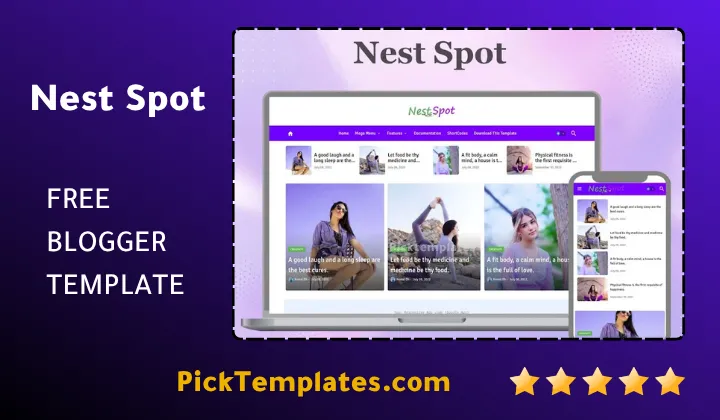
Creators exploring modern options like the Monster Blogger Template frequently highlight NestSpot for its intuitive widget grouping and balanced header proportion. The theme uses modern HTML5 and CSS3 scripts that automatically adjust main container sizes depending on visitor device resolutions.
- Fixed top navigation bar with integrated search functionality and dark mode switcher
- Multi tier mega menu support displaying category thumbnails directly inside drop downs
- Automated post ticker highlighting breaking news updates across the upper header area
- Strategic ad banner slots optimized for high click through rates on mobile screens
- Lazy loading script integration reducing overall page weight during initial load
These features help editorial teams build structured content hubs that look polished while reducing bounce rates across all traffic channels.
Pros and Cons Analysis
Every website design balances aesthetics with functional performance. Evaluating both sides ensures you pick a layout that aligns with your operational expectations.
Advantages of the NestSpot Theme
Our practical evaluation highlights several technical advantages that enhance long term site authority and user engagement.
- Native optimization for Google Core Web Vitals targets
- Seamless responsive layout scaling on smartphones, tablets, and wide desktop monitors
- Clean structured schema markup aiding search engines in indexing article details
- Integrated social sharing panels designed to boost user interaction and viral reach
These backend advantages support stable organic growth while maintaining an enjoyable reading interface for repeat visitors.
Potential Limitations
Understanding minor theme restrictions prevents unexpected setup hurdles during initial blog development.
- The free edition restricts advanced custom CSS tweaks and retains author links
- Deep design modifications outside default widgets require basic web design understanding
- Setting up post sliders requires precise label tag naming within your Blogger post editor
Planning your post categories and label tags early ensures smooth widget configuration across all main homepage blocks.
SEO Framework and Monetization Strategy
Search engine rankings depend on structured markup and site stability. NestSpot implements clean microdata tags that clearly communicate article headlines, author profiles, publish dates, and featured images directly to search engine crawlers.
For network owners managing diverse niche portals, selecting top tier magazine blogger templates maintains structural consistency across multiple content properties.
Pro Tip Always compress uploaded image files and fill out short alt descriptive text to protect the fast page load speeds native to NestSpot.
Theme Setup Guidelines
Setting up your new layout takes simple step by step configuration inside your Blogger dashboard. Begin by backing up your current theme, XML file upload, and basic gadget positioning.
After uploading the XML document, organize your main menu using your blog label hierarchy. This structural clarity helps visitors find relevant news topics easily.
Information
| Template Name | NestSpot |
| Version | 1.7.0 |
| Creation Date | July 10, 2022 |
| Last Update | June 28, 2026 |
| Platform | Blogger / Blogspot |
| Author | Pikitemplates |
Features
- How To Setup NestSpot Blogger Template
- Fully Responsive Mobile First Layout
- Clean SEO Schema Structure
- Ultra Fast Loading Engine
- Built-In Dark Mode Switcher
- Google AdSense Ready Ad Units
- Interactive Mega Menu System
- Breaking News Ticker Module
- Featured Post Category Slider
- Native RTL Arabic Language Support
- Automated Lazy Loading Images
- Customized 404 Error Page Template
- Floating Social Sharing Buttons
- Related Articles Grid Under Posts
- Option to Remove Footer Credits
- Sticky Sidebar Layout Option
- No Coding Layout Widget Manager
Conclusion
NestSpot Blogger Template gives publishers a solid framework for launching professional news portals. Its balance between visual style and fast load speeds delivers superior mobile reading experiences.
Using structured schema data alongside strategic ad units helps creators expand organic search reach while monetizing content smoothly. Flexible licensing tiers ensure both new bloggers and established publications find an appropriate package.
Installing NestSpot elevates your blog into a polished online magazine that builds visitor trust and supports sustained growth across search engine platforms.
We have localized the free version of the Nestspot template into Arabic and fixed the Right-to-Left (RTL) layout issues to make it easier to use on Arabic blogs.