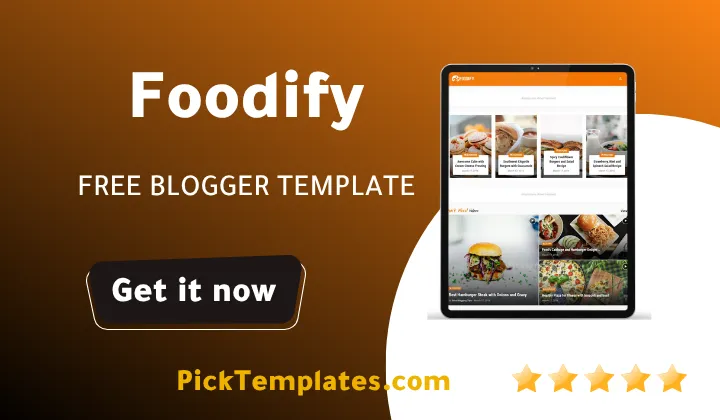

Foodify Template – A Complete Guide to Features and Customization
Table of Contents
Table of Contents
Starting a food blog or creating an online presence for your restaurant requires a theme that balances speed and visual appeal. The Foodify blogger template is a modern and highly responsive theme created specifically for culinary enthusiasts and restaurant owners who want to launch a website quickly. It offers a clean layout that adapts nicely to different screen sizes without losing its elegant structure. This template is designed to give your food business or culinary writing a highly professional look with very little setup effort.
To give you a quick summary of what this theme represents, it is a lightweight Blogspot theme optimized for speed and search engine visibility. If you are looking for a functional layout that supports high quality food photography and fast loading times, Foodify is a solid option. In this guide, we will analyze its key features, look at the differences between its free and paid versions, and share practical optimization tips to help you get the most out of your website. We will also help you understand how to customize the theme to make your blog stand out in the crowded culinary niche.
Understanding the Different Versions of Foodify Theme
When deciding to use the Foodify template you will find three main options available to suit different needs. There is a free version which is protected by copyright credits in the footer and is ideal for beginners testing the waters. There is also a limited free Arabic version which provides excellent right to left text support for Middle Eastern culinary bloggers. Finally, the paid professional version removes all copyright restrictions and unlocks full access to premium customization tools and regular theme updates.
Choosing between these versions depends entirely on your budget and goals. If you want to build a highly authoritative brand with unique footer credits, investing in the professional version from Templateify is the standard recommendation. However, if you are just starting out, the free Foodify template allows you to explore most layout settings without any financial commitment. You can easily compare its visual structure with alternatives like the Pepper Food Template to see which design style matches your brand identity best. Making the right choice early on will save you a lot of time as your food blog continues to grow.
The Core Visual and Technical Features of the Layout
The technical architecture of the Foodify theme is built with modern web standards in mind. The clean code makes editing straightforward even for beginners who do not have extensive web development skills. It works well on mobile devices, desktops, and tablets because of its highly responsive grid design. This means your readers will have a seamless browsing experience whether they are looking up recipes on their smartphones in the kitchen or reading on a large desktop monitor.
Many bloggers look for themes that offer flexibility in how articles are presented. When you explore different layout options in the magazine blogger templates category, you will notice that presentation is key to user retention. Foodify achieves this by utilizing smart widgets that allow you to display featured recipes based on specific labels or popular posts. Here is a breakdown of the design elements included in this theme.
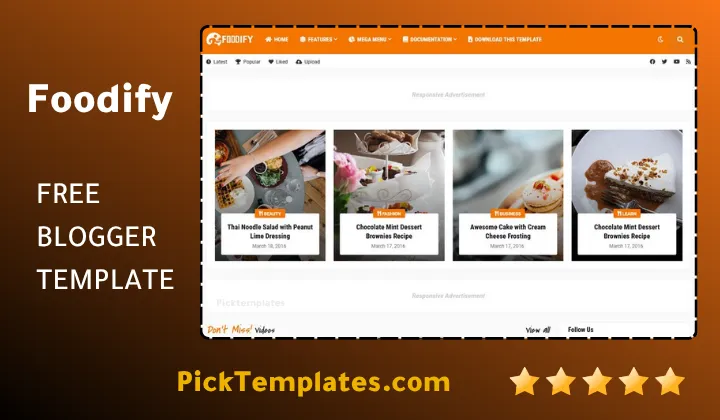
Before diving into the list of specifications, it is helpful to understand how these features work together to improve the overall browsing experience for your audience. The layout is structured to keep readers engaged with rich visuals while maintaining fast page loading times across all modern web browsers.
- One click dark mode switch to improve readability during night hours
- Full support for right to left layouts which is essential for Arabic blogs
- Advanced Ajax mega menu that displays recent posts under each category
- Built-in cookie consent banner to comply with global privacy regulations
- Fully integrated table of contents plugin to help readers navigate long recipes
- Responsive YouTube video embedding that adapts to mobile screen widths
- Custom advertisement spots positioned in high conversion areas of the template
These specific features make the theme a reliable choice for food bloggers who want to offer a premium user experience without coding. Using these built-in plugins ensures that you do not have to install heavy third party scripts that could slow down your site loading speed. This structural efficiency is what makes Foodify a preferred choice among food content creators.
How Foodify Optimizes Content Delivery and Search Engine Visibility
Search engine optimization is critical if you want your recipes and restaurant reviews to rank high on Google search results. The Foodify is built with structured data support which helps search engines understand your food blog content better. Having clean HTML markup means that search crawlers can index your pages with ease, giving you a better chance to compete in search engine result pages. The fast loading speed also contributes to better Core Web Vitals scores, which is a key ranking factor.
In terms of visual organization, this theme is highly customizable and allows you to change widths, background colors, and typography from the Blogger layout editor. If you enjoy clean layouts with structured multi column designs, you will find this theme comparable to the premium Cocomag Template in terms of aesthetic appeal. The clean white background paired with stylish fonts makes food images stand out, which is exactly what a successful food blog requires. This clean visual style ensures your content remains the main focus for your visitors.
User Engagement and Interaction Options
Keeping your readers engaged goes beyond just posting delicious recipes. You need interactive elements that encourage comments, shares, and repeat visits. Foodify addresses this by providing advanced comment systems that support Blogger, Disqus, and Facebook comments. Additionally, the template allows users to embed videos and images directly into comments via links, creating a vibrant community space where your readers can share photos of the dishes they cooked.
Practical Customization Tips for Food Bloggers
Setting up your new template does not have to be difficult if you follow a logical step by step process. After uploading the XML file of the theme to your Blogger dashboard, your primary focus should be on configuring the navigation menu and setting up the custom widgets. It is best to organize your recipes into clear categories such as appetizers, main dishes, and desserts to make navigation easy for your visitors.
To help you get started with the customization process, we have gathered some of the most effective setup practices. These tips will help you customize your site layout while maintaining fast loading times and a professional look.
- Upload high quality webp images instead of heavy png files to keep loading times fast
- Configure the social sharing widget with your active platforms to drive referral traffic
- Keep the sidebar clean by only displaying your top categories and popular posts
- Use the built-in dark mode switch as an optional feature to improve mobile readability
- Test your website speed on mobile devices using PageSpeed Insights after adding widgets
By implementing these adjustments during your setup phase, you will create a highly optimized experience that appeals to both readers and search engines. Remember that a simple and clean design always performs better than a cluttered website with too many active widgets. Keeping your interface minimalist will help draw more attention to your culinary photos and written guides.
Pros and Cons of the Foodify Template
While this theme offers a variety of premium features, it is important to look at both its strengths and weaknesses to make an informed choice. The main advantage is its super responsive design and fast loading speeds, which are essential for keeping visitors on your site. The built-in features like the Ajax mega menu and the native cookie consent also save you the trouble of using external widgets. The multi-device compatibility ensures your site looks uniform on every screen.
On the downside, the free version contains copyright credits that cannot be removed without purchasing the license. Additionally, advanced customization might require a bit of HTML knowledge if you want to make unique changes beyond the Blogger layout options. If you want to check out other options before making a final decision, looking at templates like the Cooking Template can give you alternative design ideas for recipe blogs.
In summary, the Foodify theme remains a top contender for anyone looking to build a modern restaurant or food blog. Its balance of clean code, fast loading layouts, and rich feature sets makes it a highly valuable asset for content creators. Whether you choose the free version or invest in the professional upgrade, it provides a solid foundation for your digital growth. It allows you to build a highly optimized and visually stunning home for your culinary creations without the need for expensive web development services.
Information
| Template Name | Foodify |
| Version | 1.0.0 |
| Creation Date | 30 April 2021 |
| Last Update | 30 April 2021 |
| Platform | Blogger / Blogspot |
| Author | Templateify |
Features
- How To Setup Foodify Blogger Template
- Fully Responsive Structure for Mobile Tablet and Desktop Users
- Integrated Dark Mode Toggle for Better Nighttime Readability
- Complete RTL Language Support for Arabic Recipe Blogs
- Advanced Ajax Mega Menu for Organized Category Navigation
- Lightweight and Clean Code Optimized for Search Engines
- Dedicated Cookie Consent Widget to Meet Legal Regulations
- High Speed Performance Optimized for Mobile Core Web Vitals
- Strategic Ad Placement Slots to Maximize Your Earnings
- Customizable Typography and Layout Widths via Blogger Editor
- Built-In Table of Contents for Navigating Long Articles
- Direct Social Sharing Options Including Native WhatsApp Button
- Compatible with Blogger Disqus and Facebook Comment Systems
- Responsive YouTube Video Embeds that Scale Automatically
- Clean Sidebar Layouts with Recent Posts and Comments
- Versatile Grid Layout Perfect for Restaurants and Cafes
Conclusion
The Foodify Blogger Template represents a modern and efficient design choice for culinary creators on the Blogger platform. It offers a practical alternative to complex WordPress themes by providing a lightweight structure that is extremely easy to configure. The elegant layout ensures that your food photography and unique recipes remain the absolute focus for every visiting reader.
What makes Foodify exceptional is its seamless combination of speed and modern functionality. Whether you are running a small local cafe website or launching a high traffic recipe portal, this theme provides the technical stability you need to succeed. It transforms a standard Blogspot site into a highly engaging and fast loading platform that supports your digital marketing efforts.
Ultimately, choosing Foodify means prioritizing user experience and clean design. With its mobile-first responsiveness, built-in dark mode, and excellent SEO optimization, you can focus on cooking and writing while your theme handles the technical performance. It is a highly reliable companion for any food blogger looking to grow their digital presence.
We have localized the free version of the Foodify template into Arabic and fixed the Right-to-Left (RTL) layout issues to make it easier to use on Arabic blogs.