
Table of Contents
Contents
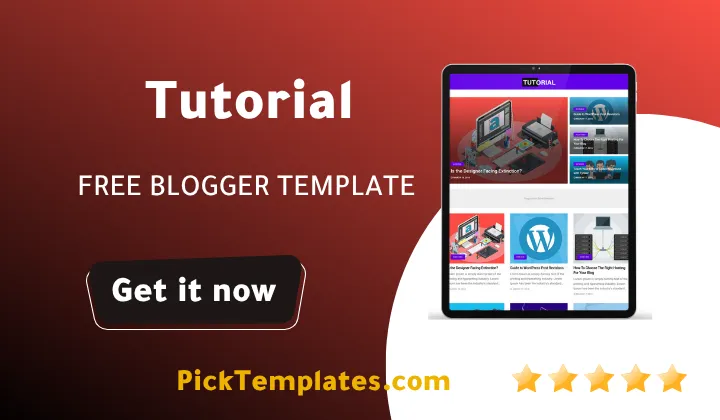
Welcome! If your blog covers everything from tech news to gaming reviews entertainment stories and viral gadget posts in one place Tutorial blogger template gives you a homepage layout built to keep every category organized instead of turning into a chaotic wall of mixed posts. It is a magazine style Blogspot theme made specifically for sites that publish across several beats at once rather than a single narrow niche.
This theme comes from OmTemplates and was built around a bold blue black and white palette with a grid based magazine structure that separates sections cleanly. Before picking it you might also want to compare it against a template like Storify Template which takes a more editorial approach to layout if your content leans heavier on long features rather than fast moving news and viral posts. Tutorial theme on the other hand is tuned for speed and variety since it needs to display tech reviews gaming updates and entertainment stories side by side without any single category dominating the page.
How This Tutorial Template Keeps Multiple Categories Organized
A multi topic blog lives or dies by its homepage structure and this is where the template earns its keep. The layout splits the front page into distinct blocks so tech posts gadget reviews gaming news and viral stories each get their own visual space instead of blending into one long scroll. Post thumbnails are used consistently across every section which helps readers scan categories quickly and jump straight to what interests them. A single right sidebar carries trending posts and widgets without competing for attention against the main grid and the three column footer gives you room to group older posts by topic once they drop off the homepage.
Keeping The Homepage Clean Across Many Topics
Running six or seven categories under one roof usually means clutter unless the Tutorial Template handles navigation carefully and this is where a few specific features matter more than they look on paper.
- Breadcrumb navigation ready so readers always know which category they are browsing
- Drop down menu built for sites with several categories and subcategories
- One right sidebar dedicated to trending and recent posts
- Three column footer for archiving posts by topic
- Load more button instead of numbered pages so category feeds stay smooth
Together these pieces stop a busy multi category homepage from feeling overwhelming even once your post count climbs into the hundreds.
Setting Up The Tutorial Without Losing Your Old Widgets
Installing a new Blogger theme always carries some risk of losing widgets you already configured so a short checklist goes a long way before you touch the XML file.
- Back up your current theme from the Blogger dashboard first
- Upload the new XML file through the restore option under Theme
- Open Edit HTML only if you need to insert tracking codes or custom scripts
- Rebuild your layout tab so widgets match the new multi category grid
- Test the mobile view separately since desktop and phone previews rarely match perfectly
Once the base setup is done many multi niche bloggers also compare it against Magsoft Blogger Template which offers a slightly different sidebar arrangement if your category count grows past what a single sidebar can comfortably hold.
Always restore your backup theme on a test post first before publishing anything live since a single missing widget script can break category pages you already ranked for.
Strengths Worth Highlighting
Where the Tutorial genuinely helps a multi category blog is in the smaller details. AMP support keeps mobile load times reasonable even when a page is pulling thumbnails from six different sections at once. WhatsApp sharing sits next to the standard social bookmark buttons which matters a lot for viral and entertainment posts that tend to spread through messaging apps rather than social feeds alone. The homepage slideshow widget is flexible enough to mix a gaming headline next to a tech story without looking mismatched and ad ready sections are placed between category blocks rather than inside them so sponsored placements do not interrupt someone mid article.
Honest Drawbacks Before You Commit
No template is perfect and this one has real limits worth knowing upfront. Free users get zero direct support so any customization mistake is yours to debug alone. The three column footer that helps organize archives can feel oversized on a blog that only runs two or three categories. Color customization beyond the default blue black and white combination requires manual CSS editing since there is no built in theme options panel for that. The framework itself was last refreshed in 2021. It still performs well but you should not expect the newer generation Blogger features found in templates released this year.
Who This Tutorial Template Actually Fits
Tutorial Theme makes the most sense for bloggers running a genuine multi topic magazine covering tech gaming entertainment and viral content rather than a single niche blog. If your content calendar mixes gadget reviews with pop culture roundups and trending stories this grid handles that variety without extra plugins. A blogger writing only recipes or only travel guides would likely get more value from a narrower single topic layout since several sections of this theme such as the drop down menu and three column footer exist specifically to manage volume across many categories at once.
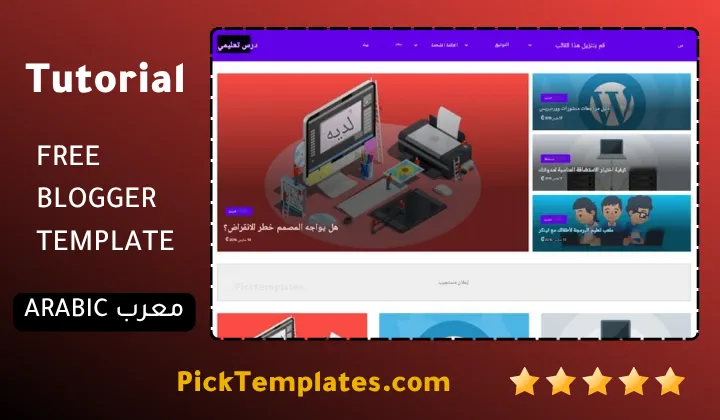
It is worth knowing this template circulates in three different forms online. The default demo version is free to preview but remains copyrighted to the original creator. A limited free Arabic translated build was adapted by Picktemplates for readers who prefer working in Arabic during setup. The full free and premium English version created directly by OmTemplates carries the complete feature set described here. If a multi category grid is not quite the direction you want you can browse a wider magazine templates collection to compare layouts before deciding.
Information
| Template Name | Tutorial |
| Version | 2.0.0 |
| Creation Date | 15 March 2021 |
| Last Update | 02 May 2021 |
| Platform | Blogger |
| Author | OmTemplates |
Features
- How To Setup Tutorial Blogger Theme
- Fully responsive layout that adapts smoothly across mobile tablet and desktop screens
- Clean magazine style grid built for news tech and entertainment blogs
- Blue black and white color palette for a bold yet elegant look
- One right sidebar structure for widgets and ad placements
- Three column footer section for extra navigation links
- Breadcrumb navigation ready for better user orientation
- SEO ready markup with schema support for search visibility
- Post thumbnail support across homepage and category pages
- Drop down menu for organizing multiple categories and subcategories
- Social bookmark ready sharing buttons
- WhatsApp sharing button built in
- Slideshow widget for featured posts on the homepage
- Load more button instead of numbered pagination
- AMP support for faster mobile loading
- Ads ready sections placed without disrupting reading flow
- Personal page templates for about and contact sections
Conclusion
Tutorial Blogger Template earns its place among multi category Blogger themes because it solves a real problem rather than just looking polished. Sites that publish tech gaming entertainment and viral content under one roof need a grid that keeps each section readable and this theme delivers that without forcing every post into a single generic feed.
It is not a template built for single niche blogs or writers who want deep control over color schemes without touching CSS and that tradeoff should factor into your decision. For a multi topic magazine style blog though it remains a solid and dependable base to build on even years after its last update.
Mouhssine Boukou has spent ten years building and reviewing Blogger themes. He puts it plainly this template earns its reputation through consistency rather than flashy extras. For a multi category blog that consistency matters more than most people expect when they are choosing a layout.
We have localized the free version of the Tutorial template into Arabic and fixed the Right-to-Left (RTL) layout issues to make it easier to use on Arabic blogs.