
Table of Contents
Contents
Welcome. If you are trying to figure out whether Nitro blogger template can hold a busy multi topic blog together the short answer is yes. Nitro was built by SoraTemplates for exactly that kind of site and it keeps sections like news sports finance and lifestyle organized on one homepage without turning into a messy pile of thumbnails.
What makes this template worth a closer look is how calmly it handles that variety. A homepage built with Nitro can show a featured story up top followed by category rows for business technology and sports and none of those sections fight for attention. If your project leans toward a single focused niche instead of a broad magazine format a lighter option such as the Minifast Template might suit you better since it trims the layout down for one topic blogs.
How Nitro Template Keeps A Multi Topic Magazine Organized
Turning Several Niches Into One Clean Homepage
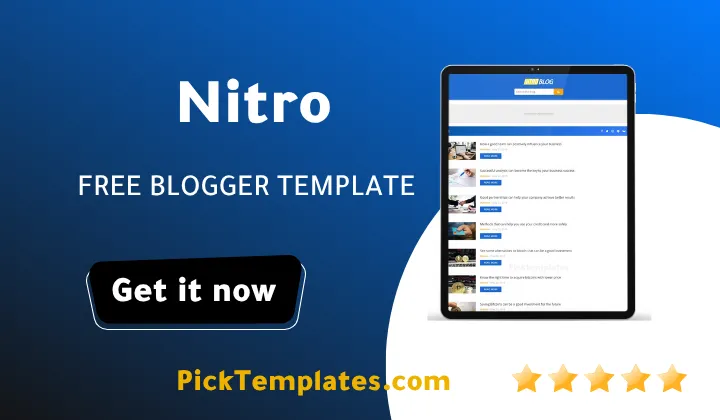
On the live demo the homepage pulls posts from separate labels such as Business Sports and Technology and stacks them into their own rows instead of mixing everything into one long feed. Each row keeps its own thumbnail size and heading style so a reader scanning the page can tell within a second which section they are looking at. This kind of separation matters more than it sounds because a magazine that blends news with lifestyle content under one visual style tends to feel cluttered fast. A tag widget and a category counter sit in the sidebar too which gives returning readers a quick way to jump straight into the section they follow most.
Group your labels before you launch. Nitro rewards blogs that plan their categories early rather than adding new labels randomly after publishing dozens of posts.
Navigation Built For Bigger Menus
The live demo shows a multi level dropdown menu alongside a dedicated mega menu option so a blog with dozens of categories does not have to squeeze everything into a single row. A sitemap widget and a custom error page are already wired in and the Nitro theme even ships with both written and video setup documentation which shortens the learning curve for anyone opening Blogger for the first time. This is one detail that separates a template built for a single niche from one actually designed to carry a full magazine structure.
Search Visibility Across Every Section
Nitro ships with schema markup and a clean heading structure baked into its post templates so search engines can read each article correctly regardless of which category it sits under. That structure alone will not push a blog to the top of results but it removes technical friction that often holds multi category sites back once they grow past a handful of labels. For blogs that want to push search optimization even further the Seoify Template is worth comparing since its entire design leans toward ranking signals rather than magazine style browsing.
Reading Experience And Design Details
The typography stays simple across posts with enough white space that long articles do not feel cramped even when a story runs past a thousand words. A right sidebar carries widgets for popular posts and social links while the footer holds three columns for extra navigation and site links. None of this feels experimental. It feels like a template built to get out of the way of the content rather than compete with it for attention.
What Nitro Does Well
Across the categories navigation and setup process a few strengths stand out clearly and they explain why this Nitro Template still gets recommended for magazine style Blogger sites years after its first release.
- Fast loading pages even with several category rows on the homepage
- Clean category separation that keeps a multi topic blog readable
- Retina ready images for sharp visuals on modern screens
- Built in schema markup for better search engine understanding
- Mega menu and multi level dropdown for large category lists
- AMP support for quicker mobile page loads
- Simple Blogger layout editor for menus colors and widgets
None of these strengths require custom coding to use which matters most for bloggers who want a magazine layout without hiring a developer to build one from scratch.
Where Nitro Falls Short
The template is not perfect and a fair review has to mention where it shows its age or its limits especially for anyone comparing it against templates released more recently than this one.
- No official support offered for users on the free version
- Design language feels closer to 2020 than to current trends
- Sidebar layout offers only one column with limited variation
- Updates have slowed down since the last fix back in 2021
These points do not break the template but they are worth weighing before committing especially if long term support matters for your specific project.
Which Version Fits Your Project
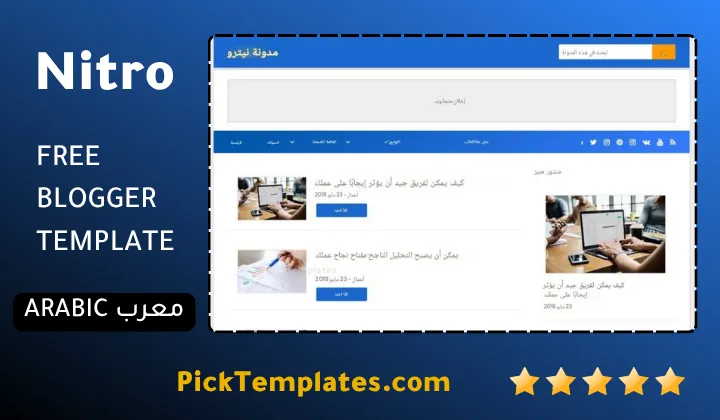
There is a free Arabic version of Nitro made available through Picktemplates after full translation work was done on the original files. There is also an English version from SoraTemplates the original author and that version comes in both a free edition and a paid premium edition with extra features unlocked for buyers.
Final Thoughts
Nitro Theme earns its place among the more dependable magazine style themes for Blogger mainly because it treats multiple categories as a design problem worth solving properly rather than an afterthought added at the end. Anyone comparing similar options can browse more choices inside the Blogger magazine templates collection before making a final decision.
Information
| Template Name | Nitro |
| Version | 3.0.0 |
| Creation Date | 20 December 2020 |
| Last Update | 12 November 2021 |
| Platform | Blogger / Blogspot |
| Author | Soratemplates |
Features
- How To Setup Nitro Blogger Theme
- Fully responsive layout for every screen size
- Fast loading speed built for niche publishing
- SEO ready markup with rich results support
- Schema markup already wired into post templates
- Retina ready images for sharp visuals
- Clean and minimalist comment system
- Multi level drop down navigation menu
- Dedicated mega menu for large category lists
- Page navigation menu for smooth browsing
- Social bookmark sharing icons
- WhatsApp sharing button included
- Three column footer layout
- One right sidebar design
- AMP support for faster mobile pages
- Ad ready widget areas
- Suitable for news sports finance and review blogs
Conclusion
Nitro Blogger Template holds up well for anyone running a blog that mixes several topics under one roof. The multi category layout the built in schema support and the ready made mega menu save real setup time compared to building the same structure from scratch on a bare theme.
It is not the newest looking theme on the market and free users should not expect direct support if something breaks along the way. Even so the core structure is solid enough that many magazine style blogs still run on it years after its release.
Mouhssine Boukou who has spent ten years reviewing Blogger themes puts it plainly. Nitro is not flashy but it is one of the few free magazine templates that actually keeps a multi category homepage readable instead of overwhelming a first time visitor. That alone makes it worth trying before paying for something newer.
We have localized the free version of the Nitro template into Arabic and fixed the Right-to-Left (RTL) layout issues to make it easier to use on Arabic blogs.