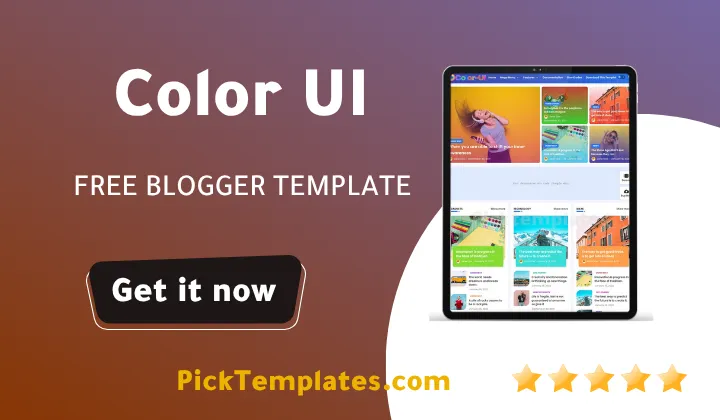
Color UI Template – A Symphony of Colors for Professional and Creative Blogging
Table of Contents
Are you looking for a way to make your blog stand out in an endless sea of standard designs? If you want to break away from the traditional, monochromatic layouts, then the Color UI Blogger Template is the ultimate solution designed for you! This template was meticulously crafted for creators, business owners, and portfolio builders who believe that first impressions are everything. By blending a sophisticated multi-color aesthetic with high-end performance, it creates an immediate visual impact that keeps visitors scrolling. Whether you are a tech reviewer or a creative storyteller, the Color UI theme paves the way for a more interactive and visually stimulating experience.
Are you ready to give your brand a unique digital identity that commands attention? Let’s dive into the details! The Color UI design is not just about looks; it is about providing a robust framework for your content to thrive. From its unique background shades to its intuitive navigation, this template helps you present your ideas in a way that feels organic and professional. We will explore the specialized features that make this one of the most sought-after designs for 2025 and beyond.
A Vibrant Design with Unique Multi-Color Layouts
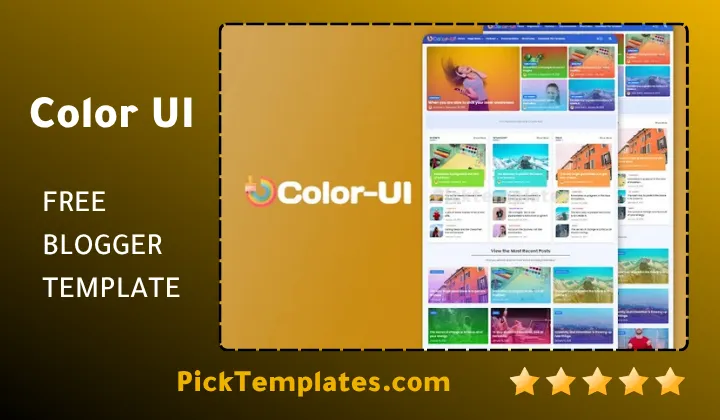
The most striking feature of the Color UI Template is its masterful use of color. Unlike standard themes, it offers unique sections with background image shades on every homepage post, giving your site a premium, custom-coded feel. This advanced design logic ensures that your blog remains memorable to every reader. In its focus on high-end visual aesthetics, it shares a similar philosophy with the Opea Blogger Template, which is known for its modern and clean interface.
The Color UI Blogger design has been engineered to provide better creativity for your portfolio or personal blog. The gradients are soft yet impactful, ensuring that the vibrancy never distracts from the actual readability of your articles. The fonts are chosen for clarity, providing a smooth browsing experience that feels as good as it looks.
The Color UI design philosophy is centered around the idea that an attractive design increases audience engagement, helping bloggers overcome the hurdle of high bounce rates through visual storytelling.
Thanks to its flexible architecture, you can easily adapt the Color UI Blogger theme to various niches. Whether you are managing a high-traffic news site or a minimalist personal diary, the colorful layout helps you build a strong, recognizable brand that resonates with your target audience.
Seamless Compatibility Across All Devices
In the modern era of web browsing, a template must be as functional as it is beautiful. The Color ui template provides a flawless responsive experience. Whether your readers are accessing your site via a high-resolution desktop or a compact smartphone on the move, they will encounter a layout that scales perfectly without losing its aesthetic charm.

Built with the latest coding standards, this template ensures that all elements from the colorful widgets to the image sliders work in harmony on all screen sizes. Your blog will maintain a professional polish regardless of the browser or device being used by the visitor.
Responsive design is no longer a luxury; it is a necessity for search engine visibility. The Color UI theme allows you to reach a global audience, ensuring that your message is delivered clearly and comfortably every single time.
“In a digital world that never sleeps, device compatibility is the bridge between your content and your audience. Color ui ensures that bridge is strong, fast, and visually stunning.”
By using the responsive framework of the Color UI design, you can rest assured that your site is ready for the future. It enhances your blog’s credibility, making it easier for your followers to engage with your content from any location.
Optimized for Mobile Performance
The core of the Color ui blogger experience is its mobile-first approach. The layout of images, text blocks, and navigation menus is automatically optimized for smaller screens, ensuring that users can find what they need without frustrating zooms or horizontal scrolling.
This mobile optimization is key to maintaining high engagement rates. The template ensures that your vibrant colors and background shades look just as good on a handheld screen as they do on a desktop.
- Accelerated loading times on mobile networks.
- Touch-friendly navigation menus and buttons.
- High-definition rendering of thumbnails and icons.
- Consistent branding across mobile and tablet interfaces.
With its adaptive design and speed-optimized code, it is safe to say that the Color UI template is an ideal choice for the modern blogger who values both form and function.
Integrated and Dynamic Homepage
The color ui blogger template offers a dynamic homepage layout that is both organized and exciting. You can customize the various sections to highlight your most important stories or newest projects, ensuring that the visitor’s attention is always where you want it to be.
The homepage serves as your digital storefront. Color Ui template provides the tools to make it look professional, with smart widgets and a layout that naturally guides the eye through your latest posts.
Crafting an Irresistible Homepage Layout
With the Color UI blogger Template 2026, you have complete control over how your posts appear. You can manage the grid styles, adjust the intensity of the colorful backgrounds, and use the built-in slider to showcase featured content that needs extra visibility.
Use the unique background shade feature to differentiate your posts, making your homepage a vibrant mosaic of your best work that captures the user’s imagination instantly.
Also, pay attention to your featured images, as the template’s unique color-overlay logic works with your visuals to create a cohesive and artistic site appearance.
High-Performance Homepage Sections
Your homepage should be more than just a list of posts; it should be an experience. Color UI allows you to implement sections such as:
- Featured Content Slider ✔️ to highlight breaking news or top-tier portfolio pieces.
- Category-Based Grids ✔️ to organize content into colorful, easy-to-navigate blocks.
- Sticky Navigation ✔️ to ensure that your menu is always accessible as the user scrolls.
- Multi-Color Labels ✔️ to add a touch of personality and organization to every post.
You can rearrange these sections to fit your content strategy perfectly. Regular updates to these sections will keep your returning readers engaged and curious about your new content.
The Sidebar Power-Tools
The color ui template includes a fully customizable sidebar, designed to increase user interaction. Whether you want to display “Trending Posts,” “Social Media Feeds,” or “Recent Comments,” the sidebar handles these widgets with elegance and speed.
The sidebar in Color UI is more than just an extra space; it is a strategic tool that helps visitors discover more of your content, thereby increasing your page views and keeping readers on your site longer.
The sidebar provides incredible flexibility. You can use it for monetization via AdSense, newsletter subscriptions, or even to highlight your most popular categories to guide the user journey.
Utilizing the sidebar features in the color ui blogger theme ensures a balanced layout where information is accessible but never overwhelming for the reader.
Multi-Section and Versatile Layout
Organization is the backbone of any successful blog. The color ui blogger provides a multi-section menu that allows you to categorize thousands of posts into logical, easy-to-find groups. This is particularly useful for those browsing our Magazine Blogger Templates category for high-density content layouts.
You can create dedicated sections for “Business,” “Lifestyle,” “Tech,” or “Creative Projects.” This logical structure allows search engines to better crawl your site, a feature also prominently found in the News Blogger Templates collection which focuses on deep information hierarchy.
With the multi-section capabilities of the Color UI Blogger template, you can build a massive content library that remains easy to navigate, ensuring that no valuable post ever gets lost in the archives.
Whether you are a niche blogger or a broad-spectrum publisher, this template provides the structural integrity needed to display your work professionally and attractively.
- Create distinct navigation paths for different content types.
- Use the multi-color labels to visually categorize your topics.
- Improve the internal linking structure through organized categories.
The Color UI design is the perfect solution for anyone who wants to manage a complex blog without sacrificing the clean and colorful aesthetic that users love.
Advanced Built-in Features and Shortcuts
This template is packed with integrated tools that extend the functionality of the standard Blogger platform. One of the highlights is the easy-to-use shortcut system, which allows you to add buttons, alert boxes, and accordions to your posts without needing to write complex code. This makes creating interactive articles easier than ever.
Additionally, the template features an integrated social sharing system and a professional comment section. It is also built to be fully compatible with major browsers and supports the latest monetization standards, allowing you to earn from your passion while maintaining a premium look.
Harness the advanced features of the Color UI Blogger template to transform your simple blog into a high-functioning digital platform that rivals expensive custom-built websites.
Effortless Customization for Everyone
One of the most praised aspects of the Color ui blogger template is how easy it is to personalize. You don’t need to be a developer or an expert in HTML to change how your blog looks. Through the user-friendly Blogger dashboard, you can modify primary colors, fonts, and layouts to match your specific vision. The theme is designed to be as flexible as possible.
Whether you want to create a dark, professional business site or a bright, neon-colored art blog, Color UI gives you the freedom to experiment. All changes can be made through the “Layout” and “Theme” sections with a simple interface.
Customizing the Color UI template allows you to inject your own personality into every pixel, ensuring that your blog is a true reflection of your unique brand and creative voice.
Personalizing Your Site’s Identity
Using the Blogger Theme Designer, you can adjust the intensity of the background shades and choose from a library of professional web fonts. This allows you to find the perfect balance between style and readability for your specific audience.
You can also rearrange the widgets on your homepage and sidebar using a simple drag-and-drop method. This means you can test different layouts to see which one gets the most engagement from your readers.
Interactive Gadgets and Add-ons
The Color UI Blogger template also makes it simple to add third-party tools. You can include email subscription forms, custom search bars, or even display your latest social media posts directly in your layout.
- Add a “Top Rated” list to highlight your best content.
- Include a “Follow Us” widget with colorful icons.
- Add custom HTML sections for specialized advertisements or tools.
By using the versatile Color UI template, you are building a site that can grow and change along with your business or personal goals.
Built-in Search Engine Optimization (SEO)
The Free Color UI blogger template is engineered with a “SEO-First” mindset. The code is clean, lightweight, and minified, which helps search engines like Google and Bing index your content faster. By providing strong ranking signals, this template helps you compete in crowded niches.
SEO is the engine that drives traffic to your blog. With the Color UI theme, you are building on a foundation that is optimized for performance, helping your articles reach the top of search results.
In addition to the code quality, the template handles alt tags for images and title tags for links automatically, which is a major factor in modern search rankings. For those looking for extreme performance, this theme pairs perfectly with the concepts found in the SEO Spot Blogger Template.
Beating the Competition with Technical SEO
Color UI was built to survive and thrive despite Google core updates. It focuses on user experience and site structure, which are two of the most important factors for maintaining your ranking during algorithm changes. Its professional design ensures you don’t face penalties associated with poor layouts or slow speeds.
Take advantage of the built-in meta tag system to define your keywords and descriptions accurately, giving search engines the right information to categorize your blog correctly.
Fast Loading and Responsive Code
Page speed is a critical ranking factor. Color UI ensures that your colorful design doesn’t come at the cost of performance. It loads quickly even with high-resolution images, keeping both users and search engine bots happy.
- Optimization for high PageSpeed Insight scores.
- Fully compatible with Google AdSense policies.
- Adheres to the latest web accessibility standards.
By choosing the Color UI Blogger template, you are giving your content the technical edge it needs to succeed in the competitive world of modern blogging.
Information
| Template Name | Color UI |
| Version | 2.1 |
| Creation Date | 2024 |
| Last Update | 2025 |
| Platform | Blogger |
| Developer | Pikitemplates |
Features
- Vibrant multi-color design for a professional and modern look
- Fully responsive across all devices (Mobile, Tablet, Desktop)
- Unique homepage background image shades on posts
- High-speed performance with optimized lightweight code
- Complete SEO optimization with automatic tag implementation
- Easy customization via the Blogger Layout dashboard
- Built-in shortcut system for buttons and accordions
- Advanced sticky header and smooth navigation menus
- Support for multi-category sections and dropdown menus
- Integrated social media sharing and follow buttons
- Full compatibility with Google AdSense and various ad networks
- Clean typography and high-readability font options
- Automatic image resizing and thumbnail optimization
- Detailed documentation for easy installation and setup
- Professional appearance designed to increase user engagement
Conclusion
The Color UI blogger template is a masterpiece of design that brings a splash of life and energy to the Blogger platform. It effectively bridges the gap between artistic creativity and professional performance. The unique use of color and background shades ensures that your blog isn’t just another website, but a destination that leaves a lasting impression on your readers.
Beyond its beauty, the Color UI theme is built for results. Its SEO-ready structure and fast-loading pages provide the technical foundation needed to grow your traffic and build a successful online presence. Whether you are aiming to showcase a portfolio or launch a complex news site, this template scales with your needs and provides a premium experience every step of the way.
Customization is the final piece of the puzzle. With the ability to change your site’s look without touching any code, Color UI puts the power of professional design in your hands. It is a reliable, future-proof choice for any blogger who wants to thrive in the modern digital landscape while maintaining a unique and colorful identity.
FAQ
Is the Color UI template suitable for business blogs?
Yes, absolutely. While it is colorful, the design is sophisticated and professional, making it perfect for businesses that want a modern and creative digital presence.
Does this template support Google AdSense?
Yes, the Color UI template is fully optimized for monetization. It includes specific ad slots that are designed to maximize revenue without hurting the user experience.
How do I change the colors of the template?
You can easily change the main colors and gradients through the “Blogger Theme Designer” in your dashboard, allowing for instant visual modifications without code.
Is the Color UI template SEO friendly?
Yes, it is built with clean HTML5 and includes structured data schema to help your content rank better in search engine results like Google and Bing.
Can I use it on multiple blogs?
Depending on the license you choose from Pikitemplates, you can use the premium version on one or multiple websites based on the terms of purchase.
Do I need coding skills to use shortcuts?
No, the template comes with clear documentation that explains how to use shortcodes for buttons and boxes simply by copying and pasting small snippets.
Disclosure 📢 This post contains marketing links. If you click on one of these links and make a purchase, I may receive a small commission at no extra cost to you. This helps support the blog and allows me to continue creating free content for you. Thank you for your support!