
Table of Contents
Contents
Welcome to our review of the Video Blogger Template. If you want a free Blogger theme for a gameplay and video channel the answer is yes. This theme by SoraTemplates gives you a red white and black layout with a mega menu and ad slots and a YouTube subscribe box. It works well for a gameplay library but it is an older design and needs a few manual additions. If you also want to compare another video layout you can open the Tubify Blogger Template review.
Video Blogger Theme Review for Gameplay Hubs
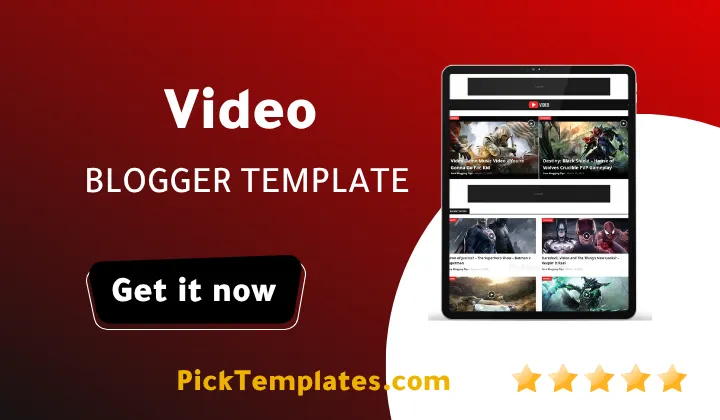
I opened the live demo and went through every visible block. The first thing you notice is how calm the homepage feels. Thumbnails are small and titles are easy to scan. Nothing fights with the video for attention. That makes the Video theme a natural home for Let’s Play clips and walkthroughs and short gameplay highlights.
What the Live Demo Shows
The structure is simple and every block has a clear job. These are the parts that matter most when you run a channel that publishes gameplay videos every week.
- A recent posts feed with square thumbnails and a small category label above each title.
- Popular posts and a featured post block that can hold your best gameplay clips.
- A Subscribe Us widget that embeds a YouTube player right in the sidebar.
- A mega menu with drop downs plus a Documentation menu that links to a web guide and a video guide.
- Ad images in the header and above the feed that are ready for banner code.
- Category and tag lists plus a Recent in Games block for your newest game coverage.
The demo posts date from 2016 and some labels do not match the videos. A superhero show sits under Beauty for example. That is sample content only so do not judge the theme by it.
Why the Gameplay Hub Angle Fits
Gaming audiences look for clips by game and by platform. This theme handles that with labels and the mega menu. You can create labels for PlayStation and Xbox and PC and Mobile and place them in the menu so a visitor reaches the right clips in one click. The Recent in Games block then acts as a live shelf for the newest title you cover.
The Subscribe Us widget is another quiet strength. A gamer who enjoys one clip sees the channel player right away and can subscribe without leaving the page. For a blog built around a YouTube channel this small block does real work.
SEO tip. Write one unique intro paragraph above every embedded gameplay video and add a custom thumbnail. Google needs readable text to understand a page that only holds an iframe.
Organizing Gameplay by Platform and Game
A clean label plan saves you hours later. This short process is the one I would follow on a fresh install before publishing the first video.
- Create four platform labels such as PlayStation and Xbox and PC and Mobile.
- Add each label to the mega menu so the structure is visible on every page.
- Point the Recent in Games block at the label of your newest game.
- Add the game name as a tag on every post so related clips group together.
- Mark your strongest clip as the featured post and refresh it each month.
Keep the label list short. Too many labels make the mega menu messy and weaken the topic focus of each archive page.
If you plan to publish step by step tutorials next to your gameplay you can also look at the BMB Blogger Template for a different style.
Speed and Mobile Experience
The Video Template is listed as fully responsive and fast loading. In the demo I also saw a separate mobile logo which tells me the header was planned for small screens. Video pages are still heavy because every iframe loads a full player. I recommend adding the lazy loading attribute to your iframe code so the player loads only when the visitor scrolls near it. Keep each post to one main embed and the page will stay light even on a phone.
Ads and Monetization
The header and the area above the feed are ready for banner ads. This is the right place for them because the player stays clean. Gamers leave quickly when an ad covers the video so keep banners above or below the player and never on top of it. A balanced setup earns steadily and keeps visitors watching longer.
Pros and Cons
No theme fits every channel. This is the honest picture after reviewing the demo and the official description of the template.
- Free to download with a clean and fast looking layout.
- Dark and light color options with red as the action color.
- Mega menu and drop downs and a three column footer are included.
- Ad slots and social sharing and a WhatsApp share option are ready to use.
- Works with YouTube and other video platforms through iframe embeds.
These strengths make setup quick for a beginner. Most of them need no coding at all.
The weaknesses are just as real and you should know them before you commit.
- The design started in 2018 and the last fix was in March 2022 so it feels dated next to modern streaming layouts.
- The demo does not show a built in server switcher so multi server players need your own code.
- Structured data for video is not shown in the demo so test your pages with Google tools yourself.
- Free users get no support and the free version keeps the designer credit in the footer.
- The sidebar heavy layout leaves less room for large video grids.
None of these are deal breakers for a small gameplay blog. They matter more for a large movie portal.
Free and Paid Versions
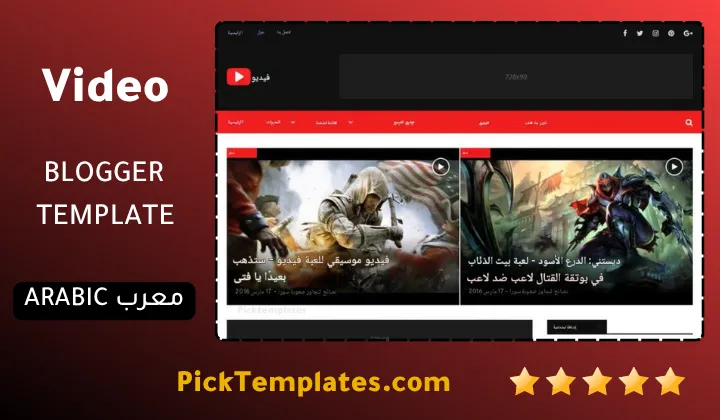
There is a free Arabic version with copyright protection that was arabized by Picktemplates. There is also a free English version with copyright protection and a paid English version created by the original designer SoraTemplates. The paid version removes the footer credit and is the safer choice for a long term project.
Who Should Use It
This Video theme suits YouTubers and gameplay bloggers and small video libraries that want a fast start without a budget. If you want a modern streaming look with player tabs you will need extra work. You can compare more options in the video Blogger templates category before you decide.
Information
| Template Name | Video |
| Version | 2.0.0 |
| Creation Date | 15 November 2018 |
| Last Update | 14 March 2022 |
| Platform | Blogger |
| Author | Soratemplates |
Version Comparison
| Template Features | Free | Arabic | Pro |
| 100% Responsive Design | ✔ | ✔ | ✔ |
| Google Testing Tool Validator | ✔ | ✔ | ✔ |
| Google Rich Results | ✔ | ✔ | ✔ |
| Custom 404 Page | ✔ | ✔ | ✔ |
| Fast Loading | ✔ | ✔ | ✔ |
| Awesome Ajax Mega Menu | ✖ | ✖ | ✔ |
| Boxed Mode | ✔ | ✔ | ✔ |
| Hot Post | ✖ | ✖ | ✔ |
| Special Ad Spots | ✖ | ✖ | ✔ |
| Whatsapp Sharing | ✔ | ✔ | ✔ |
| Featured Widgets by (Label, Recent or Random) | ✖ | ✖ | ✔ |
| Blogger, Disqus or Facebook Comments | ✔ | ✔ | ✔ |
| Drop Down Menu | ✔ | ✔ | ✔ |
| SEO Optimized | ✔ | ✔ | ✔ |
| Social Sharing | ✔ | ✔ | ✔ |
| Browser Compatibility | ✔ | ✔ | ✔ |
| Remove Footer Copyrights | ✖ | ✖ | ✔ |
| Awesome About Section | ✔ | ✔ | ✔ |
| Post Shortcodes | ✔ | ✔ | ✔ |
| Blogger Template Customizer | ✔ | ✔ | ✔ |
| Lifetime Template Updates | ✖ | ✖ | ✔ |
Features
- Fully responsive layout that fits phones and tablets and desktops
- Dark and light color options with red as the action color
- Mega menu and multi level drop down navigation
- Slideshow and featured post area for top videos
- Tabbed widget ready for popular and recent content
- Iframe support for YouTube and other video platforms
- Subscribe Us widget with an embedded YouTube player
- Header and main ad slots ready for banner code
- Three column footer and footer menu widget
- Right sidebar with popular posts and categories and tags
- Post thumbnails with category labels on every item
- Social bookmark icons and WhatsApp sharing
- Page navigation menu for archive pages
- SEO ready code with a clean structure
- AMP and browser compatibility support
- Web guide and video guide for easy setup
Conclusion
Video Blogger template remains a practical free choice for gameplay and video blogs. It gives you a fast layout and a useful mega menu and a built in subscribe box without extra plugins.
It is not a modern streaming platform. You should plan extra work for server tabs and video structured data and expect no official support on the free version.
Expert opinion from Mouhssine Boukou with 10 years of experience. I would pick this theme for a small gameplay channel that wants to launch quickly. For a large movie site I would choose a newer template with built in player tabs.
We have localized the free version of the Video template into Arabic and fixed the Right-to-Left (RTL) layout issues to make it easier to use on Arabic blogs.