Table of Contents
Contents
Welcome to this hands-on guide to the Lyricist Blogger Template. The short answer is yes. Lyricist is a solid free choice if you run a song lyrics or music blog and want readers to copy lyrics with a single tap. It is clean and fast and easy to set up but it also has a few limits that I explain honestly below.
If you want to compare it with another grid style layout from the same designer take a look at the Sora Viral Template first. Then come back here to see why Lyricist theme suits lyrics publishing much better.
Why Lyricist Works as a Niche Music and Lyrics Publishing Theme
Lyricist comes from SoraTemplates. Version 1.0 appeared on 22 June 2019 and version 2.0.0 was fixed on 02 March 2022 to solve minor CSS and image blur issues. The palette is black and white with red as the action color. That mix feels like a music magazine and keeps attention on the song title and the lyrics.
Most Blogger themes treat a lyrics post like any other article. Lyricist Template treats it as a product. The layout the shortcodes and the sidebar all work around one goal. Help a visitor find a song and read it and copy it in seconds.
Click to Copy Lyrics Built for Song Pages
The feature that defines this theme is the click to copy lyrics box. A reader taps once and the full text lands in the clipboard. This removes the awkward text selection on small screens and it is the main reason lyrics bloggers pick this theme over a generic magazine layout.
The demo menu includes a page about post format and page markup. Open it before you publish your first song because it shows the exact markup you paste into the HTML view of the Blogger editor.
Always paste your lyrics in the HTML view of the Blogger editor. Switching back and forth between Compose view and HTML view can strip the copy box markup and break the button.
Grid Layout and Homepage Structure
The live demo opens with a hot posts slider and continues with a clean grid of post cards. Each card shows a thumbnail a title a category label and a Read more link. Pagination uses a Load more posts button instead of numbered pages which feels natural for visitors who browse on phones.
The following points summarize what I noticed on the demo homepage. They show how much of the layout is ready out of the box.
- A top menu with multi level dropdowns that can hold artists genres and year lists without crowding the header.
- A hot posts slider that highlights your newest or most popular songs at the very top.
- A responsive post grid that adjusts its width to the visitor screen size.
- A sidebar with popular posts random lyrics a subscribe video box and a category list.
- A social plugin with icons for Facebook Instagram YouTube WhatsApp and more.
- A footer menu for pages such as About and Contact Us.
Not every widget needs to stay active. Remove the ones you do not need so the homepage stays light and focused on songs.
Speed and SEO Readiness
The author describes the code as clean and the Lyricist theme as one of the fastest in the SoraTemplates collection. The feature list also mentions SEO readiness and AMP support. Treat AMP as a bonus only because most sites now rely on good Core Web Vitals instead. Google considers a Largest Contentful Paint of 2.5 seconds or less as good (source web.dev).
The biggest speed risk on a lyrics site is the thumbnail. Upload compressed images and keep one consistent ratio so the grid stays sharp and quick.
Publish only lyrics that you wrote yourself or lyrics that you have permission to share. Most song lyrics are protected by copyright and a template cannot protect you from takedown requests. Original lyrics and licensed content are the safest way to grow a lyrics blog.
Beyond Music for Other Niches
The author says the theme also fits travel food recipes makeup tech reviews and news. The demo proves this because it shows fashion and home posts inside a music label. It also shows the downside. Mismatched labels look confusing so rename your categories before you launch. If you plan a wider magazine style site then read my review of the Magfolio Template to see if it fits better.
Strengths Worth Knowing
These are the strongest points I found after studying the demo and the documentation. Each one has a real effect on daily publishing.
- One tap copy for lyrics which keeps readers on your page longer.
- A fully responsive grid that looks tidy on phones tablets and desktops.
- Written and video documentation that guides the full setup.
- A simple color scheme that stays readable in long reading sessions.
- Built in shortcodes for lyrics boxes and post formats.
Together these points make Lyricist an easy starting point for beginners who want a music site without paid plugins.
Weak Points You Should Expect
No theme is perfect and Lyricist is no exception. Read these limits before you install it on a serious project.
- The author states that free users get no support so you must rely on the documentation.
- The viewport tag in the demo sets maximum scale to 1 which blocks pinch zoom and hurts accessibility. You can edit this line in the theme XML.
- The design reflects 2019 trends so it may look a little plain next to modern magazine layouts.
- The footer credit is protected which means you cannot remove it in the free copy.
- Some widgets depend on short text commands such as the random post list so a typing mistake breaks them.
None of these issues is a deal breaker but you should plan for them before launch day.
Available Versions
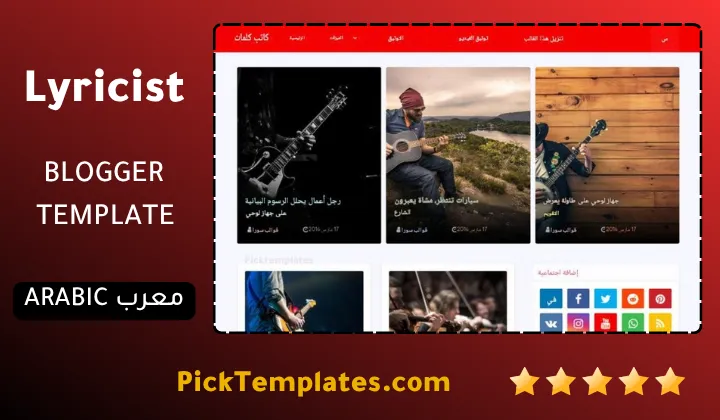
There is a free Arabic copy that is protected by copyright and localized by Picktemplates. There is also a free English copy that is protected by copyright and a paid English version created by the template author SoraTemplates. Pick the one that matches your audience and your budget.
Quick Setup Tips for Beginners
A smooth launch depends on the order of your steps. Follow this short list and you will avoid the most common mistakes.
- Back up your current theme and then upload the XML file from the Theme section of Blogger.
- Read the web documentation and watch the video guide before you touch any widget.
- Create the categories you need such as Songs Artist and Lyrics.
- Connect the hot posts slider to one label so it shows your best songs.
- Compress every thumbnail before you upload it.
- Test a lyrics post on a real phone and tap the copy button.
Finish the setup with a mobile test because most lyrics readers arrive from a phone search.
If you want to explore more layouts like this one browse the full list of magazine Blogger templates on Picktemplates.
Information
| Template Name | Lyricist |
| Version | 2.0.0 |
| Creation Date | 22 June 2019 |
| Last Update | 02 March 2022 |
| Platform | Blogspot |
| Author | Soratemplates |
Version Comparison
| Template Features | Free | Arabic | Pro |
| 100% Responsive Design | ✔ | ✔ | ✔ |
| Google Testing Tool Validator | ✔ | ✔ | ✔ |
| Google Rich Results | ✔ | ✔ | ✔ |
| Custom 404 Page | ✔ | ✔ | ✔ |
| Fast Loading | ✔ | ✔ | ✔ |
| Hot Post | ✖ | ✖ | ✔ |
| Emoji Reaction | ✖ | ✖ | ✔ |
| Whatsapp Sharing | ✔ | ✔ | ✔ |
| Featured Widgets by (Label, Recent or Random) | ✖ | ✖ | ✔ |
| Blogger, Disqus or Facebook Comments | ✔ | ✔ | ✔ |
| Drop Down Menu | ✔ | ✔ | ✔ |
| SEO Optimized | ✔ | ✔ | ✔ |
| Social Sharing | ✔ | ✔ | ✔ |
| Browser Compatibility | ✔ | ✔ | ✔ |
| Remove Footer Copyrights | ✖ | ✖ | ✔ |
| Awesome About Section | ✔ | ✔ | ✔ |
| Post Shortcodes | ✔ | ✔ | ✔ |
| Blogger Template Customizer | ✔ | ✔ | ✔ |
| Lifetime Template Updates | ✖ | ✖ | ✔ |
Features
- Click to copy lyrics box for easy sharing
- Fully responsive grid styled posts
- Hot posts slideshow on the homepage
- Multi level dropdown and mega menu
- Tabbed widget ready sidebar
- Clean and SEO ready code structure
- Fast loading performance
- AMP support listed by the author
- Black white and red color scheme
- Social bookmark and WhatsApp sharing
- Popular posts and random posts widgets
- Load more posts button for pagination
- Post thumbnails and gallery ready
- Ads ready widget areas
- Built in shortcodes for post formats
- Cross browser compatibility
Conclusion
Lyricist Blogger wtemplate is a focused and practical theme for lyrics and music blogs. The click to copy feature the clean grid and the quick loading code give beginners a strong base without any cost.
It is not flawless. Free users get no support and the pinch zoom limit and the plain 2019 look need attention. If you accept these points and test the theme on mobile before launch you will get a reliable site that readers enjoy.
Expert opinion from Mouhssine Boukou with 10 years of experience. I recommend Lyricist to anyone who wants a simple lyrics site that loads fast. Fix the viewport zoom setting on day one and compress your images and publish only lyrics you are allowed to share. If you want a modern magazine look with more design freedom choose a newer theme instead.
We have localized the free version of the Lyricist template into Arabic and fixed the Right-to-Left (RTL) layout issues to make it easier to use on Arabic blogs.