Table of Contents
Contents
Welcome to our full review of the Saas Blog Blogger Template. It is a one page portfolio and business theme from SoraTemplates that puts an intro and service blocks and a team grid and a blog and a contact form on a single scrolling page. It is a smart choice for small agencies and freelancers and SaaS studios who want to present a team while still publishing articles. It is not the best choice if you need a filterable project gallery or pricing tables out of the box.
I opened the live demo and went through every section before writing this review so the notes below come from what the page really shows. If you want to compare another Sora styled business option you can also check the Sora Tax Blogger Template before you decide.
Why the Saas Blog Template Works as an Agency and Team Showcase
Most one page themes put all the weight on a single person. This one gives equal space to a service section and a Meet The Team grid. The demo shows round photos with names and job titles such as UX Designer and UI Designer. That small detail changes how visitors judge you. A client sees a group of specialists instead of a lone freelancer and that builds trust before any message is sent.
What the Live Demo Includes
Here is the section order I found while scrolling the demo from top to bottom. Each block can be edited from the Blogger layout screen so you can keep what you need and remove the rest.
- A hero area with a greeting and a short intro and a call to action button.
- An about block with a longer personal or company story.
- Four service blocks with a title and a one line description.
- A Meet The Team grid with photos and roles.
- A Recent Blog Posts feed with thumbnails and category labels.
- A Popular Posts list and a video subscribe widget.
- A strip of five client brand logos.
- A Google map and contact details and a contact form.
Remember that the demo text is placeholder content. Plan to replace every heading and every photo before launch because visitors judge a first impression very quickly.
How the Team Grid Sells Your Services
The team grid is where this Saas Blog theme separates itself from simple one person portfolios. Each card has a photo and a name and a role line. For an agency I suggest writing the role as a result and not just a title. For example write Brand Designer for Startups instead of plain Designer. The demo also repeats cards so you can see how eight members look on a desktop screen and the spacing stays tidy as long as all photos share the same crop.
Practical tip. Crop every team photo to the same square size before uploading. Uneven faces and backgrounds make even a good grid look careless.
Setting Up the Template Step by Step
Setup on Blogger follows the usual route and the designer publishes a written guide and a video guide. Follow the order below to avoid the mistakes that beginners usually make with one page themes.
- Back up your current theme before you upload anything new.
- Upload the XML file from the Theme section of Blogger.
- Open the Layout screen and edit the hero and about and service widgets.
- Replace the team photos and roles with your real members.
- Create your posts with labels so the blog feed fills correctly.
- Swap the sample map and brand logos and contact details for your own.
Keep in mind that the contact form relies on the standard Blogger contact form widget. Send yourself a real test message before you share the site with clients.
If you want to see a different layout style before committing you can read about the Sorahive Blogger Template and compare how each one presents work.
Showing Different Disciplines
Agencies often sell several services such as branding and web design and photography. This Saas Blog Template does not include a filterable project grid with live category buttons. What it gives you is Blogger labels. You can publish each project as a post and assign a label like Design or Business and visitors can browse those label pages. The demo categories list and tag cloud show how this works. It is a practical workaround but it feels like a blog and not like a gallery.
Important note. If a filterable gallery with animated buttons is a must for your business look at a different theme. This one is built around storytelling through a team and a blog.
Speed and Mobile Behavior
The designer states that the Saas Blog is fully responsive and fast loading. The layout itself uses simple blocks and clean spacing. The demo also loads a Google map and a YouTube video and a row of logos so your real site will be heavier if you keep all of them. Remove the widgets you do not need. One more detail I noticed is that the demo viewport setting limits zooming on touch screens. Some visitors with weak eyesight rely on pinch zoom so consider adjusting that line if you are comfortable editing theme code.
Pros and Cons
No template is perfect and this one has clear strengths and clear limits. The first list shows what impressed me and the second list shows what you should weigh carefully.
- The team section builds client trust faster than a plain bio.
- The one page flow keeps visitors scrolling toward the contact form.
- A built in blog lets you publish case notes and news.
- The multi level dropdown menu handles extra pages well.
- The logo strip gives you a simple space for social proof.
- A free version is available for testing.
These strengths matter most for small teams that want a credible presence without building a custom website.
Now the weaker side of the template. Read these points before you download it so you are not surprised later.
- The demo is mostly placeholder text so you must rewrite everything.
- There is no filterable gallery and no pricing table section.
- The design started in 2019 and the last update was in 2022 so it looks a little dated beside newer themes.
- Zoom is limited on touch screens in the demo.
- The contact form depends on the Blogger widget with limited fields.
None of these points are deal breakers but they decide whether the template fits your plan.
Who Should Use It
Choose this Saas Blog theme if you run a small agency or a freelance duo or a SaaS studio and you want to show people and services and articles together. Skip it if you need a heavy project gallery or a store. For many beginners the simple structure is actually an advantage because there are fewer settings to break.
Available Versions
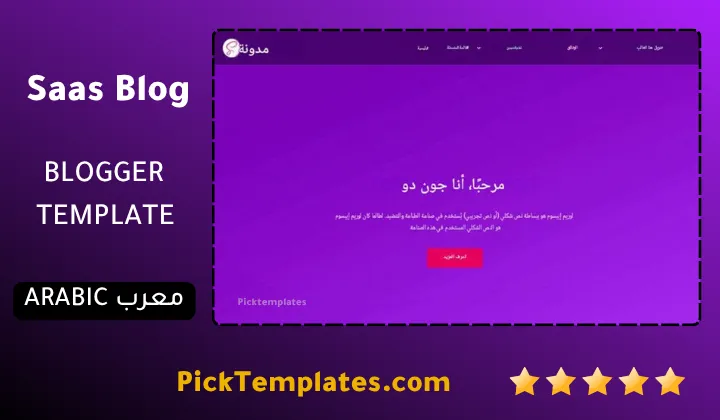
There is a free Arabic version protected by copyright that was arabized by Picktemplates. There is also a free English version protected by copyright and a paid English version and both were created by the designer SoraTemplates. You can explore more layouts in the portfolio Blogger templates category.
Information
| Template Name | Saas Blog |
| Version | 2.0.0 |
| Creation Date | 15 October 2019 |
| Last Update | 21 February 2022 |
| Platform | Blogger |
| Author | Soratemplates |
Version Comparison
| Template Features | Free | Arabic | Pro |
| 100% Responsive Design | ✔ | ✔ | ✔ |
| Google Testing Tool Validator | ✔ | ✔ | ✔ |
| Google Rich Results | ✔ | ✔ | ✔ |
| Custom 404 Page | ✔ | ✔ | ✔ |
| Fast Loading | ✔ | ✔ | ✔ |
| Boxed Mode | ✔ | ✔ | ✔ |
| Something About Me | ✖ | ✖ | ✔ |
| Right Author Service | ✖ | ✖ | ✔ |
| Meet The Team | ✖ | ✖ | ✔ |
| Brand Icons | ✖ | ✖ | ✔ |
| Whatsapp Sharing | ✔ | ✔ | ✔ |
| Featured Widgets by (Label, Recent or Random) | ✖ | ✖ | ✔ |
| Blogger, Disqus or Facebook Comments | ✔ | ✔ | ✔ |
| Drop Down Menu | ✔ | ✔ | ✔ |
| SEO Optimized | ✔ | ✔ | ✔ |
| Social Sharing | ✔ | ✔ | ✔ |
| Browser Compatibility | ✔ | ✔ | ✔ |
| Remove Footer Copyrights | ✖ | ✖ | ✔ |
| Awesome About Section | ✔ | ✔ | ✔ |
| Post Shortcodes | ✔ | ✔ | ✔ |
| Blogger Template Customizer | ✔ | ✔ | ✔ |
| Lifetime Template Updates | ✖ | ✖ | ✔ |
Features
- Fully responsive layout that adapts to phones and tablets and desktops
- One page design with a smooth section flow
- Hero section with an intro and a call to action button
- About section for a longer personal or company story
- Four service blocks for presenting what you offer
- Meet The Team grid with photos and job titles
- Recent Blog Posts section with thumbnails and labels
- Popular Posts widget for highlighting top articles
- Multi level dropdown menu
- Client brand logo strip for social proof
- Google Maps embed and contact details section
- Contact form support through the Blogger widget
- Video subscribe widget with YouTube embed
- Social icons and WhatsApp sharing support
- Search engine friendly structure and optimized loading
- Written and video documentation from the designer
Conclusion
The Saas Blog blogger template is a clean and practical one page theme for anyone who wants to present a team and a set of services in one place. Its strongest point is the Meet The Team grid because it makes a small business look organized and trustworthy.
It is not a full agency platform. You will not find a filterable gallery or pricing tables and the demo needs a complete content rewrite. If you accept those limits it is an easy and affordable way to launch a professional looking site on Blogger.
Expert Opinion from Mouhssine Boukou with 10 Years of Experience. My honest view is that this template is best for small teams that value simplicity over flashy effects. I would install it on a fresh Blogger blog and replace every placeholder image first and then fix the zoom setting for better accessibility. Do that and you get a solid base that does its job without slowing you down.
We have localized the free version of the Saas Blog template into Arabic and fixed the Right-to-Left (RTL) layout issues to make it easier to use on Arabic blogs.