
Table of Contents
Contents
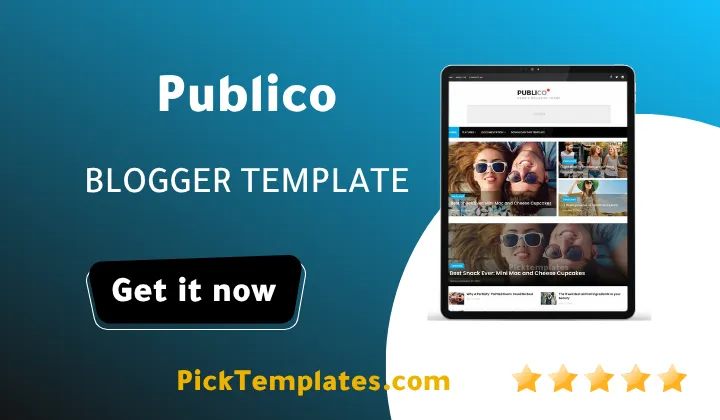
Welcome to this hands on look at the Publico blogger template. If you are trying to decide whether this news magazine theme is the right home for your site the short answer is yes for anyone running a multi topic blog that needs to keep dozens of categories tidy on one homepage without turning into a cluttered mess.
Publico theme was built by SoraTemplates and it still holds up as a solid pick for personal magazines news portals and general interest blogs that publish across several beats at once. The Alva theme takes a softer more personal route for bloggers who want fewer sections but template is aimed squarely at sites that refuse to pick just one topic.
A Magazine Layout Built For Sites With Too Many Stories
The core strength of Publico Template shows up the moment you scroll the homepage. A big featured slider sits up top for the story of the day and right below it the layout splits into clean rows that pull from different labels at once. Business sits next to lifestyle and technology sits next to sports without any of them fighting for space. That balance matters more than it sounds because most free magazine themes either force every post into one repetitive grid or they let the sidebar widgets crowd out the actual articles.
How The Homepage Keeps Every Section In Order
Publico leans on labeled widget zones for its recent posts area and each zone can be pointed at a specific category. That means the technology block can pull only technology posts while the lifestyle block stays completely separate. Setting this up the first time takes some patience because Blogger widget settings are not always obvious but once the zones are mapped to your labels the homepage manages itself. New posts drop into the right section automatically and you rarely need to touch the layout again.
The drop down navigation menu is where a lot of the organizing power actually lives. Rather than cramming ten categories into a single row the menu supports nested items so related sections can sit under one parent link. A site covering food travel and home decor can group all three under a single lifestyle tab and keep the top menu from feeling overwhelming.
What Publico Actually Includes Out Of The Box
The feature list is longer than most free themes offer and it covers the basics a growing magazine site needs from day one. Below is a quick rundown before the setup steps that follow.
- Fully responsive design that adjusts cleanly across phones tablets and desktops
- Retina ready images so photo heavy posts stay sharp on newer screens
- Three built in color options in blue red and black
- A right sidebar paired with a three column footer for extra navigation
- Built in slideshow widget for spotlighting top stories
- Automatic thumbnail cropping so post images line up evenly
- Breadcrumb navigation for easier orientation on category and label pages
- AMP support baked in for faster loading on mobile search results
None of these features require plugins or third party scripts which keeps the theme lighter than it might first appear given how much it does visually.
Setting Up Publico Without Losing An Afternoon
Getting from a blank Blogger account to a working Publico site is not instant but it is manageable if you follow the steps in order rather than jumping around the settings menu.
- Back up your current theme before uploading anything new
- Upload the theme XML file through the Blogger theme editor
- Open the layout page and assign your main labels to each homepage widget zone
- Build the drop down menu using your category labels as anchor links
- Set your preferred color scheme from blue red or black in the theme options
- Add your logo and header ad slot if you plan to monetize early
- Publish a handful of test posts across different labels to confirm the homepage pulls them correctly
Readers who get stuck on any of these steps are usually tripped up by the widget zone assignments rather than anything else in the theme.
Map your labels to homepage widget zones before you publish a single new post or the layout will look empty even after the theme is fully installed.
Sites aiming for a stronger breaking news feel rather than a general lifestyle magazine might also want to compare Publico against Roxify template which puts more weight on a ticker style homepage for fast moving headlines.
Where Publico Falls Short
No theme is flawless and Publico has a few real trade offs worth knowing before you commit to it.
- The admin panel for widget zones is not beginner friendly on the first attempt
- Update frequency has slowed down significantly since the 2023 patch
- The visual style leans traditional and will feel dated to sites chasing a more modern minimalist look
- Free support is not offered which pushes new users toward outside tutorials for anything beyond the basics
None of these points are dealbreakers on their own but they matter if your priority is a theme that gets frequent design refreshes or hand holding during setup.
Free Arabic Version And The Original English Release
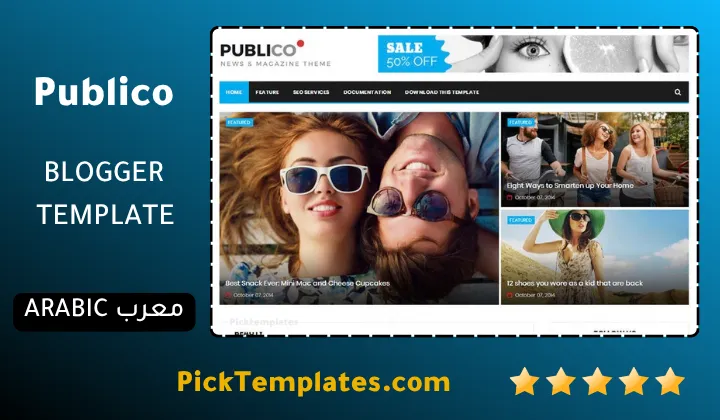
There is a free Arabic version of this theme that was translated and adapted by Picktemplates and it remains protected under standard copyright terms. Alongside it sits the original free and paid English release built directly by SoraTemplates the theme author listed above. Both versions share the same core layout so the setup steps in this guide apply to either one with only minor language differences in the widget labels.
Final Verdict On Publico
Publico Theme earns its long running popularity by solving a real problem for multi category blogs rather than chasing trends. It is not the flashiest magazine theme available in 2026 but it is dependable stable and genuinely capable of handling a busy homepage without falling apart. Anyone comparing options across the wider magazine Blogger templates collection should still put this one on the shortlist for its organizing strength alone.
Information
| Template Name | Publico |
| Version | 2.0.0 |
| Creation Date | 26 September 2017 |
| Last Update | 15 February 2023 |
| Platform | Blogspot |
| Author | Soratemplates |
Version Comparison
| Template Features | Free | Pro |
| 100% Responsive Design | ✔ | ✔ |
| Google Testing Tool Validator | ✔ | ✔ |
| Google Rich Results | ✔ | ✔ |
| Custom 404 Page | ✔ | ✔ |
| Fast Loading | ✔ | ✔ |
| Whatsapp Sharing | ✔ | ✔ |
| Featured Widgets by (Label, Recent or Random) | ✖ | ✔ |
| Hot Post by (Label, Recent or Random) | ✔ | ✔ |
| Stylish Slider by (Label, Recent or Random) | ✖ | ✔ |
| Blogger, Disqus or Facebook Comments | ✔ | ✔ |
| Drop Down Menu | ✔ | ✔ |
| SEO Optimized | ✔ | ✔ |
| Social Sharing | ✔ | ✔ |
| Browser Compatibility | ✔ | ✔ |
| Remove Footer Copyrights | ✖ | ✔ |
| Awesome About Section | ✔ | ✔ |
| Post Shortcodes | ✔ | ✔ |
| Blogger Template Customizer | ✔ | ✔ |
| Lifetime Template Updates | ✖ | ✔ |
Features
- Fully responsive design that adjusts across phones tablets and desktops
- Retina ready graphics for crisp photos on high density screens
- Three built in color schemes in blue red and black
- Right sidebar layout paired with a three column footer
- Drop down navigation menu built for handling many categories
- Built in slideshow widget for featured stories
- Automatic post thumbnail cropping for even image sizing
- Page navigation menu for easier browsing between posts
- Breadcrumb navigation for better orientation on deep pages
- Social bookmark buttons for quick sharing
- AMP support for faster mobile loading
- SEO friendly markup adapted from a proven WordPress structure
- Lightweight fast loading code with minimal bloat
- Wide compatibility across modern browsers
- Clean elegant design suited for fashion and personal blogs as well
Conclusion
Publico remains one of the more dependable free magazine themes for Blogger sites that publish across several topics rather than sticking to a single niche. The label based homepage zones and nested drop down menu do the heavy lifting that most free themes leave entirely to the user.
The theme shows its age in a few spots and the lack of free support means new users should be ready to lean on outside tutorials but the trade off is a stable well tested layout that will not suddenly break after a Blogger update.
In the expert opinion of Mouhssine Boukou who has 10 years of experience reviewing Blogger themes Publico still deserves a spot on any shortlist for multi category sites and the setup effort pays off quickly once the widget zones are configured correctly.
We have localized the free version of the Publico template into Arabic and fixed the Right-to-Left (RTL) layout issues to make it easier to use on Arabic blogs.