

Table of Contents
Contents
Welcome friend. If you run a digital magazine that mixes more than one subject and you want a homepage that still feels calm and easy to scan then Roxify blogger template by Templateify deserves a real look. It keeps a wide range of categories organized on one front page without turning that page into visual noise and it does this without leaning on complicated custom code that most editors would need a developer to touch. That answers the biggest question most editors ask before they even open a live demo.
We have reviewed many multi purpose Blogger themes on this site including our earlier look at the Teckyx template and Roxify earns its place among them for one specific reason. Instead of forcing every post type into the same box it lets each section of a busy magazine keep its own visual rhythm while the whole page still feels like one coherent publication. That balance matters most on a homepage where five completely different topics could easily clash with each other visually.
How Roxify Keeps A Multi Topic Magazine Organized
Open the live demo and you notice right away that Roxify template was not built around a single niche. The homepage mixes Fashion Food Game Health Learn Lifestyle Music Nature People Photography and Technology posts inside the same scroll without any single tag taking over the page. Each block of posts carries its own small label so a reader always knows which section they just stepped into.
A Homepage Structure That Separates Content Without Fences
A magazine juggling a dozen active tags could easily turn into a wall of random thumbnails with no logic behind it. Roxify theme avoids that trap by splitting the homepage into distinct modules that each carry their own job.
- A rotating slider at the top that highlights a handful of flagship stories
- A grid section right under the slider that blends fresh posts pulled from several tags
- Dedicated widgets that editors can lock to a single label such as Business or Health
- A sidebar built around a Popular Posts block and a full Main Tags directory
- A footer split into columns so older categories stay reachable without endless scrolling
None of these modules fight for the same visual space so a reader scanning the page for a few seconds still understands what kind of magazine they landed on.
A Mega Menu That Keeps Every Section One Click Away
Homepage variety only works if visitors can also dig deeper once something catches their eye. Roxify pairs its curated front page with a mega menu built for sites that publish across many subjects at once.
- Multiple drop down columns so a dozen or more tags never collapse into one long list
- Support for nested sub menus when a category such as Technology needs its own reviews and guides split apart
- A search icon placed right next to the main menu for readers who already know what they want
- A sticky header behavior that keeps navigation available while scrolling long homepages
The result is a menu that grows with your editorial plan instead of feeling outdated the moment you add a thirteenth category.
During setup the widget count can feel overwhelming for someone moving from a single topic blog. Assigning two or three widgets to your strongest categories first and leaving everything else on default settings makes the first week with this theme far less stressful.
If you run a multi topic magazine start by locking no more than three homepage widgets to specific tags. Leave the rest mixed so returning visitors keep discovering posts from sections they do not usually click on.
Before committing to any premium magazine theme it also makes sense to compare it against lighter options and our roundup of freebies Blogger template is a fair place to start that comparison.
Built With SEO And Speed Structure In Mind
A magazine spread across ten or more tags depends on solid technical foundations far more than a single topic blog does. Roxify was coded with that reality in mind rather than treated as an afterthought. It also means editors can add a Photography or Music tag without waiting on a developer to rebuild navigation from scratch.
- Clean semantic markup aimed at helping category and label pages rank without extra plugins
- Breadcrumb navigation so search engines and readers both understand where a post sits inside your tag structure
- A dark mode toggle for readers who browse long archive sessions
- AMP ready templates built for accelerated loading on category listings
None of this replaces good writing but it does remove several technical excuses that usually slow multi category magazines down.
The Honest Strengths And The Real Trade Offs
No template solves everything and a fair review has to say so. Roxify handles category variety well but it still comes with a short list of trade offs worth knowing before installation. Below is the balance sheet we would give any editor considering it for a busy multi author magazine.
- Strong point the multi tag homepage stays readable even with a dozen active categories
- Strong point the mega menu and dark mode toggle add real usability for returning readers
- Trade off the sheer number of widgets means new users need real time inside the layout editor before the homepage feels finished
- Trade off much of the demo content still leans on placeholder text so early setup takes patience
Neither trade off is a deal breaker but budgeting an afternoon for setup instead of ten minutes will save real frustration later.
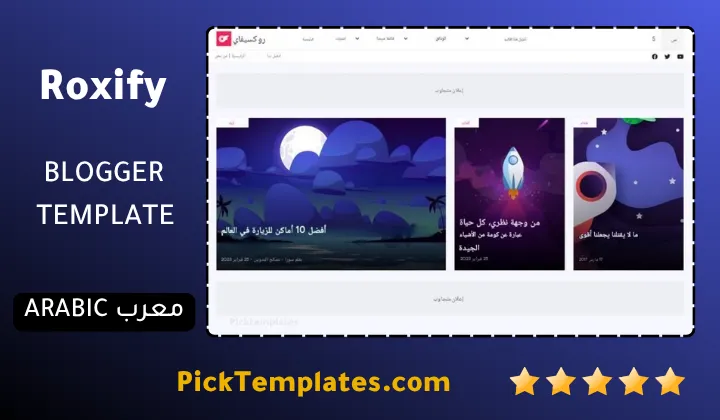
One more practical note before you go. A free Arabic version of Roxify already exists and it was translated and adapted by Picktemplates while staying protected under the original copyright terms. A separate free English version along with a paid upgraded edition remains available straight from the original creator Templateify.
If Roxify theme feels close but not quite your style browse more polished options inside our stylish Blogger templates collection before making a final decision.
Information
| Template Name | Roxify |
| Version | 1.0.0 |
| Creation Date | 7 February 2023 |
| Last Update | 26 February 2023 |
| Platform | Blogspot |
| Author | Templateify |
Version Comparison
| Template Features | Free | Pro |
| 100% Responsive Design | ✔ | ✔ |
| RTL Supported | ✔ | ✔ |
| Boxed Mode | ✔ | ✔ |
| Awesome Ajax Mega Menu | ✖ | ✔ |
| Content Section | ✖ | ✔ |
| Featured Post by (Label, Recent or Popular Posts) | ✖ | ✔ |
| Featured Widget by (Label, Recent or Popular Posts) | ✖ | ✔ |
| Special Ad Spot | ✖ | ✔ |
| 2 Content Block Types on Sidebar by (Label, Recent, or Comments) | ✖ | ✔ |
| One-Click Dark Mode | ✖ | ✔ |
| Exclusive Table of Contents Plugin-In | ✖ | ✔ |
| Responsive YouTube Videos | ✔ | ✔ |
| Advanced Related Posts | ✔ | ✔ |
| Blogger, Disqus or Facebook Comments | ✔ | ✔ |
| Embed Video and Image in Comments Via Links | ✔ | ✔ |
| Awesome About Section | ✔ | ✔ |
| Custom Footer Copyrights | ✖ | ✔ |
| Native Cookie Consent | ✖ | ✔ |
| Post Shortcodes | ✔ | ✔ |
| Fully Customizable Background, Widths, Colors and Fonts | ✔ | ✔ |
| Lifetime Template Updates | ✖ | ✔ |
Features
- Fully responsive design that adapts smoothly to every screen size
- Clean SEO friendly coding structure across every page type
- AMP ready pages for faster mobile loading
- Built in dark mode toggle for comfortable night reading
- Advanced mega menu with multiple drop down levels
- Breadcrumb navigation for better search visibility
- Multiple homepage color schemes including white yellow black and green
- Optimized ad placements across the homepage and post pages
- Social bookmark and WhatsApp sharing buttons built in
- Author bio support suited to multi writer magazines
- Post thumbnail support across every homepage widget
- Two column layout option for content heavy pages
- Cross browser compatibility across every modern browser
- Design language adapted from popular WordPress magazine themes
- Regular structure updates from the Templateify team
Conclusion
Roxify earns its place among the better multi category Blogger themes because it treats variety as a feature instead of a problem. A magazine publishing across ten or more tags rarely gets a homepage this calm without heavy custom coding.
Newer bloggers who only cover one niche might find some of its widgets unnecessary at first. Anyone planning to grow into a broader magazine format will likely grow into every one of those extra sections instead of outgrowing them.
In my ten years reviewing Blogger themes Roxify remains one of the more thoughtful attempts at solving true multi category publishing without turning to WordPress. My honest opinion is that it rewards magazines built on real editorial variety far more than it rewards a single topic blog dressed up as one. Mouhssine Boukou
We have localized the free version of the Roxify template into Arabic and fixed the Right-to-Left (RTL) layout issues to make it easier to use on Arabic blogs.