
Table of Contents
Contents
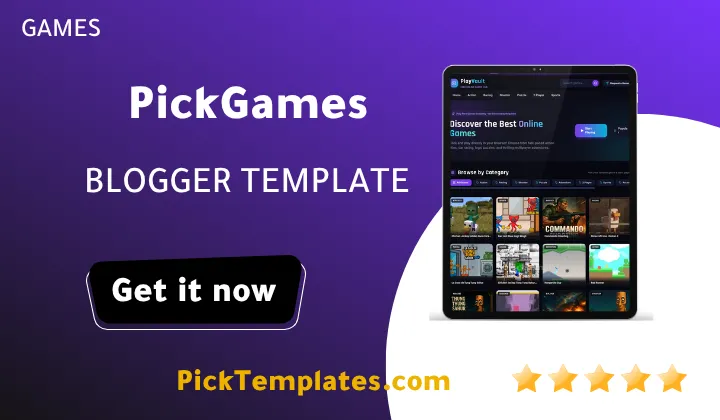
Welcome to our Pickgames Blogger Template review. Pickgames is a free dark gaming template from Kalibnet built around a square tile grid that lets visitors click a game and play it right inside the browser. If you want to run an instant play games portal on Blogger without paying for a theme this is one of the most focused options you can try.
The design borrows the feel of popular browser game portals. Games appear as clean square tiles and every click leads to a single page where the game sits inside the post. If you want to compare it with another gaming layout you can open the CK Game Blogger Template which follows a review style approach instead.
Pickgames Template Review for Instant Play Game Portals
The first thing you notice is the dark neon look. Deep navy backgrounds meet violet and cyan accents and the hero area carries a subtle grid pattern that gives it a futuristic touch. The header stays pinned while you scroll so the menu and the search box are always within reach. The menu already lists Action and Racing and Shooter and Puzzle and 2 Player and Sports which are the genres most players look for first.
On the homepage visitors see a welcome banner with a Start Playing button and then a row of category pills and finally the game grid. The grid shows two tiles per row on phones and grows up to six tiles per row on large screens. Each tile has a label badge and a title bar and a play icon that appears on hover. Cover images load lazily so the first screen stays light.
What Makes the Grid Special
The grid is the heart of this Pickgames template and it is where most of the design effort went. These are the details I found most useful for a games portal.
- Square tiles that keep every cover image the same size.
- A hover lift effect with a play button that invites the click.
- A label badge on each tile that shows the first genre label.
- A Load More Games button that adds new tiles without reloading the page.
- Category pills that you can edit from the Blogger layout panel.
- A fallback cover image for posts that have no picture.
Together these details make browsing feel quick and playful. Test the Load More button on a slow connection before launch to be sure it feels smooth for your visitors.
Setting Up a Game Page Step by Step
The Pickgames theme does not include a built in game player so you embed each game yourself. This is the routine I suggest so every game page looks the same and loads cleanly.
- Create a new post and write the game name as the title.
- Add one or more labels such as Action or Puzzle.
- Paste the game iframe code inside the post body.
- Add a short guide with controls and tips below the game.
- Upload a square cover image so the tile looks sharp.
- Publish and check the tile on the homepage grid.
The template only limits the iframe width so you must choose a height yourself. Pick a height that also fits small phones or the game may look cut off.
Practical tip. Use a cover image with the main character centered. Square tiles crop the edges and a centered subject always stays visible.
If you prefer a bolder magazine layout with gaming news instead of a pure games grid take a look at the Game X Blogger Template. Pickgames fits better when games are the main content and reading comes second.
Community and Sharing
Each game page shows labels and date and review count above the title. Below the game you find share buttons for WhatsApp and Facebook and X. After that comes a section called Player Reviews and Ratings where visitors can leave a tip or share a high score. The reviews load from the Blogger comment feed and appear as neat dark cards with avatars. Keep in mind that this is a comment area and not a star rating widget.
Honest Strengths of Pickgames
No template is perfect but this one gets several important things right for a games blog. These are the strengths that stood out most.
- It is free with no copyright limits and comes in Arabic and English.
- It has a strong mobile layout with a two column tile grid.
- It browses fast thanks to lazy loading and the Load More button.
- It is easy to edit because the layout panel shows clearly named sections.
- It gives each game a clear page with share buttons and a review area.
These strengths matter most for a new portal. A focused design lets you spend your time adding games instead of fixing the layout.
Limits You Should Know
A fair review must also show the weak side. Here is what you should keep in mind before you install the template on a blog you care about.
- Tailwind loads from a CDN so the browser builds the styles on every visit.
- Icons load from an external script without a fixed version.
- The search box is hidden on small phones so mobile users rely on the menu.
- No ad zone is ready so you must add AdSense units yourself.
- There is no light mode and no related games block under the game.
- The About section numbers such as 1000 plus games are sample text.
None of these points is a deal breaker. Fix the sample text early and plan your ad placement before you add many games.
Important note. Only embed games that you have permission to publish. Many browser games have license rules and your blog stays safe when you use official embed codes.
Free Arabic and English Versions
Pickgames comes in two free versions. One is Arabic with right to left support and the other is English. Both were created by the Kalibnet website and both are open source with no copyright limits. You can use them on personal blogs or client projects and edit them freely.
Who Should Use This Template
Pickgames suits beginners and small teams who want a fast start with an instant play games portal. If you plan to publish reviews or hardware guides instead you should browse the gaming Blogger templates category and compare a few options before you choose.
Information
| Template Name | Pickgames |
| Version | 1.0.0 |
| Creation Date | 2026 |
| Last Update | 2026 |
| Platform | Blogger |
| Author | Kalibnet |
Features
- Free Blogger template for instant play browser games
- Arabic and English versions with no copyright
- Dark neon design with a cyber grid hero banner
- Square game tile grid from two to six columns
- Hover play icon and lift animation on tiles
- Sticky header with menu and search box
- Editable Browse by Category pills
- Load More Games button without page reload
- Lazy loaded cover images
- Single game page with labels and date
- Share buttons for WhatsApp Facebook and X
- Player reviews section loaded from Blogger comments
- Announcement bar and Request a Game button
- Editable About section and four column footer
- Clearly named sections inside the Blogger layout panel
- Fully responsive for phones and tablets and desktops
Conclusion
Pickgames blogger template is a focused free choice for anyone who wants an instant play games portal on Blogger. Its square grid and dark neon style make browsing quick and fun while the setup stays simple for beginners.
It is not perfect. It relies on external scripts and it has no ad zones or related games block out of the box. Even so it offers strong value for a template that costs nothing and comes in both Arabic and English.
I would pick Pickgames for a new games portal that wants to grow with steady uploads. Start with thirty or forty games and use square cover images and plan your ad placement early. Once traffic arrives you can improve speed by hosting your own styles.