
Table of Contents
Contents
Welcome to PickTemplates and thank you for stopping by. Best Result Blogger Template is a good fit if you publish job alerts or exam results or course guides and want every topic to get its own colorful block on one homepage. It is free to use and it gives you a clean black white and red layout that you manage from the Blogger layout screen. It is also an older design from 2018 so it works best when you value structure over trendy looks.
Best Result theme was created by SoraTemplates and it sits in the magazine category. If you want to compare it with a more modern editorial layout take a look at Magfolio Blogger Template before you decide. Both are made for people who publish often and need a tidy front page.
How Best Result Handles Many Topics on One Homepage
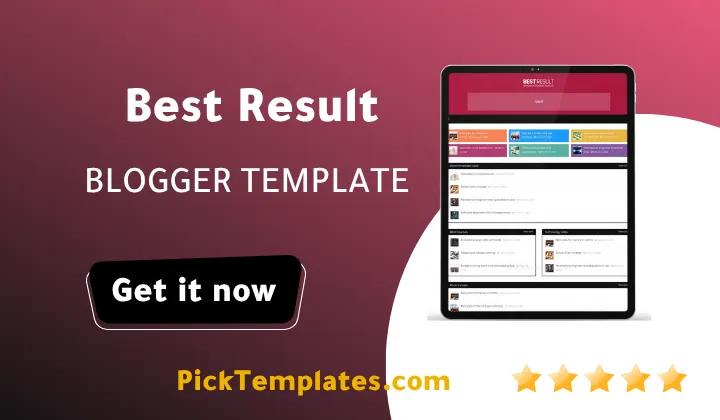
I picked the multi category curation angle for this review because that is exactly what the live demo shows from the first scroll. The homepage opens with a recommended block and then moves through Best Jobs and Courses and Technology and Free Course and Best Companies and Industry. Each section has its own label and its own layout style so visitors can jump to the topic they need without hunting through menus.
What the Demo Homepage Actually Contains
The demo is built around labeled widget blocks that each pull posts from one Blogger label. Here is what you will see when you open it and what each part does for a busy portal.
- A Recommended Jobs block in featured list style that works as your hero area.
- Best Courses and Technology Jobs blocks placed side by side in a left and right column layout.
- A Recent Posts feed with small thumbnails and a View all link.
- Free Course and Best Companies blocks followed by an Industry block in featured list style.
- Popular Posts and Categories and Tags widgets in the right sidebar.
- Social icons in the sidebar and a footer menu with Home and About and Contact links.
Every block depends on a label. If a label has no posts its block stays empty so publish a few posts per category before you show the site to visitors.
Setting Up the Category Blocks Step by Step
The setup is simple once you understand the label system. The steps below follow the pattern you can see in the demo and the official documentation.
- Back up your current theme from the Blogger Theme section before you change anything.
- Upload the template XML file and save it.
- Open the Layout page and find the homepage widget areas.
- Add each block using the post count then label then style pattern shown in the demo such as 4/Best Jobs/feat-list.
- Build the menu using the underscore pattern that marks dropdown levels.
- Preview the result on desktop and on a phone before you publish.
The demo menu uses leading underscores to mark each dropdown level and that detail is easy to miss. Keep the web documentation open while you build the menu.
Practical tip. Create all your labels first and use the exact same label names in your menu and in your homepage blocks. Mismatched names are the most common reason a block shows no posts.
For another news style theme that also organizes many categories under one navigation you can look at Pixer Blogger Template. Comparing two layouts side by side helps you see which block style suits your content volume.
Reading Experience and Built In Tools
Inside a post you get breadcrumb navigation and social sharing with WhatsApp support. The developer also lists an email subscription widget and the demo includes a shortcodes page that shows how to format notes and buttons and columns inside posts. For a job portal this is useful because you can highlight deadlines and eligibility notes without installing anything extra.
Important note. The header of the demo contains an ad placeholder image. Keep your own ad units light so they do not push the recommended block below the fold on phones.
Speed and Search Visibility
SoraTemplates lists this Best Result Template as SEO ready and fast loading. The list layouts rely on small thumbnails and that keeps the front page lighter than image heavy magazine themes. Version 2.0 fixed image blur issues and version 3.0 made minor CSS fixes in March 2022. I did not run lab speed tests for this review so run PageSpeed Insights on your own content after setup and judge the real numbers yourself.
Real World Challenges to Expect
The biggest challenge for beginners is the label based shorthand because it feels strange until you build your first block. The second challenge is image consistency. The demo uses a mix of photo sizes so upload images with the same ratio to keep the grid clean. The third challenge is age. The Best Result theme has not changed since 2022 so you may need to adjust small things by hand when Blogger updates its editor.
Honest Pros and Cons
Here are the strengths that stood out when I went through the demo and the documentation. They matter most for portals that publish many short updates every day.
- Clear category blocks that suit job and result and course content.
- A black white and red look that keeps text easy to read.
- Free download with both web and video documentation.
- Multi level dropdown menu and breadcrumbs and WhatsApp sharing included.
- Responsive layout that adapts to phones and tablets.
These strengths are real but they come with limits that you should weigh before you commit to the theme.
Now here are the weaknesses that you should know about before you download. None of them are deal breakers but they can slow down a beginner.
- The design dates from 2018 and feels plain next to newer magazine themes.
- The last update was in March 2022 so future Blogger changes may need manual fixes.
- Menu and block setup uses a shorthand that beginners must learn.
- The demo shows no dark mode switch.
- Free users do not get direct support from the designer.
If any of these points matter to your project test the theme on a fresh blog first and then decide.
Which Version Should You Use
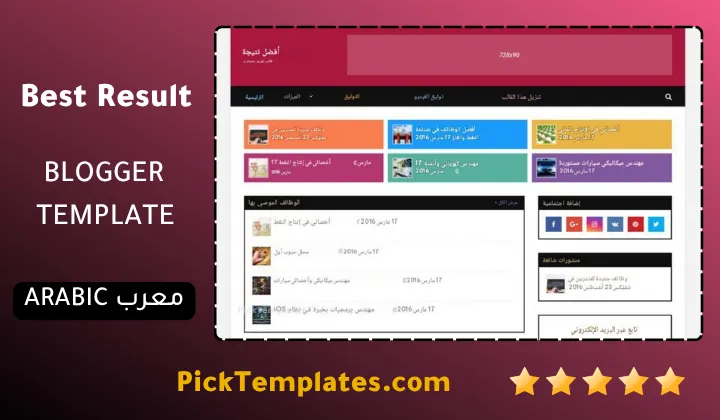
There is a free Arabic version that was arabized by Picktemplates and it is protected by copyright. There is also a free English version that is protected by copyright and a paid English version and both were created by the original designer SoraTemplates. Pick the one that matches the language of your audience and respect the license terms of whichever edition you choose.
Who Should Choose Best Result
Best Result suits some projects better than others. Use this list to check whether your site matches the profile before you download.
- Job portals that publish vacancies and recruitment news.
- Exam and result blogs that post admit cards and answer keys and model papers.
- Education sites that share free courses and study guides.
- Niche and affiliate blogs that cover several topics with equal weight.
- Beginners who want a free theme that comes with documentation.
If you need a bold portfolio look or a modern dark layout you should look elsewhere. This theme values order over style.
Information
| Template Name | Best Result |
| Version | 3.0.0 |
| Creation Date | 22 September 2018 |
| Last Update | 16 March 2022 |
| Platform | Blogspot |
| Author | Soratemplates |
Version Comparison
| Template Features | Free | Arabic | Pro |
| 100% Responsive Design | ✔ | ✔ | ✔ |
| Google Testing Tool Validator | ✔ | ✔ | ✔ |
| Google Rich Results | ✔ | ✔ | ✔ |
| Custom 404 Page | ✔ | ✔ | ✔ |
| Fast Loading | ✔ | ✔ | ✔ |
| Hot Post | ✖ | ✖ | ✔ |
| Boxed Mode | ✔ | ✔ | ✔ |
| 3 Featured Post | ✖ | ✖ | ✔ |
| Whatsapp Sharing | ✔ | ✔ | ✔ |
| Featured Widgets by (Label, Recent or Random) | ✖ | ✖ | ✔ |
| Blogger, Disqus or Facebook Comments | ✔ | ✔ | ✔ |
| Drop Down Menu | ✔ | ✔ | ✔ |
| SEO Optimized | ✔ | ✔ | ✔ |
| Social Sharing | ✔ | ✔ | ✔ |
| Browser Compatibility | ✔ | ✔ | ✔ |
| Remove Footer Copyrights | ✖ | ✖ | ✔ |
| Awesome About Section | ✔ | ✔ | ✔ |
| Post Shortcodes | ✔ | ✔ | ✔ |
| Blogger Template Customizer | ✔ | ✔ | ✔ |
| Lifetime Template Updates | ✖ | ✖ | ✔ |
Features
- Magazine style layout built for job portals and result blogs
- Black white and red color scheme with multi color featured post blocks
- Fully responsive design for phones and tablets and desktops
- Multi level dropdown menu with easy label based setup
- Homepage blocks in featured list and left column and right column styles
- Breadcrumb navigation ready for better crawling
- Social sharing buttons with WhatsApp support
- Email subscription widget ready
- Header ad slot and sidebar ad areas ready for monetization
- SEO ready structure with a clean heading hierarchy
- Fast loading design with small list thumbnails
- AMP ready option listed by the developer
- Popular posts and categories and tags widgets
- Shortcodes page for notes and buttons and post formatting
- Built on the latest Blogger layout structure for easy customization
- Web and video documentation to guide the setup
Conclusion
Best Result Blogger template remains a practical free option for multi topic portals that publish jobs and results and courses. If you want to explore more layouts like it browse our full collection of Magazine Blogger templates and compare them before you choose.
Its strength is the label driven homepage that keeps many categories organized without clutter. Its weakness is age and the lack of support for free users so plan some time for setup and testing.
Expert opinion by Mouhssine Boukou with 10 years of experience. My honest view is that this theme is a smart pick when your priority is organized content and fast publishing and not visual wow. If you want a modern look or a built in dark mode you will need extra work or a newer theme. For a job or results portal on a tight budget it still does the job well.
We have localized the free version of the Best Result template into Arabic and fixed the Right-to-Left (RTL) layout issues to make it easier to use on Arabic blogs.