
Table of Contents
Contents
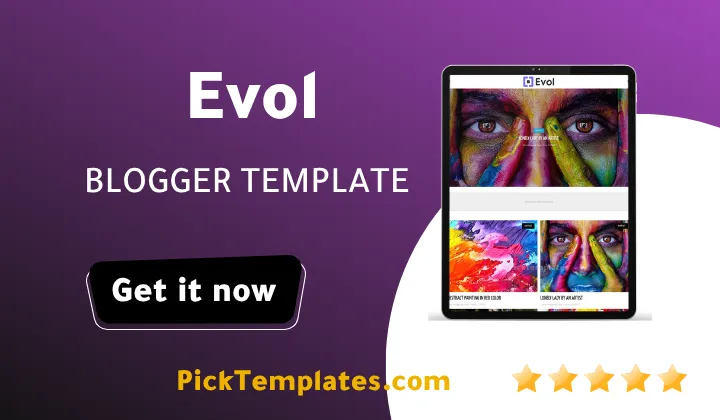
Welcome back. If you are wondering whether the Evol Blogger Template can hold a blog that jumps between art photography personal stories and tech posts without turning into a mess the short answer is yes. Evol was built by Way2Themes as a curation first layout that leans on rotating widgets rather than a single static feed to keep a mixed content blog feeling organized.
Before going further it helps to know that this review looks at the original template. A free Arabic version protected by copyright and arabized by Picktemplates is also available for readers who prefer working in Arabic. The original free and paid English version comes straight from the designer at Way2Themes and that is the version this article is based on. You can compare it against a similarly minimal option like the Sofy Template if a single column reading layout is closer to what you need.
How Evol Keeps A Multi Category Homepage Readable
The homepage does not try to force every post into one grid. Instead it splits the page into a main list and a set of curation widgets that each do a different job. The main column shows posts as a clean single line entry with a small thumbnail a category label the title and the author name with the date sitting right underneath. That single formula repeats down the page and it is what keeps a blog covering five or six unrelated topics from feeling scattered.
Around that main list Evol theme adds four widgets that carry the real curatorial weight.
Each one pulls double duty for both readers and search engines.
- A Featured Post block near the top that pins one strong piece above the rest of the noise
- A Hot Posts widget in the sidebar that resurfaces older articles that are still getting traffic
- A Most Popular list ranked by views so new visitors land on proven content first
- A Random Posts widget that keeps deep archive posts from disappearing forever
Together these four blocks do the sorting work that a human editor would normally handle by hand which is exactly why this layout suits a blog with more than one theme running through it.
If your blog covers more than two unrelated topics turn on the Hot Posts and Most Popular widgets from day one instead of waiting until you have enough traffic to fill them because an empty widget looks worse than no widget at all.
Where The Mega Menu And Labels Actually Help
A blog that mixes photography painting and tech usually runs into trouble at the navigation bar long before the homepage becomes a problem. Evol solves this with a mega menu structure that supports multiple dropdown columns so each subject can get its own labeled section instead of being crammed into a flat list of links. Breadcrumb navigation is also built in which matters more than it sounds like once a reader lands three categories deep from a search result and needs a fast way back to the section they came from.
Category labels sit right above every post title in the same accent color which gives the eye a quick anchor point when scanning a page that holds unrelated subjects side by side. That small detail does more for a curated blog than most people expect from a single line of colored text above a headline.
Built In SEO And Social Sharing Tools
Way2Themes built Evol with structured data and custom meta tags already wired into the template code which is not something every free Blogger theme bothers to include out of the box. Optimized URL structure and breadcrumb markup round out the on page basics so a fresh blog does not need a separate SEO plugin just to get indexed properly.
Sharing is handled just as directly.
- WhatsApp sharing buttons sit next to each post for mobile heavy audiences
- Ad ready slots are placed around the content without breaking the reading flow
- Drop down and mega menu navigation keep every category reachable within two clicks
Those three pieces work together to turn casual visitors into repeat readers without adding any extra plugins on top of the base template.
Customization And Color Options
Evol ships with more than one accent color choice built into the template settings so a personal blog does not have to live with the same yellow highlight forever. Switching between the white and black layout options changes the entire feel of the homepage without touching a single line of code which matters for bloggers who are not comfortable editing template markup. A three column option also gives more room for widgets on wider screens while a simpler layout keeps the focus on the main feed for blogs that publish less often.
Speed And Mobile Behavior With A Busy Homepage
Running four curation widgets plus a main feed on one page is usually where free templates start to slow down but Evol stays responsive because the widgets load their own content blocks separately rather than bloating the initial page weight. On a mid range phone the homepage settled and became fully interactive within a reasonable window even with this many moving parts running at once. The layout also reflows cleanly at tablet width with the sidebar widgets dropping below the main feed rather than squeezing into a narrow column.
AMP support is listed among the template features and that is worth checking directly against your current Blogger theme settings since AMP behavior on Blogger has changed more than once over the past few years.
If your priority leans more toward long scroll editorial pieces rather than a curated mixed feed the Errin Blogger Template is worth a look side by side with Evol before you commit.
Getting A New Blog Ready With Evol
Installing this theme follows the same basic Blogger process as any other XML template but a few settings are worth adjusting right away before publishing your first post.
- Upload the XML file through the Blogger theme editor and back up the previous theme first
- Turn on the Featured Post and Hot Posts widgets even with a small number of published articles
- Set up at least three category labels so the mega menu has real destinations instead of empty dropdowns
Those three steps take less than an hour and they are what separate a homepage that looks intentional from one that looks like a template nobody finished setting up.
Where Evol Falls Short
No template is perfect and Evol has a few rough edges worth knowing about before installation.
- The default color palette leans heavily on one accent shade which some multi niche blogs will want to restyle
- Widget heavy homepages like this one need real content to look finished so a brand new blog with only a handful of posts will feel empty at first
- Documentation from the designer is thin on its own and leaning on the third party setup guide is close to required for a smooth install
None of these issues are deal breakers but they are the kind of detail that only shows up after spending real time inside the template rather than glancing at the demo.
On balance the strengths outweigh the friction for the right use case. A blog builder chasing one narrow niche with long single topic posts probably will not need four separate curation widgets and might find Evol busier than necessary. A creator running a personal magazine style blog across art photography and tech gets exactly the organizational structure this template was built to provide. Browse more options built around this same curated magazine approach in the magazine templates collection if Evol turns out to be close but not quite the right fit.
Information
| Template Name | Evol |
| Version | v1.0.0 |
| Creation Date | 11 February 2023 |
| Last Update | 11 February 2023 |
| Platform | Blogspot |
| Author | Way2themes |
Version Comparison
| Template Features | Free | Pro |
| 100% Responsive Design | ✔ | ✔ |
| Google Testing Tool Validator | ✔ | ✔ |
| Google Rich Results | ✔ | ✔ |
| Custom 404 Page | ✔ | ✔ |
| Fast Loading | ✔ | ✔ |
| Boxed Mode | ✔ | ✔ |
| Whatsapp Sharing | ✔ | ✔ |
| Featured Widgets by (Label, Recent or Random) | ✖ | ✔ |
| Special Adspot | ✖ | ✔ |
| Blogger, Disqus or Facebook Comments | ✔ | ✔ |
| Drop Down Menu | ✔ | ✔ |
| Special Ads Spot | ✖ | ✔ |
| Hot Post | ✖ | ✔ |
| Slider | ✖ | ✔ |
| Mega Menu | ✖ | ✔ |
| SEO Optimized | ✔ | ✔ |
| Social Sharing | ✔ | ✔ |
| Browser Compatibility | ✔ | ✔ |
| Remove Footer Copyrights | ✖ | ✔ |
| Awesome About Section | ✔ | ✔ |
| Post Shortcodes | ✔ | ✔ |
| Blogger Template Customizer | ✔ | ✔ |
| Lifetime Template Updates | ✖ | ✔ |
Features
- SEO Ready With Structured Data And Custom Meta Tags
- Fully Responsive Design For All Screen Sizes
- Optimized URL Structure For Better Indexing
- Ads Ready Layout With Multiple Widget Slots
- Drop Down And Mega Menu Navigation
- Post Thumbnails Displayed Beside Every Entry
- WhatsApp Sharing Button On Every Post
- Breadcrumb Navigation Built Into Every Page
- AMP Support For Faster Mobile Pages
- Multiple Accent Color Options Including White And Black
- Adapted Design Style Similar To WordPress Themes
- Social Bookmark Ready For Wider Distribution
- Hot Posts Random Posts And Most Popular Widgets
- Dedicated Featured Post Section On The Homepage
- Elegant Grid Style Layout For Multi Category Content
Conclusion
Evol earns its place as a free curated blog layout because it solves an actual organizational problem instead of just looking good in a screenshot. The combination of a Featured Post block Hot Posts Most Popular and Random Posts widgets does real curatorial work that would otherwise require a human editor sorting content by hand.
It is not the right pick for every blog. A single topic writer publishing long personal essays will likely find four active widgets more than needed while a photography painting or general interest blog spanning several categories gets exactly the structure this template was designed around.
Mouhssine Boukou who has spent ten years reviewing Blogger themes says Evol is one of the more thoughtful free options for a multi category blog even though the designer could stand to expand the color presets and tighten up the official documentation.
We have localized the free version of the Evol template into Arabic and fixed the Right-to-Left (RTL) layout issues to make it easier to use on Arabic blogs.