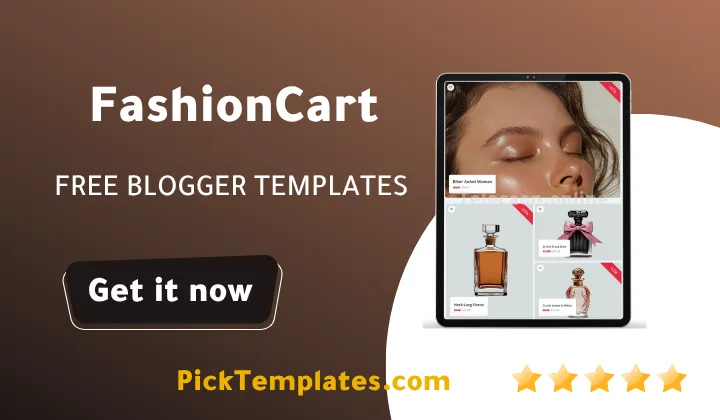
Free FashionCart blogger Template

FashionCart blogger template 2026 free Download

FashionCart blogger Template – Redefining Style for Modern Fashion and Lifestyle Blogs

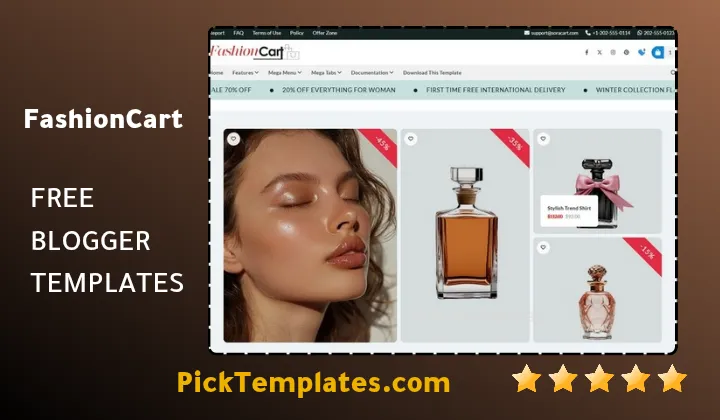
Are you a fashion enthusiast looking to launch a professional blog, or perhaps an influencer seeking a clean, high-end look to showcase your style? If so, the FashionCart blogger template is the ultimate solution tailored specifically for you. This theme was engineered to meet the high standards of the fashion industry, merging an elegant aesthetic with powerful eCommerce capabilities. By combining a minimalist white-space philosophy with bold, high-resolution imagery, FashionCart creates an instant sense of luxury and professionalism that keeps readers engaged and brands interested in collaborations.

Are you ready to transform your Blogger site into a sophisticated digital magazine that captures attention? Let’s dive in! Whether you are sharing daily outfit inspiration, beauty product reviews, or selling your own boutique items, the FashionCart template provides the framework to present your content in a responsive, fast-loading, and visually striking manner. This template is packed with premium features that we will explore in depth below.

A Sophisticated Design Focused on Visual Storytelling

The polished and airy design is the defining characteristic of the FashionCart blogger template. It utilizes a modern layout that prioritizes large, crisp images and clean typography, making it the perfect canvas for fashion photography. The theme allows you to display your latest trends and collections professionally using featured post areas and a sleek homepage slider. In its commitment to high-quality visual presentation, it rivals other premium layouts like the Topflix template which excels in the entertainment and media niche.

FashionCart has been meticulously crafted to ensure that your photos are the star of the show. It uses a selective color palette for accents, ensuring that the interface never distracts from the content itself. The fonts are chosen for maximum readability and a high-fashion feel, providing a seamless browsing experience that mimics the feel of a physical glossy magazine.

The design philosophy behind FashionCart is simple: let the style speak for itself. By balancing bold typography with spacious layouts, it creates a premium atmosphere that elevates every post to a professional standard.

Thanks to its versatile architecture, you can use the FashionCart Blogger template for various niches, including luxury travel, beauty tutorials, or streetwear news. The refined design helps you establish a strong personal brand, making your blog look more like a professional business and less like a standard hobbyist page.

Seamless Performance Across All Screens

In today’s fast-paced world, your readers are always on the move. The Fashioncart blogger template provides a flawless and responsive user experience across all devices. Whether your audience is scrolling through your latest lookbook on an iPhone, checking a product review on a tablet, or browsing on a wide desktop monitor, the template adapts perfectly to every resolution.

Built using the latest CSS3 and HTML5 responsive frameworks, FashionCart ensures that every element—from the navigation bar to the product filters—scales beautifully. Your blog will maintain its professional appearance and functionality regardless of the hardware the reader chooses.

Responsive design is no longer optional for fashion blogs, as the majority of social media traffic comes from mobile devices. FashionCart allows you to capture this mobile-first audience, providing them with a smooth, app-like experience that encourages them to stay longer and interact more with your posts.

“In the fashion world, first impressions are everything. With FashionCart’s responsive layout, you ensure that your brand looks impeccable on every screen, maximizing your reach and professional credibility.”

By utilizing the adaptive design offered by FashionCart, you can focus on creating stunning content while the template handles the technical side of cross-device compatibility, ensuring your style is accessible to everyone, everywhere.

Mobile-First Excellence for the Modern User

The mobile optimization of the FashionCart Blogger template goes beyond simple resizing. It includes touch-friendly navigation, fast-loading mobile assets, and a layout that prioritizes readability on smaller screens, eliminating the frustration of manual zooming.

This design approach ensures that your call-to-action buttons and product links are easily clickable, which is essential for blogs that incorporate affiliate marketing or direct sales.

  1. Intuitive touch-navigation menu for mobile users.
  2. Optimized image delivery for faster mobile loading times.
  3. Clean, clutter-free reading experience on small screens.
  4. Instant response of interactive elements and shop filters.

With its robust mobile framework, FashionCart stands out as the ideal choice for bloggers who want to leverage Instagram and TikTok traffic, directing fans to a high-converting mobile platform.

High-Performance Integrated Homepage

The FashionCart Blogger template features a dynamic, modular homepage designed to highlight your most important content. You can easily configure the sections to showcase recent arrivals, seasonal trends, or high-performing lifestyle articles. 

The homepage serves as your digital storefront. FashionCart provides the tools to make it both organized and enticing through a smart grid system that emphasizes visual hierarchy.

Crafting an Engaging Landing Page

FashionCart offers extensive options to fine-tune your homepage. You can toggle different layout styles, adjust the featured image sizes, and use high-impact sliders to promote your “Most Wanted” items or latest collaborations.

Use the Featured Section to highlight seasonal promotions or major brand partnerships, keeping your most valuable content at the top of the reader’s mind.

The template also supports sophisticated thumbnail formatting, ensuring that your photography looks professional and consistent throughout the entire homepage grid.

Essential Homepage Components

To maximize engagement, your fashion blog should utilize the specialized sections included in FashionCart, such as:

  • Hero Post Slider ✔️ to showcase high-quality editorial shoots or top announcements.
  • Product Category Grid ✔️ to organize content into “Summer Essentials,” “Accessories,” or “Beauty.”
  • Interactive Sidebar ✔️ for “Shop the Look” widgets, social media feeds, and email subscriptions.
  • Mega Menu ✔️ to provide quick navigation to various fashion sub-categories and style guides.

These elements are fully customizable, allowing you to build a homepage that fits your specific content strategy and business goals.

Intelligent Sidebar and Widgets

The FashionCart template includes a versatile Sidebar area where you can drag and drop widgets to enhance user interaction. This feature is perfect for adding “Shop the Post” links, Instagram galleries, or advertisements that fit seamlessly into the design.

The sidebar in FashionCart is strategically designed to improve site navigation and keep visitors on your page. By displaying trending posts or a curated selection of products, you increase the likelihood of multiple page views per session.

The sidebar is a powerful tool for monetization. Use it to display affiliate banners or a newsletter signup to convert one-time visitors into loyal subscribers and customers.

Leverage these built-in widget areas to create a personalized experience for your readers, guiding them toward your social media channels and your best-performing content.

A Multi-Functional Content Ecosystem

FashionCart provides the organizational power needed for blogs with extensive archives. With its advanced dropdown and mega-menu system, you can categorize your fashion articles into logical branches, making it effortless for readers to find specific styles or tips.

You can set up distinct areas for “Outfit of the Day,” “Beauty Trends,” “Store,” and traditional pages like “Portfolio” or “Collaborations.” This structured approach mimics the functionality of top-tier templates like the Sorashop template, which is known for managing large volumes of specific content categories effectively.

With FashionCart’s multi-section capabilities, you can build a massive content hub. Your visitors will appreciate the ease with which they can navigate between style guides and product reviews.

Whether you are a niche influencer or a broad lifestyle publisher, the menu system offers the flexibility to scale your blog as your content library grows over time.

  1. Define sub-categories for specific clothing items (Shoes, Tops, Bags).
  2. Group content by “Collections” or “Seasons” for better discovery.
  3. Streamline the path from a blog post to a product purchase.

The multi-section architecture of FashionCart is designed for growth, ensuring your blog remains organized and professional as you add more content.

Advanced Add-ons and E-commerce Features

FashionCart is not just a blog; it’s a toolkit for commerce. It comes with specialized features like product tag filters and call-to-action (CTA) spots that are built directly into the layout. It also includes an integrated social sharing system that makes it easy for readers to pin your images to Pinterest or share them on Instagram.

The template supports advanced commenting systems and is fully compatible with Google AdSense, allowing you to monetize your influence easily. Specialized widgets like “Popular Items” and “Related Style Tips” keep the audience engaged with more of your work.

Utilize the built-in CTA spots in FashionCart to drive traffic to your store or affiliate partners, turning your passion for fashion into a profitable online business.

Effortless Customization with No Coding

One of the most appealing aspects of FashionCart is how easy it is to personalize. You don’t need to be a developer to change your blog’s look. Through the standard Blogger dashboard, you can modify colors, upload your custom logo, and adjust the layout of widgets to match your brand’s unique identity.

Whether you prefer a soft pastel aesthetic or a high-contrast monochromatic look, FashionCart gives you the freedom to experiment. You can adjust the accent colors and font styles with just a few clicks, without ever opening the HTML editor.

Customizing FashionCart allows you to infuse your personal style into the template, ensuring your blog is a true reflection of your fashion sensibility.

Personalizing Your Visual Identity

Using the Blogger Theme Designer, you can instantly change the primary colors and typography. This ensures that your blog remains unique and stands out in the crowded fashion blogging space. 

You can also rearrange homepage elements using a simple drag-and-drop interface, allowing you to test different layouts to see what resonates most with your audience.

Custom Widgets and Social Tools

FashionCart supports a wide array of custom gadgets. You can easily integrate your Instagram feed, add a “Shop the Look” section, or embed your latest YouTube styling videos.

  • Add a newsletter popup to grow your email list.
  • Integrate a Pinterest “Pin It” button on all images.
  • Use custom HTML blocks for promotional banners.

This ease of customization makes FashionCart a favorite for creative individuals who want a professional site that they can manage themselves.

Optimized for Search Engines (SEO)

The FashionCart Blogger template is built with an SEO-Friendly foundation. The code is lightweight and clean, allowing search engines like Google to easily crawl and index your articles, which helps you rank higher for competitive fashion keywords.

SEO is the heartbeat of blog traffic. By using FashionCart, you are ensuring that your fashion tips and product reviews have the best possible chance of appearing on the first page of search results.

Performance and speed are also key SEO factors. FashionCart is optimized for fast loading times, which improves user retention and satisfies Google’s Core Web Vitals requirements.

Technical SEO and Structure

FashionCart follows best practices for site architecture, using proper header tags (H1, H2, H3) to organize content. It also allows for custom Meta descriptions, ensuring that your snippets in search results are attractive and clickable.

Focus on creating high-quality content, and let the template’s built-in SEO features handle the technical heavy lifting for your blog’s visibility.

Mobile-First SEO Readiness

Since Google uses mobile-first indexing, FashionCart’s perfect mobile responsiveness gives you an automatic boost. Your site will be recognized as mobile-friendly, which is essential for maintaining your search rankings in the modern era.

  • Enhanced site speed scores.
  • Cross-browser compatibility (Chrome, Safari, Firefox).
  • Schema Markup ready for better search snippets.

By selecting the FashionCart Blogger template, you are investing in a platform that works hard to get your content seen by fashion lovers around the world.

Information

Template Name FashionCart
Version 1.0
Creation Date 2024
Last Update 2025
Platform Blogger
Developer Templateify / Sora

Features

  1. Modern, polished design specifically for fashion and lifestyle
  2. 100% Responsive and mobile-friendly architecture
  3. Visual-centric layout with high-resolution image support
  4. Optimized for fast loading and peak performance
  5. Easy customization via Blogger dashboard (No coding needed)
  6. Fully SEO Friendly for better Google search rankings
  7. Sticky navigation bar for easier user browsing
  8. Professional Featured Post slider on the homepage
  9. Integrated Product Tag filters for eCommerce functionality
  10. Custom Social Widget support for Instagram and Pinterest
  11. Strategically placed Call-to-Action (CTA) spots
  12. Google AdSense ready for immediate monetization
  13. Clean, bold typography for a professional magazine feel
  14. Regular updates to maintain Blogger compatibility
  15. Structured Category sections for better content organization

Conclusion

The Fashioncart blogger template stands out as a premier choice for anyone looking to build a serious presence in the fashion and lifestyle niche. Its unique blend of aesthetic elegance and practical functionality makes it more than just a theme—it’s a comprehensive platform for growth. The clean design and focus on high-quality visuals ensure that your readers enjoy a premium experience every time they visit.

One of the greatest advantages of Fashioncart is its ability to bridge the gap between a traditional blog and a modern eCommerce site. The inclusion of product filters and prominent CTA spots allows you to guide your audience toward purchases seamlessly. It’s designed for those who want to turn their passion into a career without dealing with the complexities of difficult coding.

Ultimately, FashionCart is about providing a professional foundation. From its SEO-optimized code to its effortless customization options, every detail is engineered to help you succeed. Whether you are a solo blogger or a growing brand, this template provides the style and the substance needed to make a lasting impact in the digital fashion world.

FAQ


Is the FashionCart template free?

FashionCart typically offers a free version with basic features, while a premium version is available for those who want full features, no credits, and technical support.


Can I use this template for an eCommerce store?

Yes. While it is a Blogger template, it includes product tag filters and CTA spots designed specifically to help you sell products or promote affiliate items.


Is the template compatible with mobile devices?

Absolutely. FashionCart is fully responsive and optimized for mobile-first indexing, ensuring it looks great on smartphones and tablets.


Do I need to know coding to change the colors?

No, you can easily customize the colors, fonts, and layout through the Blogger Theme Designer interface without touching any code.


Is it SEO friendly for Google ranking?

Yes, FashionCart is built with clean, lightweight code and follows SEO best practices to help your content rank higher in search engine results.


Does it support social media integration?

Yes, it includes built-in social sharing buttons and specialized widgets for platforms like Instagram, Pinterest, and Facebook.


Leave a Comment

Comments

No comments yet. Why don’t you start the discussion?

Leave a Reply

Your email address will not be published. Required fields are marked *