
Table of Contents
Contents
An In-Depth Guide to the GalaxyMag Template
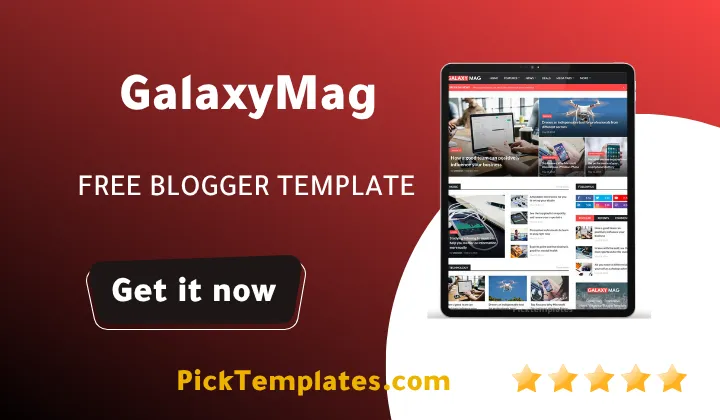
Choosing the right theme for a Blogspot site can determine how well a digital publication grows and retains readers. The Galaxymag blogger template offers a practical and robust layout that helps content creators move away from basic designs and establish a professional news portal or niche blog. This comprehensive guide provides a complete analysis of this theme to help you decide if it matches your publishing goals without needing to spend hours searching for alternative reviews.
To give you a quick and direct answer right away, the Galaxymag is a highly optimized, mobile-first magazine theme designed for fast loading times and clean ad placement. It stands out because it balances visual appeal with technical search engine optimization requirements, making it an excellent choice for publishers who want to maximize their ad revenue and rank higher on search engines. If you want to explore other layout structures before making your decision, you can also check out the Eris Template which offers another distinct approach to content presentation.
The Technical Architecture and Core Performance
Search engines prioritize websites that load quickly and offer a stable experience on mobile devices. The Galaxymag template is built with lightweight scripts and optimized style sheets to ensure that your pages load within acceptable limits even on slower mobile connections. This focus on performance helps lower bounce rates and keeps readers engaged with your articles longer.
Mobile responsiveness is no longer an optional feature for web designs because a vast majority of global traffic comes from mobile screens. The coding architecture of this theme adapts to any screen size, ensuring that your text remains readable and your images do not overflow their containers. This seamless transition between desktop and mobile layouts helps maintain a professional look regardless of how your audience accesses your site.
In addition to speed, the internal coding includes structured schema data markup. This markup helps search crawlers understand your content context better, which can improve your organic visibility over time. For creators who are focused on building a dedicated news site, exploring specialized news blogger templates can provide additional insights into how layout structures impact user behavior and search rankings.
Comparing the Editions and Licensing Options
When planning your budget and site goals, it is essential to understand the structural options available for this specific template. The developer, Templateify, originally released this theme on 24 April 2019 and updated it to version v2.1.0 on 5 February 2021 to ensure compatibility with modern web standards.
Understanding the structural differences between these editions will help you choose the right starting point for your online publication. Here is a breakdown of how the versions compare and what each offers to the end user
- The free GalaxyMag theme is a copyright-protected version that allows you to test the layout and primary features but requires keeping the author attribution credits in the footer.
- The limited free Arabic version provides right-to-left language support for Middle Eastern publishers who want to build a localized audience with standard right-to-left text alignment.
- The paid professional version unlocks full customization rights, removes all footer credits, and provides access to premium support and lifetime updates.
It is important to select the version that matches your current budget and long-term technical needs. Testing the unpaid version first is usually a safe way to evaluate how well the theme integrates with your daily publishing routine.
Optimizing Layout and Ad Revenue Potential
Monetizing a blog requires a delicate balance between showing ads and maintaining a clean reading space. GalaxyMag includes built-in ad slots placed in high-conversion areas such as the header, within the article body, and along the sidebar. These slots are designed to work smoothly with Google AdSense and other third-party advertising networks without breaking the responsive grid.
The layout editing interface is fully compatible with Blogger Layout Version 3.0, allowing users to drag and drop widgets to rearrange sections. This means you do not need advanced coding knowledge to change the position of your popular posts, social subscription boxes, or category sections. If you want to see how other themes handle layout and customization, you can read about the SpotBuzz Template to compare its widget configuration options.
Evaluating the Pros and Cons Honestly
No template is perfect for every single scenario, and looking at both sides of the coin helps you make an informed decision. Let us examine the positive aspects first to see what makes this theme a strong contender for your Blogspot site.
Evaluating the advantages of this theme reveals why many publishers prefer it over standard Blogspot layouts for their daily operations
- Excellent loading speeds on mobile networks due to clean style sheets and minimal reliance on heavy JavaScript libraries.
- Straightforward widget integration through the standard Blogger layout manager which eliminates the need to edit HTML code directly.
- Pre-placed advertisement zones that target high-click areas on your pages without cluttering the content.
These technical benefits work together to provide your audience with a seamless reading experience across all devices.
While the template offers many benefits, it is equally important to look at the challenges you might face when deploying it on your site
- The free version strictly limits your ability to customize footer branding which can affect how professional your site looks.
- Upgrades and major version transitions must be done manually by copying and pasting the XML code into your theme editor.
- Some advanced features require external scripts that can slightly slow down your loading times if not optimized.
Understanding these limitations beforehand allows you to plan your technical setup and avoid unexpected display issues during configuration.
Information
| Template Name | GalaxyMag |
| Version | v2.1.0 |
| Creation Date | 24 April 2019 |
| Last Update | 5 February 2021 |
| Platform | Blogger / Blogspot |
| Author | Templateify |
Features
The theme comes packed with a robust selection of features designed to improve both user experience and technical site performance. These pre-configured elements make it easier to manage your digital publication without touching a single line of complex code
- How To Setup GalaxyMag Post Shortcodes
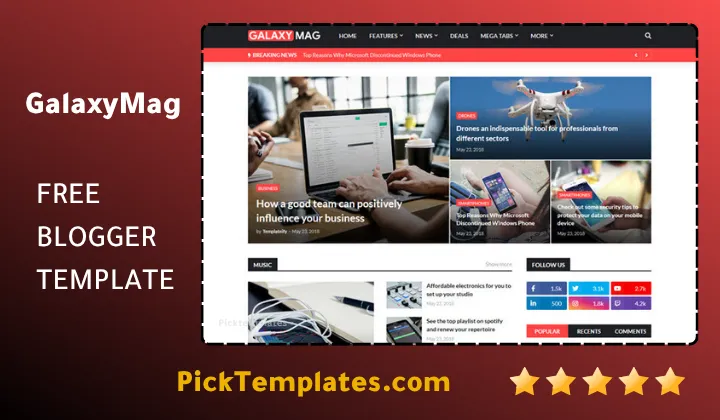
- Optimized Magazine Grid for News and Editorial Content
- Fully Responsive Layout for Mobile and Tablet Users
- Built-in Schema Markup for Better Search Engine Performance
- Easy Customization via Blogger Layout Version 3.0
- Advanced Mega Menu and Structured Multi-level Navigation
- Lightweight Codebase for Faster Loading Times
- Pre-defined Ad Slots for Seamless AdSense Integration
- Standard Social Sharing Widgets for Reader Engagement
- Readable Typography and High-Contrast Color Scheme
- Breadcrumb Navigation and Author Profile Support
- Multi-column Footer with Widget Support
- Cross-browser Compatibility with Modern Web Browsers
- Clean Code Architecture Designed for Core Web Vitals
- Multi-niche Compatibility for Tech News and Lifestyle Blogs
- Available in Free Premium and Right-to-Left Arabic Editions
Using these tools effectively can help elevate your website from a simple personal diary to a professional news platform. Make sure to explore the layout options to find the exact combination of widgets that serves your audience best
Conclusion
The GalaxyMag Blogger Template offers a solid foundation for publishers who want to grow their online presence without dealing with complex server configurations. By combining a clean aesthetic with lightweight backend code, it allows content creators to compete with larger media websites directly on the Blogspot platform. It serves as a practical choice for anyone looking to present their work in a clean, professional layout.
What sets this theme apart is how well it supports monetization and search engine discoverability out of the box. Instead of spending hours troubleshooting slow page speeds or fixing broken widget displays, you can rely on this stable build to handle the technical heavy lifting. This gives you more room to focus on crafting quality articles that keep your readers coming back.
In summary, choosing this theme provides the balance of flexibility and ease of use that modern bloggers need. Its responsive layout, built-in SEO features, and easy layout customization make it a dependable asset for your digital publishing journey. It represents a practical step forward for creators seeking a polished website layout.
We have localized the free version of the GalaxyMag template into Arabic and fixed the Right-to-Left (RTL) layout issues to make it easier to use on Arabic blogs.