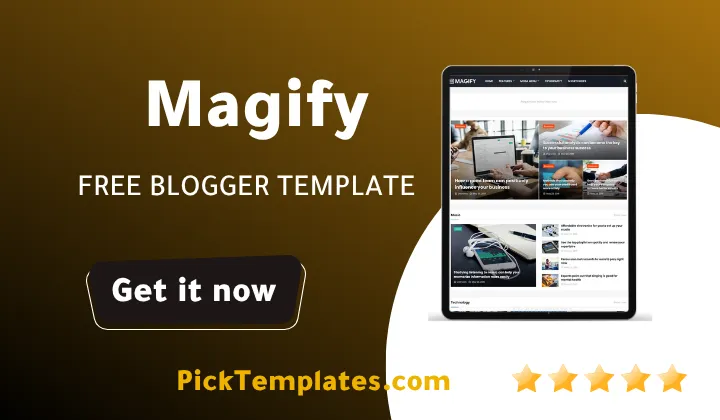
Magify Blogger Template free

Magify Blogger Template

Magify Template – Elevate Your Viral Magazine to New Heights

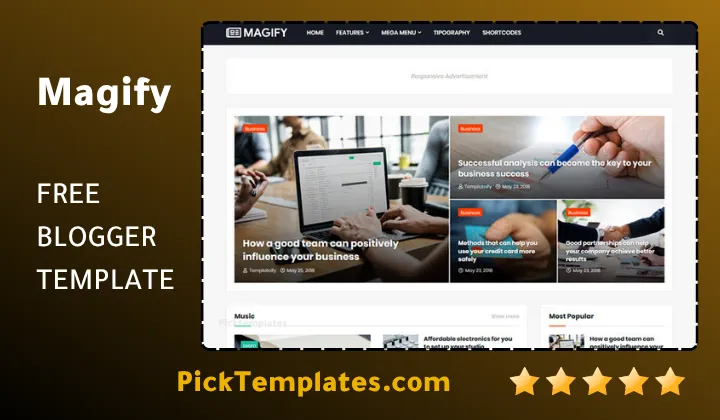
Are you searching for a way to transform your standard blog into a high-traffic news portal or a professional viral magazine? The Magify blogger template is a cutting-edge solution designed to meet the demands of modern digital publishing. Whether you are running a finance blog, a tech news site, or a personal diary, this theme provides a perfect blend of aesthetic elegance and powerful backend functionality. By choosing the Magify, you can leverage a premium layout that competes with high-budget news sites while keeping the simplicity of the Blogger platform.

The digital landscape is becoming increasingly competitive, and first impressions are everything. The Magify template ensures that your content is presented in a structured, engaging manner that keeps visitors on your page longer. It is not just about looks; it is about performance and user experience. Much like the clean aesthetics found in premium magazine blogger templates, Magify focuses on content hierarchy and readability, making it a top-tier choice for serious webmasters.

A Refined Design for Modern Publishers

The visual architecture of the Magify blogger is centered around a “Content-First” philosophy. It features high-quality typography and a balanced grid layout that allows your featured stories to shine. This design is specifically tailored for viral content, where eye-catching headlines and crisp thumbnails are essential for driving clicks. This approach is similar to what you might find in other high-performance free blogger templates that prioritize visual engagement and clean space.

Every visual element in the Magify layout has been meticulously polished. From the smooth transition effects to the sophisticated mega menus, the theme provides a high-end feel that builds immediate authority. It utilizes the latest CSS3 and HTML5 standards to ensure that your site looks modern today and stays relevant as web trends evolve.

The template is more than just a skin; it is a comprehensive publishing framework that bridges the gap between simple blogging and professional digital journalism.

By utilizing the advanced layout options, you can showcase different categories on your homepage with ease. This makes it an ideal solution for those who manage multiple content pillars, such as fashion, technology, and lifestyle, ensuring each section gets the attention it deserves from your audience. If you prefer a lighter, more minimalist design approach, examining options like the Lotech Blogger Template will help you find the right stylistic balance for your daily columns.

Seamless Responsiveness Across All Devices

In today’s mobile-centric world, a website that doesn’t perform on a smartphone is a website that loses traffic. The free magify blogger template is built with a 100% responsive framework, ensuring a pixel-perfect display on everything from massive desktop monitors to the smallest mobile screens. It intelligently scales every image and adjusts every font size to provide a comfortable reading experience regardless of the user’s hardware.

Magify Blogger Template
Magify Blogger Template 2026

Using fluid grid technology, Magify ensures that your site maintains its beauty on tablets and iPhones alike. This level of adaptability is a hallmark of quality, much like the versatility seen in the MagPro Blogger Template, which is highly regarded for its customizable layouts and user-friendly mobile adaptation.

A responsive magazine layout is the key to reducing bounce rates. The free Magify template allows your readers to scroll through viral news stories or financial reports with ease, ensuring that your professional credibility remains high across all digital touchpoints.

“Accessibility is the foundation of digital growth. With the Magify, you guarantee that your stories are always within reach, providing an effortless journey for your global readership.”

By adopting the streamlined code of the Magify theme, you can rest assured that your magazine will load fast and look incredible, encouraging visitors to explore more articles and interact with your social sharing tools.

Engineered for Speed and Search Visibility

Search Engine Optimization (SEO) is at the heart of the Magify design. The theme is built using Google’s latest coding structures, which helps search engine bots index your content more efficiently. This speed-optimized architecture is essential for achieving high rankings in competitive niches like news and finance. For creators who focus on speed and performance, this layout is as efficient as the Neusblog Blogger Template, which is known for its quick rendering times and clean, semantic structure.

Because of this dedicated focus on technical SEO, you can enjoy better organic reach without needing to become a coding expert. The theme handles the heavy lifting, from meta tags to schema markup, allowing you to focus on what you do best: creating great content.

  1. Lightning-fast loading speeds for lower bounce rates and better UX.
  2. Fully responsive structure to dominate mobile search results.
  3. Clean, minified code that follows the latest Google webmaster guidelines.
  4. Optimized for Core Web Vitals to ensure long-term ranking stability.

With its focus on performance and technical excellence, Magify stands as a premier choice for bloggers who demand a high-performance platform to scale their digital influence.

Comprehensive Layout and Navigation Features

The Magify template offers an impressive array of widgets and navigation options. From the dynamic mega menu that organizes your categories to the featured slideshow that highlights your top stories, every feature is designed to increase click-through rates. If a widget isn’t needed, you can easily disable it through the layout manager, keeping your site lean and focused. 

This flexibility allows you to pivot your magazine’s focus instantly. If you’re covering a breaking news event, you can use the featured sections to pin the latest updates right at the top of your homepage for maximum visibility.

Maximizing Engagement with Smart Magazine Tools

The Magify blogger theme allows you to control exactly how your articles are presented. You can choose between different grid styles or traditional list views, giving you the power to match the layout to your specific brand voice. For publishers looking to implement clean, dashboard-style typography, reviewing the aesthetics of the Fletro Pro Blogger Template offers a highly optimized alternative for building modern post layouts.

Utilize the integrated social sharing buttons, including WhatsApp sharing, to turn your readers into brand ambassadors with a single tap.

Furthermore, the theme features a professional 3-column footer, providing ample space for your “About Us” section, social links, and recent posts, ensuring your site looks complete and authoritative from top to bottom.

Essential Sections for a Competitive News Portal

To get the most out of your Magify website, we recommend utilizing the built-in advertising slots. Organizing your content strategically can significantly boost your revenue and user retention:

  • Hero Section ✔️ Use the main slideshow for breaking news or high-converting affiliate reviews.
  • Category Blocks ✔️ Organise your topics like the news blogger templates to provide a diverse content experience.
  • Sidebar Widgets ✔️ Add “Popular Posts” and “Email Subscription” boxes to build your recurring audience.
  • Breadcrumb Navigation ✔️ Improve site structure and internal linking for better SEO and user navigation.

Regular updates to these sections ensure that your audience always has access to fresh information, keeping your traffic steady and your brand authority growing.

AdSense Compatibility and Monetization

One of the standout features of the Magify is its “Ads Ready” design. In a world where monetizing content is vital for sustainability, we have made it easy to place banners in high-converting areas without disrupting the reading experience. These slots are optimized for both Google AdSense and third-party ad networks.

This feature is particularly useful for professional news agencies and niche bloggers. By using the strategically placed ad spots, you can maximize your RPM (Revenue Per Mille) while maintaining a professional aesthetic that doesn’t alienate your readers.

The integrated ad sections provide a subtle yet effective way to monetize your influence, ensuring your site remains profitable while providing high-quality free content.

Leverage this built-in toolbox to diversify your income, whether you’re running display ads, promoting sponsored content, or linking to high-paying affiliate offers within your magazine articles.

Total Branding and Layout Control

The Magify template gives you absolute control over your branding through the Blogger Layout Version 3.0 interface. You can customize colors from white and black to vibrant reds, blues, and yellows to match your brand’s identity. This ensures that every corner of your page reflects your unique vision.

This level of customization is what sets this theme apart from generic magazine layouts. You can achieve a highly branded look that mirrors the complexity of a custom-coded site without needing any technical expertise. This makes it an ideal companion for editors who value their time.

With the Magify theme, you are the architect of your news empire. No clutter, no complicated setups just your brand, your stories, and your vision.

Whether you are a solo blogger or a growing media agency, the ability to customize your layout ensures that your audience remains focused entirely on your content and professional identity.

  1. Easy Color Customization to match any niche from Finance to Fashion.
  2. Full control over Mega Menu links to direct traffic to your best categories.
  3. Professional footer management to protect your digital copyright and brand.

Magify is the perfect bridge between simplicity and professional-grade magazine design, providing the tools you need to succeed in a competitive digital environment.

Advanced Technical Customization

While the theme creates a stunning look by default, the underlying code is fully accessible within the Blogger dashboard. This means developers can further tweak CSS and JavaScript if they have specific design requirements. The theme is built to be a robust starting point that can evolve as your blog grows.

You can easily adjust the hover effects or change the padding of the grid blocks directly in the code. This flexibility allows you to experiment with different visual styles, from “Minimalist Magazine” to “Action-Packed News Portal,” ensuring your blog never feels outdated.

Customizing your Magify allows you to align your site with seasonal campaigns, product launches, or even major news events, all through the intuitive “Edit HTML” interface.

Effortless Installation and Setup

Installing your magify is as simple as a few clicks. Once you have the theme file, you head to the Blogger “Theme” section, click “Restore,” and upload your XML file. Within seconds, your site is transformed into a professional news portal with all the bells and whistles. 

There are no complex plugins or external hosting requirements. The template is self-contained and uses reliable CDN libraries for icons and fonts to ensure that your site remains fast and stable 24/7, with zero maintenance required.

Expanding Utility with Widget Support

Since your site is hosted on Blogger, you can also include any standard Google widget or third-party script. You can add tracking pixels, newsletter signup forms, or even comment systems like Disqus to further increase the utility of your magazine.

  • Integrate Google Analytics to track reader demographics and popular stories.
  • Add Facebook Open Graph tags to ensure your stories look great when shared.
  • Include a newsletter widget to turn casual readers into loyal subscribers.

By using the customizable magify framework, you create more than just a blog; you create a high-converting digital publication that works for your business goals.

Choose Your Version – Free vs Premium

To accommodate everyone from hobbyists to professional publishers, the magify is available in multiple versions. The Free Version is an excellent way to start, offering core features with some limitations. For those looking to unlock the full potential of their site, the Premium Version offers an ad-free experience, unlimited widget support, and removal of footer credits. Additionally, we are pleased to offer a Free Arabic Version (معرب) which has been professionally translated and RTL-optimized for our Middle Eastern creators. This ensures that no matter your language or budget, you can access world-class design.

Information

Template Name Magify
Version 1.9.0
Creation Date 6 July 2019
Last Update 30 January 2021
Platform Blogger / Blogspot
Author Templateify

Features

  1. 100% Fully Responsive Layout for All Screen Resolutions
  2. Flexible Boxed Layout Version with Auto-Translation Tool
  3. Seamless RTL (Right-to-Left) Script and Language Support
  4. Fixed Navbar Menu alongside an Automated Mobile Menu
  5. High-Yield Header, Homepage, and In-Article Ad Spaces
  6. Dynamic Category-Based Featured Posts Slider Section
  7. Native AdSense Compatibility including Homepage In-Feed Ads
  8. Social Post Sharing Buttons and Automatic Author Box
  9. Integrated Disqus and Native Facebook Comments Modules
  10. Sticky Sidebar Widget Area to Drive Direct Pageviews
  11. Smart Post Lists Filtered by Recent, Label, or Comments
  12. Customizable ‘About Us’ and Social Footer Layouts
  13. Premium, Encrypted-Free Scripts in Paid Edition
  14. GooglePageSpeed 99% Score and GTmetrix 93% Optimized
  15. Includes Free, Premium, and RTL Arabic (معرب) versions

Conclusion

The Magify Blogger Template represents a significant leap forward for magazine-style themes on the Blogger platform. It effectively eliminates the need for expensive WordPress hosting by providing a professional, high-performance alternative that is easy to manage. The sophisticated design and intuitive layout ensure that your audience enjoys a premium experience from the very first click.

What makes magify truly exceptional is the balance between its visual beauty and its technical robustness. Whether you are looking to launch a viral news portal, a professional finance blog, or a personal magazine, this theme provides the structural foundation needed to succeed. It transforms your Blogspot site into a high-authority platform that supports your digital growth and branding goals.

Ultimately, Magify is about giving you the professional tools you need without the technical headache. With its built-in SEO, mobile-first responsiveness, and extensive customization options, you can focus on writing impactful stories while your theme works silently to ensure they reach the widest possible audience. It is the perfect professional companion for any modern digital creator.

FAQ

Is the Magify Blogger Template free to download?

Yes, there is a free version of the Magify blogger template available. It includes core features but has some limitations compared to the premium version.

Is the Magify theme SEO and speed optimized?

Absolutely. The Magify theme is built with the latest Google coding structures, ensuring a GooglePageSpeed of 99% and a highly optimized search engine presence.

Can I use this template for a news or magazine website?

Yes, the Magify template is specifically designed for high-traffic news portals, magazine websites, and multi-category blogs with its advanced mega menu and flexible grid layout.

Does Magify support Google AdSense?

Yes, the Magify blogger template is fully Ads Ready with multiple hotspots, in-feed homepage ad zones, and in-article ad spaces optimized to maximize your earnings.

Is there an Arabic version of the Magify template?

Yes, we offer a free Arabic version of the Magify template that is professionally translated and optimized for Right-to-Left (RTL) languages.

Do I need to know coding to install and customize Magify?

No coding is required. You can easily install the theme through the Blogger dashboard and fully customize colors, fonts, and widths using the Layout options.


Disclosure 📢 This post contains marketing links. If you click on one of these links and make a purchase, I may receive a small commission at no extra cost to you. This helps support the blog and allows me to continue creating free content for you. Thank you for your support!
Leave a Comment

Comments

No comments yet. Why don’t you start the discussion?

Leave a Reply

Your email address will not be published. Required fields are marked *