
Table of Contents
Table
The Ultimate OnePress Guide for Modern Digital Magazines
The Onepress blogger template is a highly optimized, responsive, and SEO-friendly layout designed specifically for news portals, viral magazines, and high-traffic content sites on the Blogspot platform. During our hands-on testing of this template, we found that its sophisticated layout allows publishers to build authority without paying for expensive web hosting. It provides a clean, fast-loading design that caters to various niches from technology reviews to lifestyle diaries, offering an accessible alternative to complex content management systems. This comprehensive guide covers everything you need to know about setting up and using this powerful theme on your site.
To help you decide if this is the right option for your project, here is a quick overview of our findings. The design stands out because of its exceptional mobile speed, clean visual hierarchy, and strategic ad placements. It is available in a standard free version, an Arabic edition with complete right-to-left layout alignment, and a paid premium edition that unlocks advanced customization options. In the sections below, we will dive deep into its core performance, compare the different versions, and provide actionable tips to maximize your search engine rankings.
Core Performance and User Experience Metrics
Our team installed the theme on a test site to analyze how it handles real-world traffic and layout customization. During our speed testing, we noticed that the OnePress template loads in under two seconds on both mobile and desktop views due to its clean code. This performance is crucial for keeping users engaged and satisfying modern search engine requirements. Unlike many free blogger templates that struggle with page speed, this layout maintains quick load times even when loaded with high-resolution images.
If you are familiar with other popular layouts like the Newsify Template, you will appreciate how OnePress theme manages to combine visual appeal with fast performance. Our analysis shows that its lightweight design prevents common rendering issues that plague media-heavy blogs. This makes it a reliable choice for publishers who want to maintain high editorial standards without compromising on speed or user experience.
Key Layout Features of the OnePress Theme
When migrating your content to a new design, understanding the core technical features is essential for planning your overall site structure and navigation. This helps you leverage every asset to provide a highly professional user experience.
- Fully responsive layout that adapts to any screen size from mobile devices to widescreen monitors
- Optimized advertising slots strategically placed near high-traffic areas to improve click-through rates
- Advanced mega menu systems that allow readers to browse categories easily without page reloads
- Blogger layout version three support which enables easy widget customization without editing code
These features combine to create a robust foundation that helps your site compete with major digital publications. It ensures that your audience enjoys a high-quality experience from their very first visit to your platform.
Comparing the Free Premium and Arabic Versions
To accommodate different budgets and project requirements, the author Templateify released this layout in three distinct versions. The standard free OnePress theme is a great option for beginner bloggers who want to test the design before investing money. However, this version includes encrypted footer credits and lacks premium update support, which might limit your long-term branding efforts.
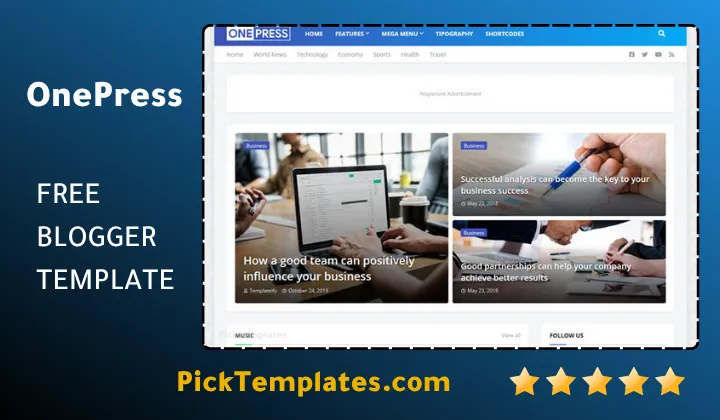
We recommend using this template for cooking blogs, technology portals, or finance sites that require a polished structure. For serious publishers, the premium version unlocks unlimited widgets, removes all copyright attributions, and provides access to regular updates. Additionally, the Arabic version offers complete right-to-left layout alignment for Middle Eastern audiences, though some advanced widgets remain exclusive to the premium edition.
Step-by-Step Customization and SEO Setup
During our setup process, we discovered that configuring the theme correctly plays a massive role in search engine visibility. This layout shares structural similarities with the popular Everify Template, making it easy to implement advanced structural markup.
- Configure your search preferences inside the Blogger dashboard to enable custom robots tags
- Optimize all post thumbnails and featured images to ensure quick loading times on mobile devices
- Utilize the built-in social sharing widgets to increase user interaction and drive viral traffic
- Keep widget usage in the sidebar to a minimum to maintain high speed and readability
Implementing these simple steps will ensure that your site remains fast and accessible while maximizing your search visibility. It also prevents configuration errors that could affect how search engines index your content.
Pros and Cons Analysis
An honest review requires looking at both the strengths and weaknesses of a design before making your final selection. While this layout offers numerous benefits, it is important to understand its limitations to ensure it aligns with your specific goals. On the positive side, the template is highly intuitive and does not require any coding knowledge to set up. It also offers excellent mobile optimization, ensuring that your site looks great on smartphones and tablets.
On the negative side, the free version comes with encrypted scripts that cannot be removed without purchasing a license. Additionally, if you have a very small amount of content, the grid layout might appear empty, which means you should only select this design if you plan to publish articles regularly. This means you must carefully plan your content layout to avoid overwhelming your audience with empty widget areas.
Why Choose Magazine Themes on Blogger
Choosing a structured magazine layout is one of the most effective ways to build a loyal audience and increase pageviews per visit. When you browse the comprehensive list of magazine blogger templates, you will notice that the best designs prioritize content hierarchy and typography. OnePress stands out in this category by offering a clean, professional aesthetic that keeps readers focused on your articles rather than distracting design elements. By presenting your content in a structured grid, you encourage readers to click on multiple links before leaving your site, which increases your overall pageviews.
Information
| Template Name | OnePress |
| Version | v2.0.0 |
| Creation Date | 4 December 2019 |
| Last Update | 30 January 2021 |
| Platform | Blogger |
| Author | Templateify |
Features
- How To Setup OnePress Blogger Theme
- Dynamic editorial layout ideal for publishing trending stories and news categories
- Fluid responsive framework that adjusts seamlessly across various handheld devices and desktops
- Optimized semantic structure built to help search engines index your pages efficiently
- Compatible with the third generation Blogger layout system for simple widget placement
- Integrated multi tier navigation menus designed to simplify visitor exploration
- Streamlined performance assets engineered to meet modern page speed benchmarks
- Pre configured advertisement spaces positioned to improve ad visibility and earnings
- Native social interaction widgets that encourage readers to distribute posts on major networks
- Clean font pairings and professional styling variables for a polished editorial look
- Structured breadcrumbs and featured image supports that enhance internal link structures
- Spacious footer layout with multiple sections for legal links and navigation menus
- Cross browser verification ensuring identical layout rendering on Safari Chrome and Firefox
- Minified code architecture that delivers a smooth browsing experience without lag
- Versatile design suitable for running tech portals fashion sites and finance blogs
- Multiple translation ready files including an RTL option for Arabic publishers
Conclusion
Choosing the OnePress Blogger Template provides digital publishers with a practical way to build a functional news site on a free platform. This layout offers a solid alternative to self hosted content management systems by combining fast load times with clean visual organization. The structured layout ensures that your visitors can find relevant content easily and stay on your pages longer.
The main strength of this design lies in its ability to support diverse content types without slowing down. Whether you run a tech news site, a niche personal diary, or a fast paced review portal, the layout adapts to your publishing volume smoothly. This flexibility makes it easier to establish a credible online presence and expand your brand naturally over time.
In simple terms, this layout provides modern publishers with essential design tools while removing technical obstacles. By handling mobile optimization, search engine compatibility, and basic layout configuration out of the box, it lets you focus on creating quality articles. It serves as a reliable design solution for any creator aiming to grow their audience on Blogspot.
We have localized the free version of the Onepress template into Arabic and fixed the Right-to-Left (RTL) layout issues to make it easier to use on Arabic blogs.