

Table of Contents
Contents
Welcome, and here is the short answer first if you came here wondering whether this tool is worth your time. The Pickspot Blogger template biolink generator gives freelancers, consultants and small agencies a single hosted landing page built around one job, moving a visitor from a first click toward an actual hire, a booked call or a direct message, without a paid subscription or any coding background required.
This review looks at the Pickspot biolink generator strictly through a lead generation lens, meaning the focus stays on how well the layout, the button hierarchy and the contact options actually help a working professional close deals, rather than simply looking pretty inside a browser tab. If a lighter, more stripped down alternative appeals to you instead, the Pickpure blogger template biolink generator is worth comparing before you commit to a final layout.
Turning A Single BioLink Into A Client Acquisition Page
Blogger Bio-Link Generator
Fill in the details below to generate your custom professional Blogger Profile template.
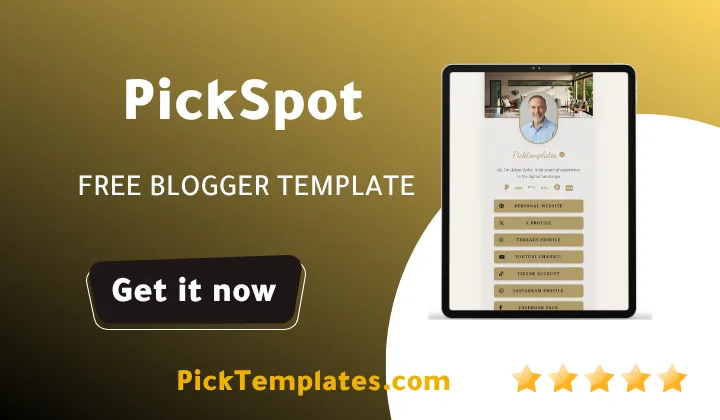
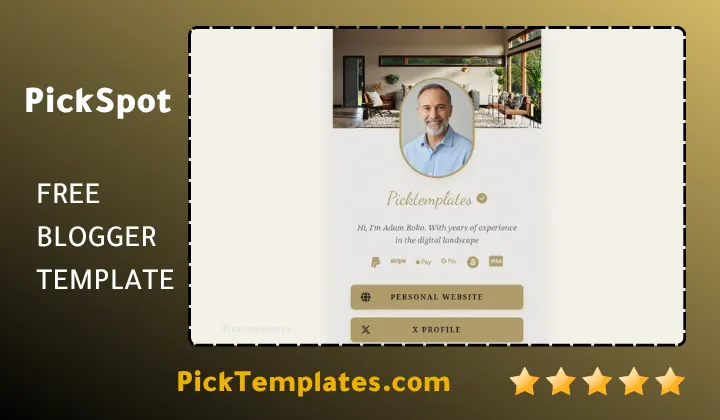
Most link in bio tools were designed for casual sharing, not for closing business, and that difference becomes obvious the moment you compare Pickspot against a typical linktree style page. The oval profile avatar, the verified checkmark placed next to your name and the cream textured background all work together to build instant credibility, and that matters because a hesitant visitor who does not trust your identity within the first two seconds rarely scrolls far enough to reach a contact button.
Why The First Impression Decides If A Lead Even Scrolls Down
A biolink page built for hiring has roughly the same window of attention as a business card handed across a table. The wood interior header illustration and the FontAwesome 6.5.1 icon set give the page a finished, agency style look rather than a rushed personal experiment, which quietly raises the perceived rate you can charge before a client has read a single word.
A visitor decides whether to trust a bio page faster than it takes to read this sentence, so keep your headline role description short, specific and written for the exact client you want to attract, not a generic label like designer or developer.
Direct Messaging Buttons That Shorten The Sales Cycle
Once a visitor trusts the page enough to keep reading, the template’s next job is removing every unnecessary click between interest and an actual conversation, and Pickspot handles this through a dedicated contact row placed close to the top of the page.
- WhatsApp button built for an instant one tap conversation starter
- Telegram shortcut suited to creators managing a channel based community
- Email icon for clients who prefer writing a brief before calling
- Optional link field that can point straight to a calendar booking page
Because every one of these fields hides itself automatically when left blank, you never end up with a row of dead, unclickable icons quietly undermining the professional image the rest of the page worked to build.
Structuring Your Call To Action Blocks For Higher Click Through
The way buttons are ranked on the page matters almost as much as whether they exist at all, and Pickspot blogger template gives you enough control to build a genuine hierarchy instead of one long undifferentiated list of links.
- Reserve the top full width gold styled button for your single most important offer
- Use the second tier of buttons for a portfolio link or a recent case study
- Push payment and tip icons down into the secondary wallet row
- Rewrite the primary button label whenever a campaign or offer changes
Treating the page like a funnel rather than a directory is what separates a biolink that generates real inquiries from one that visitors glance at and quietly leave.
Do not stack more than two or three primary buttons above the fold. A page carrying fifteen equally weighted links stops working as a hire me page and starts reading like a directory nobody wants to click through.
What Genuinely Works For Freelancers Chasing New Business
After building a page with this generator, a few strengths stand out clearly for anyone using the link to pitch actual clients rather than just followers.
- The gold gradient primary buttons pull attention exactly where a pitch needs it
- Optional fields that auto hide keep the page tidy no matter how few links you fill in
- Loading speed stays close to instant, which matters when a client opens the link mid meeting
- Full white label footer control removes any watermark that would dilute your own brand
Together these details make the page feel like a bespoke piece of client facing collateral rather than a free tool with obvious limits.
Where The Lead Generation Experience Falls Short
No template is without trade offs, and being direct about them is more useful than pretending the generator is flawless.
- There is no native contact form, so every inquiry routes through an external app like WhatsApp or email
- Analytics are not built in, you still need to paste in your own Google Analytics or pixel code manually
- Payment icons only link out to external processors, there is no in page checkout
- Deeper visual changes require opening the XML file, which is not friendly to someone with zero coding experience
None of these gaps are unusual for a free Blogger based tool, but a freelancer expecting an all in one CRM style dashboard should adjust expectations before starting.
Setup Notes From Actually Building A Page With This Generator
Filling in the Biolink generator form takes a few minutes, though the more time consuming part is writing a bio paragraph that reads like an actual pitch rather than a resume line. Swapping a vague label such as developer for something like senior web architect and consultant noticeably changes how the page reads to a first time visitor. For anyone who wants an even more polished, personalized interface once the basic funnel is proven, the premium Pickbiocard blogger template biolink generator is a natural next step to explore.
Pasting the generated code into the Blogger theme editor is straightforward, and because the output is clean semantic HTML rather than a script heavy widget, search engines can actually index the page, which slowly adds organic visibility on top of whatever traffic your social profiles already send.
Information
| Template Name | Pickspot |
| Version | 1.0.0 |
| Creation Date | 2026 |
| Last Update | 2026 |
| Platform | Blogger |
| Author | Kalibnet |
Features
- Profile first design built around an oval avatar and a verified checkmark badge
- Cream paper textured background paired with a wood interior header illustration
- Complete FontAwesome 6.5.1 icon library covering every major social platform
- Fully responsive layout tuned for touch friendly mobile button spacing
- Optional link fields that automatically hide themselves when left empty
- Support for major networks including Instagram, YouTube, GitHub and Pinterest
- Full width glowing gold styled primary call to action buttons
- Secondary circular icon row reserved for wallet and payment links
- Built in monetization icons for PayPal, Stripe and Crypto wallets
- Direct messaging shortcuts for WhatsApp and Telegram contact
- Semantic SEO friendly HTML structure built for organic search visibility
- Lightweight mobile first code aimed at sub second load times
- Editable XML theme file for deeper CSS and animation customization
- Full white label footer with custom copyright and backlink control
- Ready for Google Analytics and marketing pixel integration
- Zero recurring subscription cost when self hosted directly on Blogger
Conclusion
Viewed purely as a lead generation tool, the Pickspot Blogger Template Biolink Generator earns its place because it treats a bio link as a funnel rather than a list, giving freelancers a real hierarchy of buttons, direct messaging shortcuts and a credibility driven design instead of a flat pile of links. Anyone curious about other biolink options built on the same platform can browse the full biolink template category for comparison before deciding.
It is best suited to freelancers, consultants and small creative teams who already have a clear offer and simply need a fast, credible page to sit behind their social profiles, and it is less suited to anyone who needs a built in CRM, native forms or in page payment processing without touching any code.
Expert opinion (Mouhssine Boukou, 10 years of experience) after building and testing dozens of biolink funnels for freelance clients, my honest take is that Pickspot earns its keep on first impressions and button structure, but it only pays off if you actually treat the bio paragraph and the top button like sales copy rather than filling them in as an afterthought, because the prettiest layout still will not close a deal that the words on the page fail to set up.





I like the focus on using Blogger as the host for a centralized bio-link page,Blog Comment Creation Guide especially since it avoids ongoing subscription costs while keeping everything under your own control. The sections on responsiveness and speed are important because a lot of social traffic comes from mobile users. It would also be interesting to hear how you track visitor behavior and link performance over time.