
Table of Contents
Contents
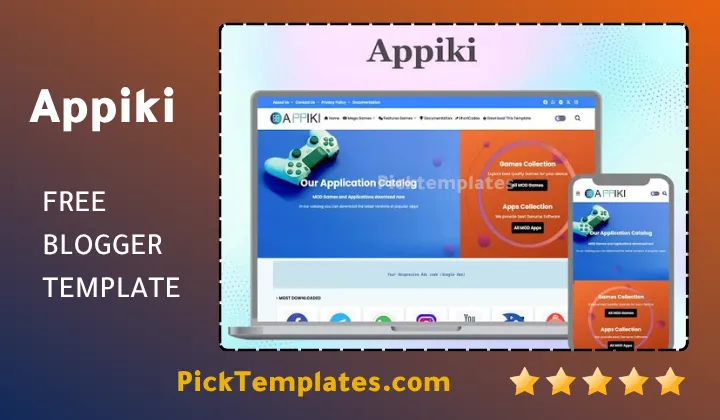
Welcome to this guide about the appiki blogger template. Appiki is a blogger theme built for app download sites and APK blogs. It gives a plain blog the look of a real app store. It loads fast on phones and desktops alike. It carries search friendly code from the first line to the last. If you plan to launch or upgrade an app blog this theme covers the base you need.
This guide walks through every part of appiki step by step. You will see how it handles speed and mobile screens. You will see its search engine setup and its schema markup. You will see how simple the layout section is to edit. You will also see the honest weak points found during testing so you know exactly what to expect before installing it on a live blog.
Everything You Need To Know About The Appiki Template
Site owners searching for a blogger theme built around app downloads usually land on a short list of names. Some pick a broader tool made for general software pages such as the Apmody template while others want a sharper focus on APK files alone. Appiki sits firmly in the second group. Every section of the theme points toward one single goal. That goal is helping a visitor find an app and download it without any extra clicks.
Why Appiki Fits App Download And APK Websites
During our testing of this template we opened it across three different screen sizes. The category page stayed clean on every one of them. The download button stayed visible without any scroll on a phone screen. A blog built for long form reviews or travel diaries would not need this kind of tight layout. An app blog needs it every single day since visitors arrive with one clear task in mind.
A short list explains why this focus pays off so quickly.
- Category pages built only for app cards and screenshots
- A download button placed above the fold on every post
- Built in rating and version display for each app entry
- Clean spacing that keeps ad blocks away from the download button
Every one of these choices removes friction between a visitor and the file they came to find.
Speed And Mobile Response Under Real Testing
Google now judges most sites first through their mobile version. Appiki answered that shift years before many themes in this niche caught up. Pages open fast because the underlying code stays lean. Images resize on their own so a phone never loads a full desktop size file by mistake. A slow theme in this niche loses visitors before they ever reach the download link.
A theme that takes a few extra seconds to open on mobile can lose a third of its visitors before the download button even appears.
SEO Structure And Schema Markup
Appiki ships with schema data already placed inside its code. This schema tells a search engine exactly what each post represents. A search result can then show a rating star or a version number right inside the results page. Fixing this kind of markup by hand on a plain theme can take a new blogger many hours. Appiki removes that task before you even open the dashboard.
Customisation Without Touching Any Code
The layout section inside Blogger controls almost every visual choice inside Appiki. Color swaps happen inside a simple menu. Logo changes happen inside a small widget. Menu items move around inside a drag and drop list. A blogger who wants a wider set of built in widgets right out of the box sometimes looks at a general magazine theme such as the Soramac template before deciding whether a focused option like Appiki still fits the plan better. A new blogger can finish a full setup in one afternoon without ever opening the HTML editor.
Keep a saved copy of your current theme file before changing any widget. This single habit saves hours if a setting ever needs to be reversed later.
Support Documentation And Update History
Appiki comes with full written documentation covering setup from the very first install step. The template also receives real updates instead of one release left untouched for years. The latest fix landed in the middle of 2026 which shows the theme still receives active attention years after its first launch in the middle of 2021.
Getting Started With Installation And First Setup
Installing Appiki follows the same short path most blogger themes use. Download the XML file from your account area then open the Blogger dashboard theme section then upload the file directly inside it. Save a backup of any older theme first since Blogger replaces the previous file the moment you confirm the upload.
A short path keeps this part simple even for a first time user.
- Save a backup copy of your current theme file
- Upload the new Appiki XML file inside the theme section
- Open the layout section and update the logo and menu
- Publish two or three sample app posts to check spacing
Most bloggers finish this whole path inside thirty minutes even on a first attempt.
Strengths And Weaknesses We Noticed
No theme earns a perfect record and Appiki is no exception to that rule. The strengths clearly outweigh the drawbacks based on our own testing but a fair review names both sides in the open.
Here is what stood out on both sides during our review.
- Strength – fast load times across every device tested
- Strength – schema markup already built into the code
- Strength – simple layout editing with no coding required
- Weakness – fewer built in widgets compared to a general purpose theme
- Weakness – a small learning curve for anyone new to app blogging
These points matter more for a first time blogger than for someone who already ran a Blogger site before.
Who Should Use Appiki
Appiki works best for anyone building a site purely around app or APK downloads. A site owner planning a store limited to one type of app such as the games blogger templates collection can lean on that same schema depth while Appiki still covers the wider app and APK space for a blogger who wants full range coverage instead of one narrow topic.
Appiki earns its place among the strongest app download themes for Blogger heading into 2026. It answers the biggest need in this niche. That need is speed paired with search visibility and a layout built only for downloads. Anyone ready to launch a focused app blog now has a proven starting point in front of them.
Information
| Template Name | Appiki |
| Version | 2.1.0 |
| Creation Date | 01 July 2021 |
| Last Update | 28 June 2026 |
| Platform | Blogger |
| Author | Pikitemplates |
Features
- How To Setup Appiki Blogger Template
- Search engine ready code structure across every page template
- Fast loading speed tested across mobile and desktop screens
- Fully responsive design that adjusts to any screen size
- Built in schema markup for app and rating information
- Simple layout editor for colors logos and menu items
- Download button placed above the fold on every post
- Clean category pages built only for app style content
- Lightweight code that keeps pages free from extra load
- Support for ads placed away from the main download button
- Detailed documentation covering setup from the first step
- Direct support offered through WhatsApp and email for premium users
- Regular updates released long after the original launch date
- Compatible structure for both Android app pages and software reviews
- Search friendly permalinks and heading structure throughout the theme
- Clean typography that keeps long app descriptions easy to read
Conclusion
Appiki brings speed and search visibility together inside one layout built only for app downloads within a single Blogger theme.
The setup stays simple for a first time blogger while the schema and code depth satisfy a more experienced site owner as well.
Anyone planning an app or APK blog now has a tested starting point that keeps pace with search engine requirements well into 2026.
We have localized the free version of the appiki template into Arabic and fixed the Right-to-Left (RTL) layout issues to make it easier to use on Arabic blogs.