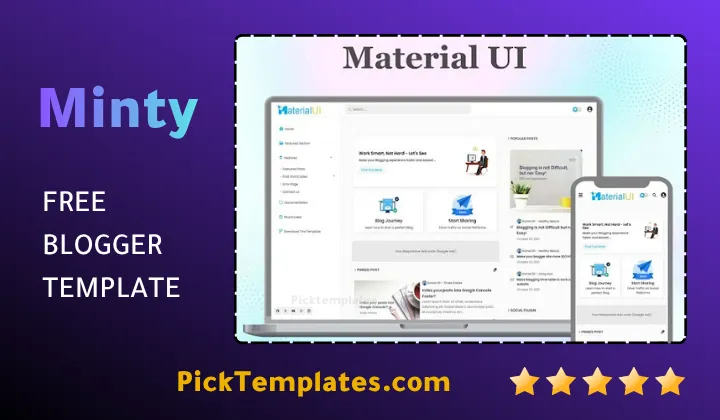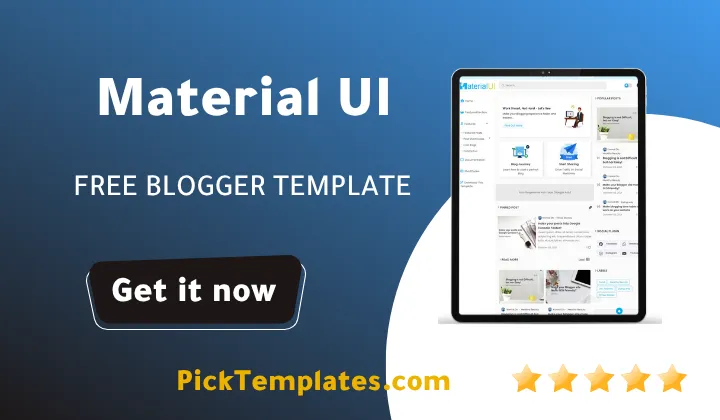
Material UI Blogger Template - Best Free Theme

Material UI Blogger Template – Best Free Theme

Material UI Template – A Modern Approach to Professional Web Design

In the fast-evolving world of digital content, the visual presentation of your blog is just as critical as the quality of your writing. If you are searching for a way to give your site a sophisticated, Google-inspired look, the Material UI blogger template is the ultimate solution. This theme is built upon the principles of Material Design, focusing on clean layouts, meaningful transitions, and a user-centric experience. By choosing this template, you are not just changing a theme; you are upgrading to a high-performance framework that prioritizes speed and aesthetic elegance.

Whether you are a tech reviewer, a lifestyle blogger, or a news editor, the Material UI blogger provides the versatility needed to stand out in a crowded digital landscape. It combines the latest optimization techniques with a stunning interface that feels both familiar and futuristic. In this comprehensive guide, we will explore why this specific template is considered a top-tier choice for modern publishers and how it can help you outrank the competition in search results.

A Refined Design Based on Material Design Principles

The most striking aspect of the Material UI template is its commitment to visual hierarchy and depth. By using shadows, bold color palettes, and grid-based layouts, it creates a sense of organization that guides the reader’s eye naturally across the page. This design philosophy ensures that your articles are easy to read and your images look professional. Much like the popular Median UI blogger template, this theme focuses on a dashboard-style interface that simplifies navigation and enhances the overall “app-like” feel of your website.

Every element, from the buttons to the cards, has been meticulously crafted to ensure a consistent look. The use of whitespace is intentional, preventing the blog from looking cluttered even when filled with high-resolution images and long-form text. This balance of style and substance is what makes it a favorite among professional bloggers globally.

Material UI design isn’t just about how it looks; it’s about how it works. It leverages the psychological impact of colors and layers to create an intuitive experience that keeps users engaged for longer periods.

By implementing this Material UI blogger theme, you provide your audience with a premium browsing environment. The smooth animations and responsive components ensure that every click feels satisfying, which is essential for building a loyal readership and reducing bounce rates on your platform.

Unmatched Speed and Performance Optimization

Performance is the backbone of the material ui blogger template. Our team of skilled developers at Pikitemplates has integrated high-level optimization techniques to ensure that your site loads in the blink of an eye. In an era where a one-second delay can lose you a visitor, having a fast-loading theme is no longer optional; it is a necessity.

Material UI Blogger Template

The code has been compressed and minified, removing unnecessary scripts that usually bloat free blogger templates. This results in excellent scores on Core Web Vitals, which directly influences your ranking on Google. A faster site means a better user experience and a significant advantage in SEO.

The template is also highly compatible with various third-party scripts, allowing you to add functionality without significantly sacrificing speed. If you have previously used the Plus UI v3.1 blogger template, you will appreciate the similar focus on performance and lightweight architecture found here.

“A fast website is a successful website. By choosing the Material ui template, you are investing in a foundation that respects your user’s time and search engine requirements simultaneously.”

With the Material ui blogger, you don’t have to choose between beauty and speed. It offers a unique optimization strategy that pre-loads essential elements, ensuring that your content is visible to the reader almost instantly upon arrival.

Dynamic Compatibility Across All Screens

The responsive nature of this template ensures that your blog looks flawless whether viewed on a 4K monitor, a tablet, or a mid-range smartphone. The layout automatically adapts its dimensions, rearranging sections to maintain readability and visual appeal on smaller screens.

Using fluid grids and flexible images, the Material UI template provides a seamless transition between different viewport sizes. This is crucial for maintaining a professional image and ensuring that mobile users have the same high-quality experience as desktop users.

  1. Adaptive layouts that resize instantly based on device width.
  2. Mobile-optimized navigation menus for easy thumb-access.
  3. High-definition image rendering that doesn’t slow down mobile devices.
  4. Touch-friendly interface elements designed for modern interaction.

Having a responsive design is a key pillar of the Material UI blogger template philosophy, helping you reach the massive segment of mobile-first users who consume the majority of digital content today.

Feature-Rich Homepage Layout

The homepage of the Material UI theme is designed to act as a gateway to your best work. It features multiple sections that allow you to highlight featured posts, recent updates, and specific categories in a clean, organized manner. Customization is easy, allowing you to tailor the look to your specific niche. 

A well-organized homepage is essential for news-heavy sites. This theme excels as a multipurpose option, much like the layouts found in magazine blogger templates, where variety and hierarchy are paramount for user navigation.

Enhancing Visual Appeal with Sliders and Grids

The template offers several options for displaying your content on the front page. You can choose between elegant grid systems or a sophisticated post slider that grabs the visitor’s attention immediately upon landing on your site.

Utilize the Hero Section to showcase your most important announcements or viral articles, ensuring they get the visibility they deserve right from the start.

Additionally, the post cards include hover effects and clear typography, making every entry look like a piece of professional editorial content rather than just another blog post.

Modular Homepage Sections

You can customize which sections appear on your homepage to better serve your audience. Recommended sections for a professional look include:

  • Featured Content Slider ✔️ to highlight your top-performing or most recent stories.
  • Category-Based Grids ✔️ to organize content by topics like Tech, Fashion, or News.
  • Smart Sidebar ✔️ for displaying popular posts and social media feeds without clutter.
  • Mega Menu ✔️ to provide a comprehensive view of your blog’s structure at a glance.

These sections are easy to manage via the Blogger layout editor, requiring zero coding skills to rearrange or hide according to your current content strategy.

The Advanced Sidebar Ecosystem

In the Material UI blogger template, the sidebar is more than just a place for ads. It is a functional space that provides extra value to the reader. You can add various widgets that enhance user discovery, such as “Most Popular Posts” or “Recent Comments,” keeping the community active.

The sidebar is intelligently designed to remain unobtrusive on mobile while providing maximum utility on desktop. It serves as a perfect location for search bars, profile information, and newsletter sign-up forms to increase your conversion rates.

The sidebar widgets are fully customizable, allowing you to create a personalized experience that reflects your blog’s unique personality and goals.

By using the sidebar effectively, you can guide your readers toward your cornerstone content or affiliate links, making the Material UI blogger template a powerful tool for monetization.

A Versatile Multipurpose Template

The versatility of this theme makes it suitable for almost any niche. From professional portfolios to job boards, the Material UI template adapts to your needs. For those looking to build specific types of sites, its flexibility is comparable to the Jobiki blogger template, which focuses on structured data and specific niche layouts.

The multi-section menu allows for deep categorization, which is perfect for blogs that cover a wide range of topics. This logical structure helps both the user and search engines understand the breadth of your expertise.

Whether you are running a personal journal or a corporate news site, the Material UI blogger template provides the professional foundation required to succeed in the digital age.

The theme’s adaptability ensures that as your blog grows, your design can grow with it, allowing for the addition of new categories and features with minimal effort.

  1. Tailor the design to match your specific branding.
  2. Switch between different layout modes to suit different content types.
  3. Easily scale your site from a small blog to a massive content hub.

This makes the Material UI blogger template a long-term investment for anyone serious about their online presence and digital brand identity.

Advanced Add-ons and Integrated Tools

To provide a truly premium experience, we have included several built-in add-ons. These include custom social sharing buttons that look sleek and modern, as well as a professional comment system that integrates perfectly with the Material design. It also supports Dark Mode, allowing users to switch themes based on their lighting environment or preference.

The template is also built to be AdSense friendly, with strategic ad placements that maximize revenue without ruining the user experience. You can also integrate custom gadgets like the ones found in the minimalist Casper blogger template to maintain a clean aesthetic while adding functionality.

Harness the advanced features of the Material UI blogger template to create a site that is not only beautiful but also highly functional and profitable.

Seamless Customization Experience

One of the core philosophies of the Material UI template is accessibility. You do not need to be a developer or know HTML/CSS to make your blog look exactly how you want. Through the Blogger Theme Designer, you can change the entire color scheme, update your logo, and modify fonts with just a few clicks.

This user-friendly approach allows you to spend more time on what matters writing great content and less time worrying about technical design hurdles. The template is designed to be a “plug-and-play” solution for modern creators.

Personalizing your site has never been easier. The Material UI template puts the power of high-end design in the hands of every blogger, regardless of their technical background.

Full Control Over Brand Identity

The customization options extend to every corner of the theme. You can adjust the width of the main content area, choose from a library of Google Fonts, and set custom colors for links and headers to match your existing branding perfectly. 

The layout editor allows you to move sections around using a simple drag-and-drop interface, making it easy to experiment with different configurations until you find the one that works best for your audience.

Powerful Widget Support

The Material UI blogger template supports all standard Blogger widgets and includes several custom-coded ones for better performance and style. You can easily add:

  • Custom About Me sections with social icons.
  • Trending post lists with thumbnail support.
  • Newsletter opt-in forms for email marketing.

By utilizing these tools, you can transform a standard blog into a professional platform that rivals expensive WordPress setups.

Search Engine Optimization (SEO) at its Core

Ranking on the first page of Google requires more than just keywords; it requires a technically sound website. The Material UI blogger template is engineered with SEO in mind. It uses the correct heading structures and schema markup to ensure search engines can easily parse your data.

SEO optimization is built into the very fabric of this theme. From meta tags to lightning-fast load times, every detail is tuned to help your content rise to the top of search results.

The clean code structure makes it easier for bots to crawl your site, which is essential for indexing your latest articles quickly. This theme ensures your hard work gets the visibility it deserves.

Optimized for Modern Search Standards

The Material UI blogger template follows the best practices for on-page SEO. This includes optimized image tags, breadcrumbs for better site navigation, and structured data for rich snippets in search results.

These features work together to improve your Click-Through Rate (CTR) and overall authority in your niche, making your blog a formidable competitor in any search query.

Mobile-First Design for Google Ranking

Since Google uses mobile-first indexing, having a mobile-friendly site is a major ranking factor. The Material UI template’s responsive design ensures you stay on the good side of the algorithm, providing a top-tier mobile experience that Google loves.

  • Blazing fast mobile page speed.
  • Error-free responsive layout for all viewports.
  • Optimized internal linking structure.

By using the Material UI blogger template, you are giving your blog the best possible chance to succeed and grow its organic traffic over time.

We believe in providing options for every type of creator. That is why we offer a Free Material UI blogger template version for those just starting their journey, which includes all the essential features needed to launch a beautiful blog. For professional users who require advanced features, technical support, and the removal of footer credits, we offer a premium version. The premium edition unlocks the full potential of the theme, ensuring your site remains unique and fully supported by our development team.

Information

Template Name Material UI
Version 2.1.0
Creation Date October 19, 2021
Last Update February 11, 2026
Platform Blogger
Developer Pikitemplates

Features

  1. Modern and professional Material Design interface
  2. 100% Responsive design for Desktop, Mobile, and Tablets
  3. Highly optimized for fast loading and high performance
  4. SEO Friendly structure for better search rankings
  5. Support for Dark Mode and Custom Color Palettes
  6. Easy customization via Blogger Layout without coding
  7. Integrated Mega Menu and Dropdown Navigation
  8. Advanced Post Slider and Grid layout options
  9. AdSense ready with strategic advertisement slots
  10. Built-in social sharing buttons and social icons
  11. Support for Google Fonts and custom typography
  12. Clean and lightweight code architecture
  13. Multi-author support with custom author boxes
  14. Regular updates to maintain platform compatibility
  15. Comprehensive documentation for easy installation

Conclusion

The Material ui blogger template represents the perfect marriage between aesthetic beauty and technical performance. It is designed for bloggers who refuse to compromise on quality, offering a framework that is as reliable as it is visually stunning. With its focus on Google’s design language, your blog will instantly gain a sense of authority and modernity that attracts both readers and advertisers.

Whether you are looking for a free Material UI template to test the waters or the full premium version to build a brand, this theme provides all the necessary tools for success. Its optimization ensures that your site stays fast, its responsiveness ensures it stays accessible, and its clean design ensures your content remains the star of the show.

In a world where digital trends change overnight, the Material UI template offers a timeless look that remains relevant and professional. By choosing this Material UI blogger theme, you are setting your blog on a path of growth, ensuring that every visitor has a memorable and engaging experience on your pages.

FAQ

Is the Material UI blogger template free?

Yes, there is a free version available with standard features. However, a premium version is also available for those who want advanced customization, technical support, and no footer credits.


Is this template suitable for a technology blog?

Absolutely. The Material UI design is perfect for tech and gadget blogs, providing a modern, clean, and professional look that suits technical content.


How do I enable Dark Mode in the Material UI theme?

Dark Mode can usually be enabled through a dedicated toggle button in the header or via the theme customization settings in the Blogger dashboard.


Does the template support Right-to-Left (RTL) languages?

Yes, the Material UI template is fully compatible with RTL languages like Arabic, ensuring a smooth reading experience for all audiences.


Is the template optimized for Google SEO?

Yes, it is designed with clean code, fast loading speeds, and proper schema markup to ensure the best possible performance in search engine rankings.


Do I need to know how to code to install this template?

No coding knowledge is required. The template can be installed easily and all its features can be managed through the simple Blogger layout interface.


Disclosure 📢 This post contains marketing links. If you click on one of these links and make a purchase, I may receive a small commission at no extra cost to you. This helps support the blog and allows me to continue creating free content for you. Thank you for your support!
Leave a Comment

Comments

No comments yet. Why don’t you start the discussion?

Leave a Reply

Your email address will not be published. Required fields are marked *