
Table of Contents
Contents
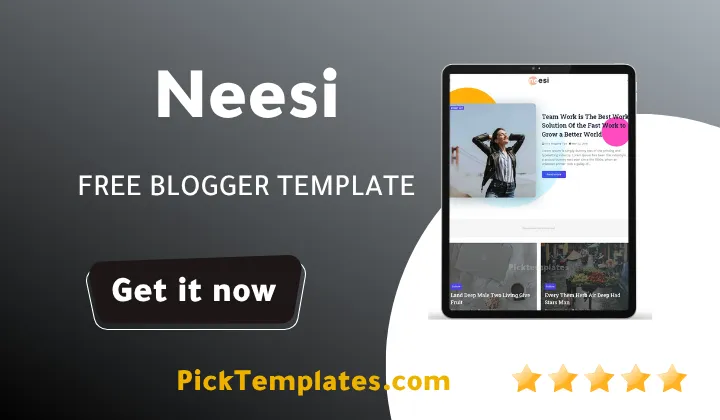
Welcome back to another hands-on template breakdown. If you are asking whether Neesi blogger template is worth installing on a content site right now here is the short answer. It works well for creators who need a lightweight multi-purpose layout. It is not the right pick if you require a dedicated e-commerce checkout flow.
Neesi was originally built by Way2Themes as a Blogger theme aimed at fashion beauty travel and general content blogs. Readers comparing options often place it next to a template like Zyra Blogger Template before making a final pick because both target similar niches.
What Neesi Blogger Theme Actually Delivers
Before going further it is worth clearing up something that confuses a lot of readers. There are three separate copies of this design floating around online. The original file is a free neesi theme protected by full copyright terms. A second copy is a limited free Arabic release localized by Picktemplates. A third copy is an English build offered in both free and paid tiers and produced by Templateify. Each copy behaves a little differently so check which one landed on your computer before troubleshooting an issue. This split is also why Neesi shows up so often on lists of free blogger templates even though the paid version has extra widget access.
Core Design And Layout
The theme ships with a fairly long feature sheet and most of it is genuinely usable rather than marketing filler. Here is what stands out on the design side.
- Fully responsive grid built to adapt across phone tablet and desktop screens
- Drop down navigation paired with a mega menu option for larger content libraries
- Breadcrumb navigation ready structure for cleaner internal linking
- Three column layout with white and black color variants plus multi color support
- Native support for post thumbnails social bookmark icons and WhatsApp sharing buttons
Put together these pieces give the theme a fashion magazine feel without forcing every blog into the same rigid mold.
SEO And AMP Behavior
On the technical side Neesi runs on Blogger Layout Version 3.0 which is the newer XML structure Google pushed out for wider script compatibility. The theme also ships an AMP version alongside the standard desktop build. That matters because AMP pages strip out render blocking scripts and serve a lighter HTML shell straight from cache which tends to shorten first paint time on mobile searches.
Test the AMP version separately from the desktop version before publishing anything live. A widget that looks fine on desktop can break silently inside the AMP shell because AMP does not allow custom JavaScript.
Blogger Layout Version 3.0 templates are not backward compatible with older Version 2 widgets. Anyone migrating from an old theme should back up existing widget content first.
Field Notes On Loading And Script Behavior
From a pure code standpoint the stylesheet is consolidated into a single file rather than split across several imported sheets. That reduces the number of separate requests the browser has to resolve before it can paint the page. The script side leans mainly on native Blogger widgets rather than a stack of third party libraries so there is less to break when Google rolls out a platform update. Under repeated refresh checks the drop down menu and mega menu kept their click response even with several tabs open at once. That is not always true for older three column Blogger themes still running on heavy jQuery sliders.
Because the layout is adapted from a WordPress style grid it also includes a portfolio section which is unusual for a free Blogger theme. That section works well for photography or travel bloggers who want a visual index page separate from the regular blog feed.
Best Use Cases For This Layout
Not every niche needs a magazine grid so it helps to know where Neesi actually fits before installing it.
- Fashion and beauty blogs that rely on large thumbnail imagery
- News and magazine sites publishing several categories at once
- Photography or travel pages using the built in portfolio section
- Small online store landing pages that mainly need product style grids
A personal journal with a single writer and few categories will likely find the mega menu overkill.
Setting Up The Template
Setup itself is short once the XML file is in hand. Here is the general path most users follow.
- Download the template package from a trusted source and unzip it if needed
- Open the Blogger dashboard and select the Theme menu on the left panel
- Click the small arrow next to the Customize button in the top right corner
- Choose Restore and upload the XML file from the downloaded package
- Wait for Blogger to apply the new layout then reload the site to confirm it took effect
The whole process usually takes a few minutes and does not require touching raw code unless colors or ad slots need manual adjustment.
If Neesi still feels too magazine heavy for a personal blog it is worth placing it side by side with Meota Blogger Template which leans toward a simpler minimal reading layout.
Features And Setup Resources
Neesi comes with several pre built ad slots placed around the header sidebar and inside post content. That makes it a reasonable starting point for AdSense monetization without editing the raw XML. The custom widget areas are labeled clearly enough that a beginner can drag a gadget into place without breaking the surrounding grid. The table below points to a fuller customization walkthrough.
| Resource | Purpose |
|---|---|
| Neesi Setup And Customization Guide | Step by step walkthrough for adjusting colors menus and widget placement |
Strengths And Weaknesses
No theme is free of trade offs and Neesi is no exception. Here is where it earns its place and where it falls short.
What works well
- Clean single file stylesheet that keeps page weight low
- AMP support built in rather than bolted on later
- Portfolio section that most free Blogger templates skip
- Ad slots already positioned for quick AdSense setup
Where it struggles
- Removing the footer credit from the free copyrighted copy is not permitted under the original terms
- The Arabic localized build from Picktemplates carries fewer widget options than the English release
- Mega menu can feel crowded on sites with only a few categories
- Color customization beyond the built in white and black variants requires manual CSS work
None of these points are dealbreakers on their own but each one is worth knowing before committing a live domain to the theme.
Neesi theme earns a solid recommendation for fashion beauty and general lifestyle blogs that want a magazine feel without a heavy script load. Readers exploring more options in the same space can browse the full magazine template category for additional layouts built around the same content style.
Information
| Template Name | Neesi |
| Version | 1.0.0 |
| Creation Date | 13 March 2023 |
| Last Update | 13 March 2024 |
| Platform | Blogspot |
| Author | Way2themes |
Features
- How To Setup Neesi Blogger Theme
- SEO Ready Markup Built For Search Visibility
- Full Browser Compatibility Across Modern Browsers
- 100 Percent Responsive Layout For Mobile And Desktop
- Adapted From A WordPress Style Grid System
- Social Bookmark Icons Ready Out Of The Box
- Post Thumbnail Support On The Homepage Feed
- Multiple Ad Slots Ready For AdSense Placement
- Drop Down Navigation With Mega Menu Option
- White And Black Color Variants Included
- Multi Color Support For Custom Branding
- Three Column Layout With Elegant Simple Styling
- WhatsApp Sharing Button Built Into Post Footer
- Breadcrumb Navigation Ready For Cleaner Internal Links
- Blogger Layout Version 3.0 Compatible Structure
- Built In AMP Version For Faster Mobile Loading
Conclusion
Neesi Blogger Template holds up well for anyone running a fashion beauty or general lifestyle blog on Blogger. The single file stylesheet keeps the page light and the built in AMP version gives mobile readers a faster path into each post.
Picking the right copy matters more than picking the theme itself. Readers who only need a quick free option can use the limited Arabic build from Picktemplates while those who want full widget access and paid support should look at the English release from Templateify.
In the view of Mouhssine Boukou who has spent ten years testing Blogger themes for content publishers Neesi remains a dependable pick for teams that want a magazine style layout without paying for a premium build right away. His main caution is to test the AMP shell early since that is where most support tickets on this theme tend to originate.
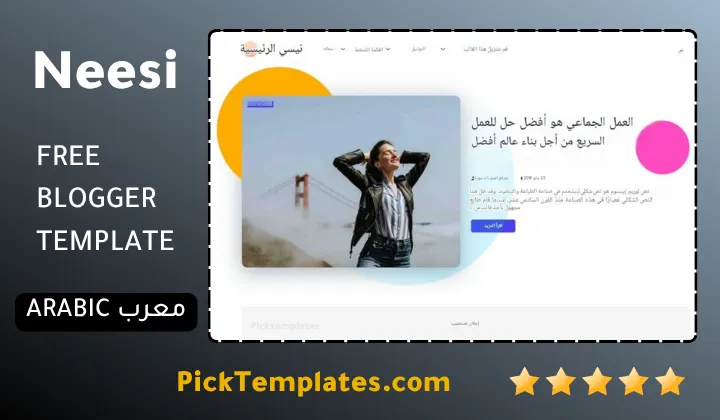
We have localized the free version of the Neesi template into Arabic and fixed the Right-to-Left (RTL) layout issues to make it easier to use on Arabic blogs.