
Table of Contents
Contents
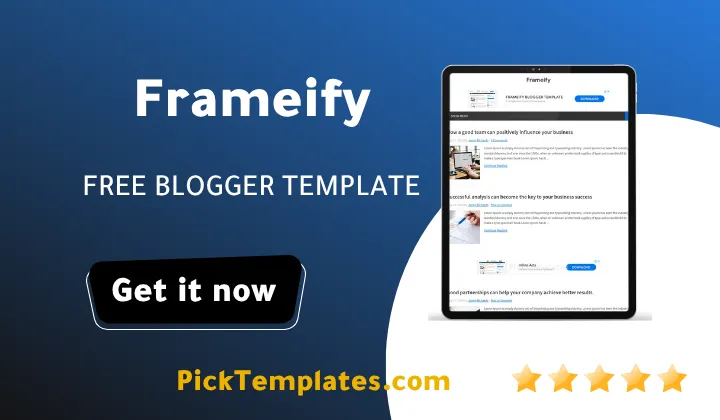
Welcome to our comprehensive architectural breakdown of the Frameify blogger template. If you want a direct answer regarding its primary strength then consider this fact immediately. Frameify is an exceptionally clean modular magazine theme designed specifically for online publishers who need to organize diverse editorial categories across a unified homepage without visual clutter or system slowdowns.
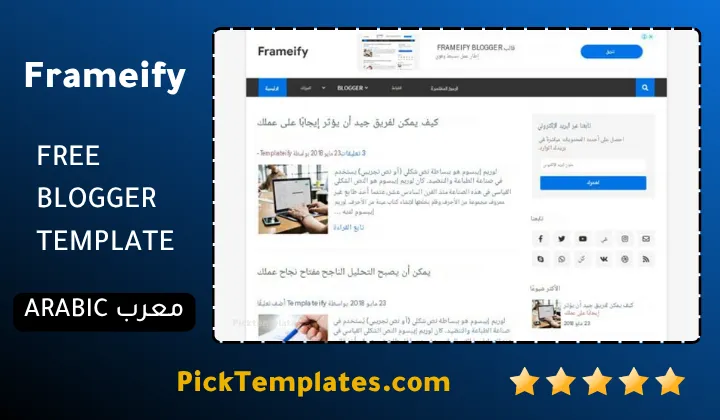
Before exploring the structural details it is essential to understand distribution rights. You can access a free Arabic edition protected by copyright through Picktemplates while the original creator Templateify provides both a free copyrighted English edition and a premium fully unlocked English package for advanced editorial teams who seek greater flexibility.
Why Frameify Excels at Multi Category Content Organization
Managing an online publication that covers technology along with lifestyle and business requires a layout that prevents topic collision. Frameify theme solves this fundamental editorial challenge by offering structured category grids and compartmentalized content slots. The theme frames every article with balanced margins and distinct boundary lines that help readers navigate diverse topics effortlessly.
When running a digital magazine you must ensure your visitors never feel overwhelmed by dense walls of text. Similar to our observations with the Nitro Blogger Template this Frameify Template establishes clear visual anchors through headline hierarchy and clean thumbnail framing. The interface treats every editorial vertical as an independent channel while preserving overall brand harmony.
Setting up multiple editorial feeds requires careful curation. The following structured points explain how the homepage layout distributes diverse content blocks to maintain reader attention throughout their visit.
- The header mega menu groups subcategories dynamically so readers can explore complex topic hierarchies without losing their place on the main page.
- Main homepage grid blocks let publishers assign specific labels to highlight featured investigations alongside everyday breaking news updates.
- Sidebar modules host trending widgets and author spotlights to keep secondary content easily accessible without cluttering the primary article feed.
- Footer columns provide organized directory links that direct readers toward evergreen archives and static informational resources.
Carefully planning these widget placements ensures your readers discover relevant stories across different subjects without experiencing cognitive fatigue.
Mastering Clean Multi Topic Navigation with Smart Menus
Editorial success depends heavily on how quickly visitors find their preferred topics. Frameify incorporates a multi tier navigation bar that supports extensive drop down menus as well as rich category showcases. Readers can hover over a category tab to see recent posts with thumbnails and publication dates right inside the menu frame.
The true power of a multi topic portal lies in frictionless routing where every visitor finds their preferred niche within two clicks from the homepage.
This organized structure allows lifestyle writers and tech reviewers to coexist on the same platform smoothly. The framework ensures that large image assets load only when needed so that multi category pages retain instant responsiveness across desktop and mobile screens.
Balancing Visual Hierarchy and Readability Across Sections
Publishing stories across different fields demands distinct visual presentation styles. Frameify balances card layouts with standard chronological streams to give editorial directors complete creative control. You can feature an investigative report with a massive hero graphic while running concise market briefs in a clean secondary list beside it.
Just as we noticed when reviewing the minimalist Micro Blogger Template clean typography makes a monumental difference in visitor retention. Frameify uses clean sans serif typography that renders crisp text on high pixel density mobile displays. The generous white space surrounding article titles keeps dense topic sections feeling light and readable.
Publishers who manage high volume content releases will appreciate the specific structural benefits highlighted in the following list of layout advantages.
- Modular story cards feature high contrast headings that guide reader eyes across competing stories effortlessly.
- Built in ad placements sit between content sections to maximize ad impressions without invading the reading flow.
- Responsive thumbnail containers crop images automatically to preserve uniform proportions across all devices.
- Social sharing elements stay neatly tucked below article titles to encourage viral distribution without blocking content.
These thoughtful design choices create a polished magazine atmosphere that elevates independent blogs into reputable digital news brands.
Performance Realities and Asset Management in Complex Layouts
Running multiple homepage widgets on a Blogger site often leads to script bloat. Frameify minimizes this risk by utilizing clean lightweight scripts and optimized style sheets. Version updates resolved earlier image plugin challenges and eliminated server instabilities to ensure reliable performance under heavy traffic loads.
However publishers must exercise discipline when configuring multiple widgets. Loading twenty high resolution thumbnails inside several category widgets on a single page will naturally increase initial load times. You should compress your hero images to WebP format and keep your homepage feed capped at a reasonable post count to maintain high Core Web Vitals scores.
Practical Customization Challenges and Editorial Tradeoffs
No publishing framework is completely free of limitations. While Frameify delivers exceptional category management it requires strict adherence to its labeling system. If you change a Blogger label name you must manually update your widget settings to avoid broken feed displays.
Furthermore the free edition includes encrypted script restrictions and footer copyright attributions that cannot be altered without purchasing a commercial license from Templateify. If your team plans to build a bespoke publication with custom code integrations investing in the premium tier is a necessary step.
If you want to explore more options designed for diverse publishing needs check out our curated magazine templates collection to compare various layout styles and functionality options.
Information
| Template Name | Frameify |
| Version | 1.4.0 |
| Creation Date | 15 March 2019 |
| Last Update | 30 January 2021 |
| Platform | Blogger |
| Author | Templateify |
Version Comparison
| Template Features | Free | Pro |
| 100% Responsive Design. | ✔ | ✔ |
| Fixed Menu. | ✖ | ✔ |
| Multi-Level/DropDown Menu. | ✔ | ✔ |
| Mega Menu by (Recent or Label). | ✖ | ✔ |
| Custom Mobile Menu. | ✔ | ✔ |
| Fixed Sidebar. | ✔ | ✔ |
| Social Icons on Sidebar. | ✔ | ✔ |
| Post List Widget by (Recent, Label or Comments). | ✖ | ✔ |
| Footer Sections for Gadgets. | ✔ | ✔ |
| Footer Menu. | ✔ | ✔ |
| Custom Advertisement Areas (ADS 1, ADS 2). | ✖ | ✔ |
| AdSense Inline Ads on (Index). | ✖ | ✔ |
| Post Share Buttons. | ✔ | ✔ |
| Auto Author Box. | ✔ | ✔ |
| New Blogger Comment Form Style. | ✔ | ✔ |
| Disqus and Facebook Comments. | ✖ | ✔ |
| Templateify Post Shortcodes. | ✔ | ✔ |
| Full-Width Version. | ✔ | ✔ |
| Auto Translate. | ✔ | ✔ |
| Fast Loaded. | ✖ | ✔ |
| SEO Optimized. | ✖ | ✔ |
| Fully Customizable Background and Colors. | ✔ | ✔ |
| Remove Footer Credits. | ✖ | ✔ |
| Use For Customers. | ✖ | ✔ |
| 6 Months of Premium Support. | ✖ | ✔ |
| Lifetime Template Updates. | ✖ | ✔ |
Features
- Fully Responsive Layout Structure
- Multi Category Content Blocks
- Advanced Mega Menu Navigation
- Strategic Native Advertisement Areas
- Clean Search Engine Optimized Markup
- Automated Thumbnail Generation Engine
- Support for External Featured Images
- Custom 404 Error Page Layout
- Fast Loading Clean Scripting
- Social Share Integration Widgets
- Related Posts Recommendation Carousel
- Author Profile Box Integration
- Multi Level Dropdown System
- Featured Post Hero Section
- Customizable Sidebar Widget Slots
- Cross Browser Performance Optimization
Conclusion
Frameify Blogger Template stands out as an exceptionally reliable choice for publishers managing multi niche digital magazines. Its structured frame design and robust category curation widgets allow you to organize technology lifestyle culture and news updates without creating clutter.
While the initial setup demands precise label management and image optimization the resulting publication provides an elite reading experience that builds reader loyalty and supports higher advertising earnings.
Expert Opinion by Mouhssine Boukou with 10 years of platform experience. Frameify remains one of the cleanest magazine layouts available for Blogger because it prioritizes structural order over unnecessary animations. If you run a high volume publication with multiple writers and diverse categories this template offers the exact visual discipline and fast loading foundation required to build long term editorial authority.
We have localized the free version of the Frameify template into Arabic and fixed the Right-to-Left (RTL) layout issues to make it easier to use on Arabic blogs.