
Table of Contents
Contents
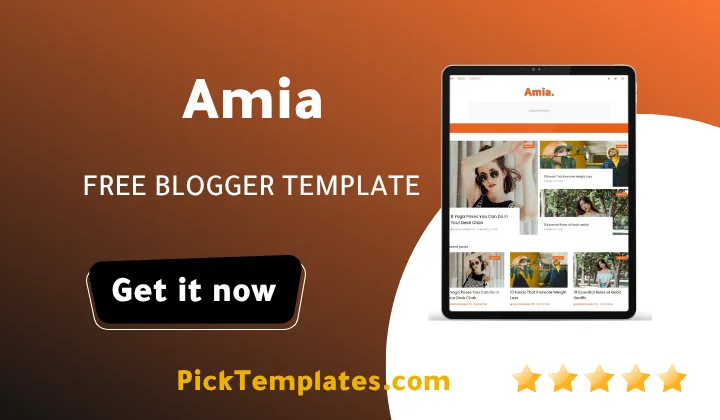
Welcome to this complete review of Amia blogger template. If you want a free Blogger theme that keeps a photo heavy lifestyle blog fast and clean then this free Amia template deserves a spot on your shortlist among today’s free blogger templates. It pairs a minimal black and white Amia theme design with an infinite scroll feed built to keep large images loading smoothly instead of dragging your homepage down and that balance is rare among free options in this niche.
Amia was created by SoraTemplates and first launched in September 2019. A version 2.0 update arrived in February 2022 to smooth out responsiveness and fix a blurry image bug that had bothered early users. The Amia theme was built mainly for photo gallery blogs though it also fits travel food recipe fashion and personal diary style sites just as well. Readers who want a heavier magazine style grid instead might prefer our look at the Bunq Template which leans more toward a multi category news layout.
How Amia Keeps Large Photos Fast On Every Device
Most photography focused themes slow down the moment you add high resolution images. Amia avoids that trap through lazy loading so pictures only render once a visitor scrolls near them. The infinite scroll pulls in older posts on the same page which cuts down on extra page loads and keeps browsing quick even on a phone with a weak connection.
Retina ready assets keep photos sharp on high density screens without forcing browsers to load oversized files twice. A homepage built with dozens of thumbnails still loaded within a couple of seconds on a mid range phone which says a lot about how tightly the CSS was written.
Compress your images before upload even on a fast theme like Amia. A four thousand pixel wide photo straight from a camera will always slow a page down no matter how good the code behind it is.
A few specific choices explain why this template handles heavy image galleries better than many free themes in the same category and they are worth listing out here so you know exactly what is happening under the hood.
- Lazy loaded thumbnails that only fetch images once a reader scrolls near them
- Retina ready image handling built for modern high density phone and laptop screens
- An infinite scroll homepage that avoids repeated full page reloads
- Lightweight CSS with minimal render blocking scripts slowing the first paint
- AMP support for a stripped down fast loading mobile version of every post
None of these tricks require any coding on your part since they are already baked into the theme files the moment you install Amia on your blog.
Who Amia Actually Works Best For
The tag list behind Amia reads like a checklist for lifestyle publishing girly fashion personal blog OOTD recipe and influencer style sites. The layout gives photography plenty of breathing room while a right sidebar keeps navigation links and a search box within easy reach. Personal pages for an about section or a contact form slot in cleanly too which matters for anyone turning a hobby blog into a small personal brand. If your niche leans closer to tech news or a busy multi author magazine our review of the Minim Template is probably a better fit since it was built with denser content sections in mind.
Even without touching a single line of code you can swap accent colors adjust the slideshow images and rearrange sidebar widgets through Blogger’s normal Layout panel since Amia was adapted from a component based structure similar to what modern WordPress themes use. Beginners who have never built a blog before tend to find this part far less intimidating than they expect once they spend ten minutes clicking through the available options.
SEO And Social Sharing Built Right In
Amia ships with SEO ready markup and breadcrumb navigation which gives search engines a cleaner picture of your site structure right out of the box. Clean semantic code like this tends to help newer blogs get indexed a little faster though nothing replaces steady publishing and real backlinks over time. Social bookmark ready sharing icons sit next to every post along with a WhatsApp sharing button which matters a lot for lifestyle and fashion blogs where a large share of traffic still arrives through messaging apps rather than search alone.
Setup Notes And A Few Honest Drawbacks
Amia is not a perfect theme and it would be dishonest to pretend otherwise. The mega menu and drop down navigation take a bit of trial and error to configure correctly inside Blogger’s layout editor especially for anyone setting up a Blogger theme for the first time. Some users have also reported that widget spacing needs manual tweaking once more than three sidebar gadgets are added which can leave extra white space if you are not careful.
Getting Amia running smoothly on a fresh Blogger account usually comes down to a short sequence of steps rather than one long complicated process and here is roughly how it goes.
- Download the XML theme file and back up your current Blogger template first
- Upload the new XML file through the Blogger theme editor
- Set up the homepage slideshow and menu widgets through Layout
- Add your logo and favicon through the theme customization panel
- Test the infinite scroll and mobile AMP pages before going live
Most of that process takes under an hour even for someone who has never touched Blogger’s XML editor before which is a fair trade off for a free theme.
One point worth flagging honestly is that free users do not get direct support from the original designer which is fairly standard across free blogger templates but still worth knowing before you get stuck on a setting. The published documentation covers most common questions and community threads fill in the rest for anyone patient enough to search a little.
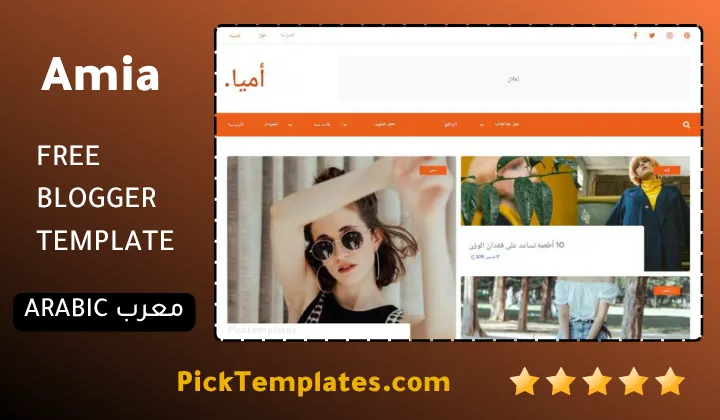
It is worth knowing that a free Arabic version of this template exists and was localized under copyright by Picktemplates while the original free and paid English versions were built and are maintained by SoraTemplates the designer credited above.
Amia earns its place among the better free blogger templates for a photo driven personal blog thanks to real attention paid to speed rather than just good looks. Anyone who wants to compare a few more polished options before committing can browse our full stylish Blogger templates collection for additional ideas.
Information
| Template Name | Amia |
| Version | 2.0.0 |
| Creation Date | 15 September 2019 |
| Last Update | 22 February 2022 |
| Platform | Blogspot |
| Author | Soratemplates |
Version Comparison
| Template Features | Free | Pro |
| 100% Responsive Design | ✔ | ✔ |
| Google Testing Tool Validator | ✔ | ✔ |
| Google Rich Results | ✔ | ✔ |
| Custom 404 Page | ✔ | ✔ |
| Fast Loading | ✔ | ✔ |
| Awesome Ajax Mega Menu | ✖ | ✔ |
| Boxed Mode | ✔ | ✔ |
| Hot Post | ✖ | ✔ |
| Featured Widgets by (Label, Recent or Random) | ✖ | ✔ |
| Blogger, Disqus or Facebook Comments | ✔ | ✔ |
| Drop Down Menu | ✔ | ✔ |
| SEO Optimized | ✔ | ✔ |
| Social Sharing | ✔ | ✔ |
| Browser Compatibility | ✔ | ✔ |
| Remove Footer Copyrights | ✖ | ✔ |
| Awesome About Section | ✔ | ✔ |
| Post Shortcodes | ✔ | ✔ |
| Blogger Template Customizer | ✔ | ✔ |
| Lifetime Template Updates | ✖ | ✔ |
Features
- Fully responsive design that adapts to every screen size
- Retina ready graphics for crisp photos on high density displays
- Fast loading infinite scroll built for image heavy blogs
- Clean minimalist layout with generous white space
- Elegant grid based homepage with a right sidebar
- AMP support for faster mobile pages
- Breadcrumb navigation ready for a clearer site structure
- Drop down mega menu for organizing multiple categories
- Built in slideshow widget for the homepage hero section
- Personal page templates for about and contact sections
- Post thumbnails optimized for gallery style browsing
- WhatsApp sharing button for quick social distribution
- Social bookmark ready sharing icons on every post
- Page navigation menu for smoother browsing between posts
- Three column footer widget area for extra content
- SEO ready markup to help pages rank in Google search
Conclusion
Amia Blogger Template proves that a free theme can still put real engineering thought into image heavy blogs without turning into a slow bloated mess. The combination of lazy loading infinite scroll and retina ready assets is exactly what a photography personal or fashion blog needs to keep readers scrolling instead of waiting.
The rough edges around widget spacing and menu setup are minor compared to what the theme gets right and most of them disappear once you spend a little time in the Blogger layout editor. For a zero cost starting point Amia remains one of the more thoughtful choices currently available for Blogger creators who shoot a lot of photos.
Mouhssine Boukou who has spent more than ten years testing and reviewing Blogger themes shares a candid final word here. Amia is one of the few free themes he has tested that treats page speed as a real design requirement rather than an afterthought squeezed in after the visuals were finished. His only wish is that a future update extends the same lazy loading logic to the sidebar widgets since that remains the one spot where the theme still feels a step behind its own homepage.
We have localized the free version of the Amia template into Arabic and fixed the Right-to-Left (RTL) layout issues to make it easier to use on Arabic blogs.