

Table of Contents
Contents
Welcome. If you want a straight answer first. Xapify blogger template is built for exactly the kind of high volume multi category news site that needs to organize dozens of daily posts without turning into a cluttered mess. It handles that load well for a Blogger theme and gives editors a clean way to separate sections. It isn’t the lightest option on the market though and a few structural choices will matter more for some publishers than others.
Before going further it helps to know Xapify theme circulates in three separate forms. A free version that stays under the original copyright terms. A limited Arabic language release localized by Picktemplates. And the full English free-and-paid edition built by its original designer at Templateify. Publishers comparing layout options in this category sometimes also look at the Plexify Blogger Template since both themes share a similar column based magazine structure.
How Xapify Organizes A Busy News Site
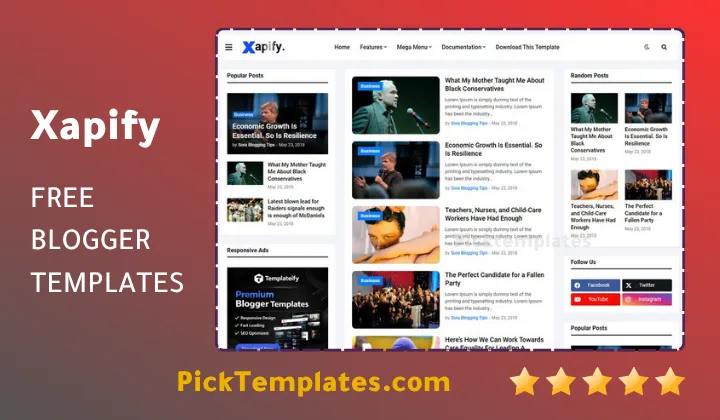
Xapify was clearly designed with volume in mind. Rather than a personal diary layout it leans toward a magazine format built around a mega menu a homepage slider and a grid of post cards. This suits finance blogs tech review sites and multi author newsrooms that publish several stories a day and need every category to stay visible without forcing readers to dig through endless pagination.
Category Depth Without Losing The Reader
A theme built for many sections only earns its keep if visitors can still find their way around once the tenth or twentieth post goes live in a single week.
Xapify handles this through a short list of structural choices that matter once a site grows past a handful of topics.
- A mega menu that holds nested subcategories for finance tech and lifestyle sections at the same time
- A homepage slideshow that rotates featured stories from different categories rather than just the newest post
- A three column grid that keeps thumbnails visible even on category heavy pages
- Breadcrumb navigation so readers always know which section they landed in
- A drop down menu for secondary links without crowding the main bar
None of these features are unique on their own. What matters is how Xapify combines them and keeps the page readable even once a site grows past a handful of categories.
Editorial Workflow And Section Separation
For a team publishing sports technology and politics under one domain the ability to keep sections visually distinct is not a small detail. Xapify’s grid layout gives each post card enough breathing room that category tags and thumbnails do most of the separating work on their own.
Keep the top level menu to five or six main categories at most. A mega menu can technically hold far more but every extra branch adds one more click between the reader and the story they actually came for.
Where The Structure Shows Real Limits
No template is free of trade offs and Xapify has a few worth knowing about before installation.
The free download also comes without direct support from the author. That matters more for a news site than for a small blog since editorial teams tend to hit configuration questions faster once several categories and authors are involved. Sites leaning toward a simpler single topic format may also find the mega menu and slider more structure than they actually need. In that case the Newsim Blogger Template offers a lighter news layout without the full magazine grid.
Search Visibility And Loading Behaviour
Xapify ships with schema markup and AMP support built in. That gives search engines a cleaner read of headlines authors and publish dates. Google’s own Core Web Vitals guidance treats loading speed and layout stability as ranking factors for news content specifically so a theme that keeps its code lean has a real edge over a heavier WordPress style import. Xapify stays on the lighter side for a magazine template. Sites that stack many extra widgets on top of the mega menu should still test load times after customization rather than assuming the base build alone guarantees a good score.
Monetization Layout
News sites depend on ad revenue more than most blog formats and Xapify was built with that reality in mind.
- In feed ad slots placed naturally between post cards
- Header banner space sized for standard AdSense units
- Sidebar zones that stay visible without pushing content below the fold
- Ad ready spacing that avoids breaking the grid on mobile screens
These placements won’t replace a dedicated ad management plugin but they give a new site enough structure to start earning from day one.
For a broader comparison of layouts built for this format the full Blogger news template collection is worth browsing before making a final choice. Reference details and setup steps for Xapify itself are listed below.
Information
| Template Name | Xapify |
| Version | 1.0.0 |
| Creation Date | 24 March 2026 |
| Last Update | 24 March 2026 |
| Platform | Blogger |
| Author | Templateify |
Features
- How To Setup Xapify Blogger Template
- SEO ready structure with clean semantic markup
- Fully responsive design across mobile tablet and desktop
- AMP support for faster loading news pages
- Adapted from WordPress style layout conventions
- Multiple color skins including violet green blue and red
- Mega menu built for large multi category sites
- Homepage slideshow for featured stories
- Three column grid post layout
- Breadcrumb navigation ready
- Drop down menu support for secondary links
- Post thumbnails displayed on every card
- Ad ready sections for AdSense and banner placement
- WhatsApp and social sharing buttons included
- Cross browser compatibility across major browsers
- No footer widget area for a lighter page load
Conclusion
Xapify earns its place among Blogger news themes because it solves a real problem. Sites publishing many stories across many categories need a structure that scales without becoming confusing and this theme delivers that through its mega menu slider and grid layout working together rather than competing for attention.
The version a reader chooses matters. The free copyrighted build is a fair starting point for testing the layout. The Arabic localized release from Picktemplates suits publishers who need the interface in that language. Anyone running a commercial news project long term should still go through Templateify directly for the paid edition since that path includes ongoing updates and actual support.
Expert Opinion by Mouhssine Boukou with ten years of hands on experience building and customizing Blogger themes for news publishers. Xapify holds up well for a magazine format and the mega menu is genuinely useful once a site passes ten or more categories. The missing footer widget area is the one design choice worth watching since it removes a natural spot for newsletter signups. For a site planning to scale past a hobby blog the paid tier is the smarter long term investment.
We have localized the free version of the Xapify template into Arabic and fixed the Right-to-Left (RTL) layout issues to make it easier to use on Arabic blogs.