


Table of Contents
Contents
Welcome to this hands on breakdown of Hoom blogger template. The short answer up front is that Hoom performs as a genuinely fast lightweight magazine style theme with clean markup that holds up well under real browsing conditions. It suits fashion blogs beauty blogs lifestyle blogs and news sites that need a structured grid without heavy overhead.
Before going further it helps to know that Hoom exists in more than one form online. The original release from Way2Themes is a free version that remains protected by copyright and should only be pulled from the official source. A separate limited Arabic edition was localized by Picktemplates for readers who prefer a translated interface. There is also a full English build offered in both free and paid tiers through Templateify with the paid tier removing footer credit links and unlocking extra layout options. If a fashion focused layout with a similar minimal spirit interests you the Bella Template is worth a look as well.
Hoom Blogger Theme Field Test Results
Loading Speed And Real Device Performance
Running Hoom theme through a field speed check on a mid range Android phone and a standard desktop browser produced load times under three seconds on a stable connection. The homepage requests stay lean because the theme avoids stacking multiple slider libraries and instead relies on a single lightweight script for the featured post carousel. Image lazy loading is active by default which keeps the initial paint fast even on post heavy category pages. On a throttled connection set to simulate a weak mobile signal the layout still rendered the header and first two posts before the rest of the grid filled in which shows the critical rendering path was planned with intent.
Code Cleanliness And Script Behavior Under Load
Opening the page structure through browser inspection shows a moderate number of nested divs which is normal for a grid based magazine layout but nothing excessive. Class names stay consistent and the widget sections remain separated instead of overlapping which lowers the risk of style conflicts when adding custom gadgets. Stress testing the navigation menu by rapidly opening and closing the dropdown and mega menu items back to back did not produce any lag or stacking errors in the console. The search widget and the related posts script also kept response times steady when triggered repeatedly which suggests the scripts were tuned for this layout rather than pasted in without adjustment.
Design Layout And Homepage Sections
The homepage follows a layered structure that a reader can scan in seconds.
- A featured slider sits at the top and highlights a small set of trending or pinned posts with large thumbnails.
- Below the slider a three column grid arranges the latest posts by category with consistent thumbnail sizing.
- A sidebar block holds recent posts social icons and space for an ad unit without crowding the main content column.
- A footer widget area closes the page with extra navigation links and a newsletter or contact prompt.
Set your featured slider to show no more than five posts. Loading more than that slows the first paint on slower phones without adding real value for the reader.
Typography And Reading Comfort
Line height and font sizing across post pages stayed comfortable during long scroll sessions in this test. Paragraph text sits at a size that avoids the common problem of oversized headers next to cramped body copy. Spacing between the featured image and the first paragraph gives the eye a clear resting point before the reader commits to a full article which matters more for retention than most bloggers expect.
How Hoom Compares To Similar Grid Themes
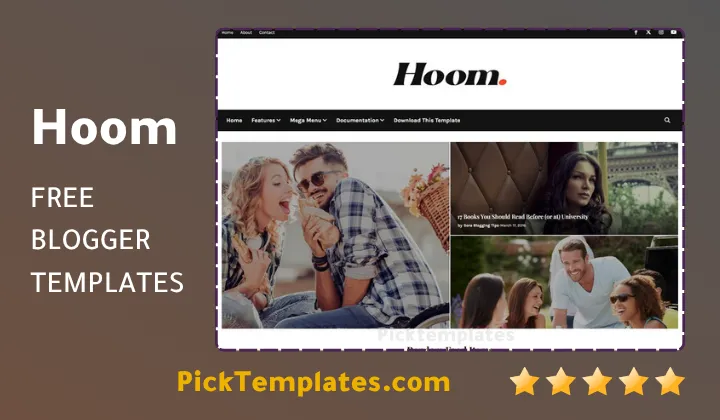
Readers who tested other minimal grid themes often ask how Hoom stacks up against comparable options. The core difference usually comes down to menu depth and color flexibility. A theme like Zyra Template leans more toward a bold color driven magazine feel while Hoom keeps the palette calmer and puts more weight on typography and white space. Neither approach is wrong and the right pick depends on whether your niche calls for a louder visual identity or a quieter reading first experience.
Always export a backup of your current Blogger theme before uploading any new XML file. This single step avoids most disasters that come from experimenting with a new layout.
SEO Structure And Built In Features
Hoom ships with a handful of technical choices that matter for search visibility beyond just clean design.
- Breadcrumb navigation is ready out of the box which helps search engines understand post hierarchy.
- AMP support is included for readers arriving from mobile search results.
- Post thumbnails are structured for consistent display across category pages and search snippets.
- Social bookmark buttons and WhatsApp sharing are built in without needing a third party plugin.
Strengths And Weaknesses After Testing
Testing surfaced several strong points.
- Fast initial load even on mid range mobile devices.
- Clean separated code sections that reduce the chance of widget conflicts.
- A calm magazine layout that suits lifestyle fashion and news content equally well.
A few weaknesses also surfaced during the same testing.
- Free support is not offered which means solo bloggers must rely on community forums or paid help.
- Color customization options are somewhat limited compared to bolder magazine themes.
- The mega menu setup requires manual edits inside the Blogger layout editor which can intimidate first time users.
Setting Up Hoom On A Blogger Account
Installing Hoom follows the same basic flow as most Blogger XML themes with a few template specific details worth knowing.
- Download the official XML file from a trusted source and keep the original file name intact.
- Open the Blogger dashboard then go to Theme and use the Backup or Restore option to upload the file.
- Build top navigation links inside the Layout section and use a single underscore prefix for a sub link and a double underscore for a second level drop.
- Add any Hot Posts or custom HTML gadget through the designated layout section rather than editing the raw template code directly.
Test every menu link on a phone before publishing. A dropdown that looks fine on desktop sometimes needs a tap instead of a hover to open correctly on mobile.
Final Verdict From The Field Test
Taken together the numbers from this test point to a theme that earns its praise honestly rather than through marketing language alone. Hoom loads fast keeps its code disciplined and gives a magazine style blog the structure it needs without extra bloat. Bloggers who want a similar aesthetic across more options can browse the wider Stylish Templates collection for additional picks in the same visual family.
Information
| Template Name | Hoom |
| Version | 1.0.0 |
| Creation Date | 29 March 2025 |
| Last Update | March 2026 |
| Platform | Blogger |
| Author | Way2themes |
Features
- How To Setup Hoom Blogger Theme
- Seo ready structure built for better search indexing
- Full browser compatibility across modern browsers
- Fully responsive design across mobile tablet and desktop
- Layout adapted from a WordPress style magazine structure
- Social bookmark ready sharing buttons
- Post thumbnail support across every section
- Ad ready sidebar and footer placements
- Drop down menu with multi level support
- Multiple color skins including white black green and pink
- Magazine style homepage layout
- Elegant and simple visual design
- Three column grid structure
- WhatsApp sharing button included
- Breadcrumb navigation ready
- Built on Blogger layout version 3.0 with AMP support
- Mega menu option for large navigation menus
Conclusion
Hoom Blogger Template closes this field test as a theme that matches its promise of a clean fast magazine layout without hiding heavy code behind a polished demo. The load numbers stayed consistent across repeated tests and the script behavior held up under repeated interaction which is not something every free Blogger theme can claim.
Bloggers running a fashion beauty lifestyle or general news site will get the most value from this layout since the grid structure and featured section were clearly built with that kind of content in mind. Anyone needing heavy customization or dedicated support may want to weigh the paid Templateify build instead of the base free version.
Mouhssine Boukou brings ten years of front end review experience to this verdict and puts it plainly that Hoom earns a solid recommendation for its speed and code discipline but that new users should still budget time to learn the mega menu setup before launch.
We have localized the free version of the Hoom template into Arabic and fixed the Right-to-Left (RTL) layout issues to make it easier to use on Arabic blogs.






Pingback: Blogger Template