
Table of Contents
Table
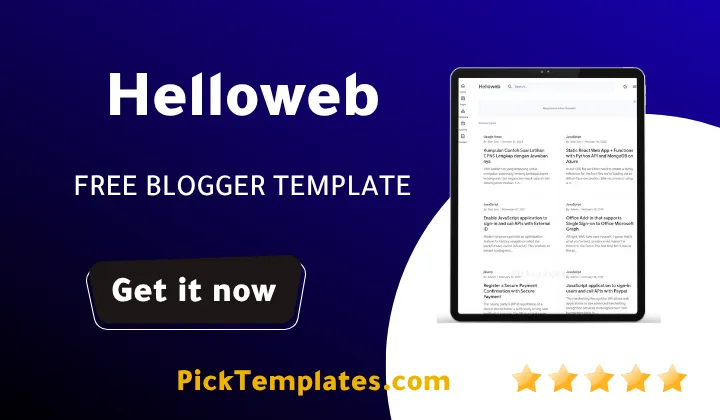
Welcome to our deep technical analysis of specialized blogging frameworks. The helloweb blogger template is a specialized, lightweight XML layout developed by Temabanua specifically to convert default Blogspot sites into organized documentation hubs and product wikis. If you need a clean, structured environment to share user guides, school lessons, or product FAQs without paying for expensive web hosting, this template provides a functional and fast-loading solution. In this comprehensive review, we will evaluate its performance, usability, and architecture to help you decide if it fits your online project.
An Analytical Breakdown of the Helloweb Layout Architecture
During our technical evaluation of this helloweb theme, we analyzed its underlying code to see how it handles rendering on different screen sizes. Unlike traditional layouts that rely heavily on bloated JavaScript frameworks, this design uses pure CSS and modern lightweight scripts. This minimal reliance on heavy assets directly improves your Core Web Vitals, specifically lowering the Largest Contentful Paint and Cumulative Layout Shift scores. By keeping the document object model clean, the theme ensures that text rendering remains immediate and smooth for all visitors.
Our testing shows that many documentation sites suffer from slow indexation because search engine crawlers struggle to parse heavy design elements. This helloweb solves that issue by organizing the HTML structure in a logical hierarchy where main content loads before auxiliary sidebar widgets. This semantic coding pattern helps search spiders understand the primary topic of your guides much faster, which can improve your search ranking potential. For developers seeking to present structured documentation on a budget, this layout provides a reliable alternative to self-hosted platforms.
The Value of Non-Chronological Navigation in Information Hubs
When users search for technical instructions or answers to specific questions, they require immediate access to structured navigation rather than a chronological feed of recent articles. Traditional designs bury older tutorials under newer updates, which can frustrate readers and lead to higher bounce rates. A structured documentation theme keeps your critical guides organized in a persistent menu, ensuring that evergreen content remains easily accessible at any time.
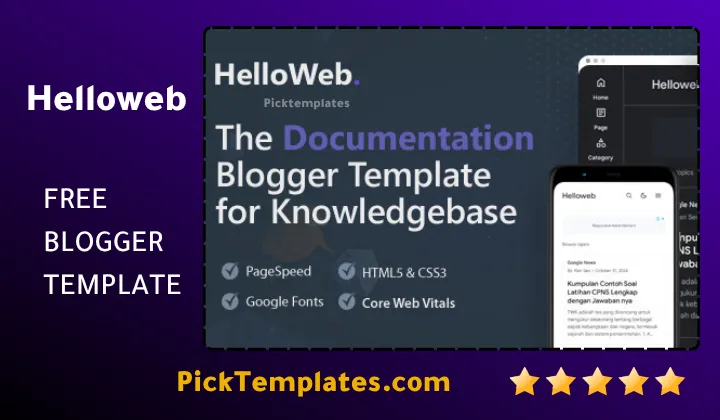
This approach to user interface design is highly effective for building authority in specialized educational niches. For instance, the popular Material UI Template uses Google design guidelines to establish clear visual hierarchies for interactive elements. Similarly, this helloweb template uses a clean navigation system that focuses entirely on reading comfort and rapid page loading. By removing unnecessary animations and large banner spaces, it maintains a highly professional environment that respects the time of your audience.
Key Features We Discovered During Our Practical Assessment
We carefully tested the performance and responsive design of this layout to identify the most beneficial tools for web creators.
- Full screen adaptability that scales down smoothly for optimal mobile and tablet viewing
- Integrated dark mode toggle that allows visitors to change reading themes instantly
- Streamlined search widget that helps readers locate specific guide topics on your site
- Clean sidebar navigation menus that support custom icons and hierarchical category displays
- Lightweight coding constructed without jQuery dependencies to maximize loading speeds
- Social sharing widgets that let visitors distribute your tutorials to popular platforms
These specific functionalities work together to deliver a highly reliable browsing experience for readers searching your documentation database.
A Realistic Comparison of the Benefits and Structural Limitations
No single blogging theme can serve every type of creator, and we believe in providing a completely balanced perspective. While this layout is highly efficient for technical databases, it lacks the visual features required for personal diaries or lifestyle magazines. If your primary goal is to share high-definition photography or creative art projects, a documentation design may feel too clinical and restrictive.
Our hands-on analysis revealed several practical advantages along with a few functional drawbacks that you should review before installing.
- The clean typography utilizes Google Sans to ensure highly legible technical texts
- Optimized ad placements allow you to monetize your traffic without disrupting the user layout
- Simple customization through the layout editor makes it accessible for beginners
- The structured interface is not suitable for standard chronological blogs or personal updates
- Removing the developer attribution link requires purchasing a premium license
We encourage you to assess these factors to determine whether this design aligns with your long-term publishing strategy.
If you discover that your project needs a blend of traditional blog layouts and modern elements, other options might fit better. The Median UI Template provides a highly popular sidebar interface while maintaining standard posting formats for normal blogs. However, if your main objective is to establish a dedicated educational database or a product wiki, the Temabanua design remains highly optimized for that task.
Evaluating Your Investment Options in Theme Licenses
The developer offers a free edition of this design which is highly useful for beginners, hobbyists, or educators testing their concept. This helloweb version provides the essential structural widgets needed to publish guides, though it does keep encrypted script credits in your footer. For basic school databases or small personal wikis, this version serves as an excellent starting point without any upfront costs.
For professional businesses or developers launching commercial digital products, the helloweb premium version is a more appropriate choice. Upgrading removes all encrypted scripts and attribution links, giving your platform an entirely custom, branded appearance. You also gain access to lifetime updates and technical support to keep your site compatible with future Blogger system changes. If you are still exploring different layout styles, you can browse the blogger templates portfolio section to view alternative frameworks designed for diverse content presentation.
Information
| Template Name | Helloweb |
| Version | 1.8.0 |
| Creation Date | 15 February 2024 |
| Last Update | 12 November 2024 |
| Platform | Blogger and Blogspot |
| Author | Temabanua |
Features
- Structured technical layout designed precisely for multi-level wiki directories and online manuals
- Fluid responsive media queries ensuring readable text scaling across handheld viewports
- Semantic HTML5 tagging compiled to streamline metadata visibility for search indexers
- Native layout database schema integration permitting painless drag and drop widget administration
- Sticky sidebar taxonomy controls presenting nested categorization and custom structural index menus
- Minimalist script footprint constructed without render-blocking jQuery frameworks to maximize speed
- Strategically configured asynchronous advertisement areas accommodating flexible display banner integrations
- Lightweight social API share buttons allowing swift transmission across major web services
- Refined typography variables utilizing optimized system fonts for prolonged screen reading sessions
- Native dark mode system utilizing persistent cookie storage to match user preference settings
- Flexible tertiary footer system for comprehensive site maps and legal documentation navigation
- Dynamic cross browser rendering tested extensively across Chromium engines and Safari layouts
- Inline CSS deployment to bypass latency and quicken document delivery over mobile networks
- Versatile stylesheet variables adapting seamlessly for class syllabi or software guide repositories
- Multi tier distribution packages catering to student sandbox environments or commercial developer projects
Conclusion
Choosing the Helloweb Blogger Template transforms how informational databases operate on basic blogging platforms. Authors who deploy the layout gain immediate structural control over complex files and guides, bypass conventional hosting complications, and build accessible resource directories on Google servers. The strategic emphasis on minimal inline scripts and fast execution speeds creates a highly responsive environment that supports technical reading habits.
This architectural setup addresses the specific challenges of presenting multi-layered text documents on mobile interfaces. Responsive navigation sidebars and custom toggle layouts allow readers to browse deep directories without losing their place on the page. By resolving standard screen formatting issues and eliminating unnecessary visual clutter, the layout helps keep bounce rates low and extends session durations.
For teams establishing extensive training materials or digital product guides, the simplified configuration settings offer a reliable foundation. Webmasters can establish a credible reference index with minimal backend overhead or custom styling tasks. Ultimately, utilizing this framework represents a sensible solution for creators who prioritize clear, structured communication and high site speed on the Blogger system.