
Table of Contents
Contents
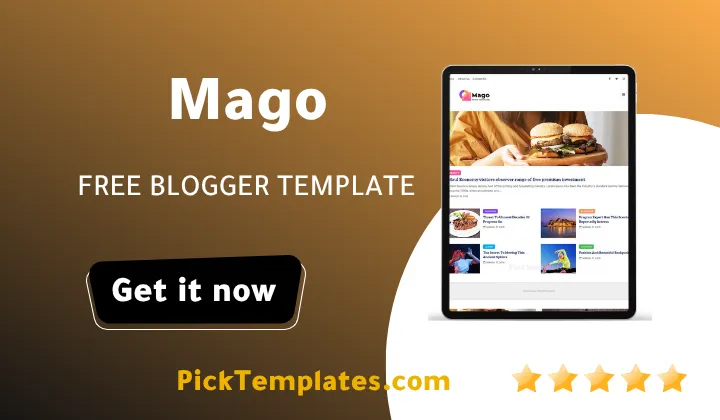
Welcome friend. If you came here wanting a fast answer here it is. Mago blogger template is a free lightweight Blogger theme built for bloggers who cover more than one topic under a single roof. It handles beauty posts fashion posts and business posts inside one homepage without feeling cluttered. Anyone comparing it against a template like Bfresh template will notice Mago leans toward a calmer editorial feel rather than a busy magazine grid.
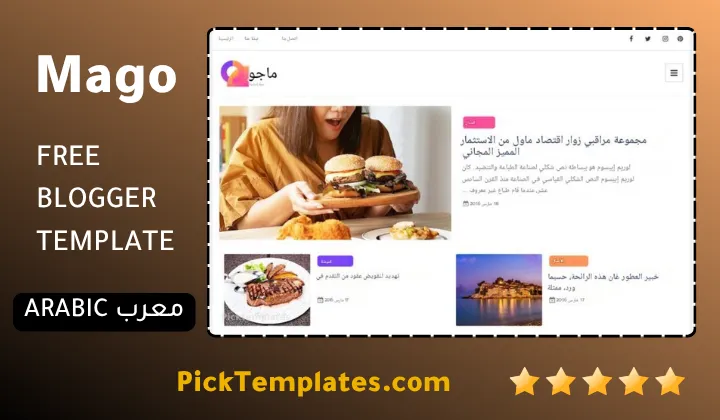
Before going further it helps to know there are two editions floating around online. A free Arabic edition exists and it was translated and protected under copyright by the team at Picktemplates. A separate English edition also exists in both free and premium form and it comes straight from the original creator OmTemplates. This review focuses on the original English build so every feature mentioned below matches what OmTemplates actually shipped.
A Closer Look At How Mago Handles Multiple Blog Categories
Mago theme was clearly built with variety in mind. The public demo running on the official OmTemplates domain shows labels for Beauty Business Fashion Food Learn Nature People and Photography sitting side by side inside the same sidebar. That single detail says a lot about the intended audience. This is not a one topic personal diary theme. It behaves more like a small magazine skeleton meant to hold several writers or several moods under one banner.
Sidebar Widgets That Do The Sorting
The right sidebar carries a stack of small tools that keep a busy blog from turning into a mess. A Random Post widget pulls an older article back into view. A Recent Post widget keeps the newest work visible near the top. A Popular Posts widget rewards whatever article is already earning clicks. A Labels widget lists every category so readers can jump straight to a topic they care about.
None of these widgets are unusual on their own but stacked together they turn a pile of unrelated posts into something that reads like an organized publication. Readers comparing this sidebar setup against something like Embe template will see Mago Template favors a denser more traditional blog sidebar rather than a stripped down magazine strip.
A theme can only organize what a writer is willing to organize first. Sort the topics on paper before touching the Blogger dashboard.
Core Features Worth Knowing
Before choosing any theme it helps to see the full feature set laid out plainly so nothing gets missed once installation actually begins and the labels start piling up fast.
- Fully responsive layout that adjusts smoothly across phone tablet and desktop screens
- Breadcrumb navigation ready so visitors always know where they landed
- Native AMP support for lighter faster mobile pages
- WhatsApp sharing button included for quick social distribution
- Three column footer area for extra links widgets or contact details
- Drop down menu support for organizing many pages under a few tabs
- Dedicated portfolio style pages for showcasing personal work
- Clean minimalist visual language with plenty of white space
- Search engine friendly markup aimed at solid Google visibility
- Post thumbnail support so every article shows a preview image
None of these features are exotic on their own yet stacked together they cover most of what a small multi topic blog actually needs from the very first day.
Setting Up Labels Without Creating Chaos
New bloggers often make the same mistake with a multi category theme like this one. They create a fresh label for every single post instead of settling on a short master list first. A cleaner approach usually looks something like this.
- Decide on five to eight main topics before writing the first post
- Keep label names short since long labels break the sidebar layout on smaller screens
- Apply only one or two labels per post rather than five or six
- Review the labels widget every few weeks and merge anything that overlaps
- Save the busiest label for the homepage featured slot
Following that short routine keeps the sidebar readable even after hundreds of posts pile up over the following months.
Speed And Mobile Behavior
OmTemplates built Mago around minimal JavaScript on purpose. That choice shows up as quicker paint times on slower mobile connections which still matters since Google’s own Search Central guidance continues to treat page speed signals as part of the overall ranking picture.
Where Mago Falls Short
No theme is perfect and Mago is no exception. The public demo still leans on placeholder Lorem Ipsum content which makes it harder for a first time visitor to picture a finished site. The homepage sticks to a single column post list rather than a true masonry grid so readers wanting a heavy visual magazine feel may want to look elsewhere. Free users also get zero official support according to the template page itself so any customization beyond basic label setup falls entirely on the site owner. The last update landed back in September 2021 which means newer Blogger features added since then were never folded into the original build.
Who Mago Actually Fits
Mago suits a blogger juggling more than one interest under a single domain. A lifestyle writer covering beauty fashion and food together will feel right at home here. A small team publishing under a few different bylines will also appreciate how the sidebar naturally spreads attention across categories instead of burying older posts. A single topic technical blog focused purely on one niche will likely outgrow this layout faster and might do better with a template built for deep long form reading instead.
Pick a theme that matches the busiest habit already running on your blog not the one you wish you had someday.
Mago remains a solid free pick for anyone starting a multi topic blog without a design budget. Readers wanting to browse more polished layouts in the same spirit can look through the full stylish Blogger template collection before making a final decision. The setup guide linked inside the features table below walks through installation step by step for anyone ready to move forward today.
Information
| Template Name | Mago |
| Version | 1.0.0 |
| Creation Date | 20 September 2021 |
| Last Update | 20 September 2021 |
| Platform | Blogger |
| Author | OmTemplates |
Features
- How To Setup Mago Blogger Theme
- Available in light friendly color options for flexible branding
- Includes ready made personal page templates for about and contact sections
- Two column layout keeps the main content wide while the sidebar stays compact
- Ads ready spacing built into the header area for extra revenue placement
- Clean minimalist structure that keeps navigation simple for new visitors
- Search engine optimized markup aimed at better visibility on Google
- Elegant typography choices suited for beauty fashion and lifestyle content
- Both free and premium editions available depending on customization needs
- Automatic post thumbnail generation for every published article
- Fully responsive design that adapts to phones tablets and desktops
- Social bookmark buttons ready for quick sharing across platforms
- Drop down menu support for organizing multiple pages neatly
- Three column footer area for extra widgets and contact information
- Native AMP support for faster loading mobile pages
- Dedicated portfolio layout for showcasing personal projects or work samples
Conclusion
Mago Blogger Template earns its place among free multi category themes mainly through its sidebar tools and its simple label based structure. It will not win a design award next to a heavy visual magazine layout but that was never really the goal behind it.
Anyone starting a blog that spans more than one topic will get a workable foundation here without spending a single dollar. The bigger investment ends up being time spent planning labels properly rather than money spent on the theme itself.
In ten years of testing Blogger themes across different niches Mago still holds up as one of the easier multi category layouts to hand off to a first time blogger. The sidebar tools alone save hours of manual sorting work later on. My only real complaint stays the outdated demo content which forces new users to imagine the finished result rather than see it right away. Mouhssine Boukou
We have localized the free version of the Mago template into Arabic and fixed the Right-to-Left (RTL) layout issues to make it easier to use on Arabic blogs.