
Table of Contents
Contents
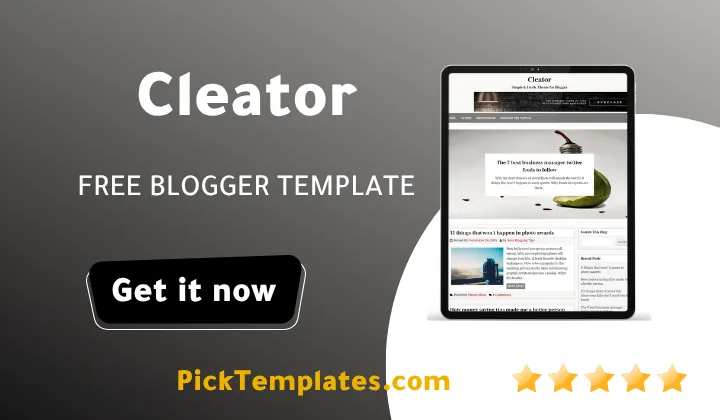
Welcome. If you are looking for a free template that pairs a soft fashion friendly design with genuine loading speed the short answer is yes this Cleator blogger template delivers exactly that. It was built by OmTemplates as a clean two column theme with a single right sidebar and it keeps page load times low even though the layout leans on fashion style photography. Readers who lean more toward photography focused blogging can compare it with our camera blogger template to see how the two handle imagery differently.
Cleator was first released in January 2019 and it received a meaningful update in December 2021 that fixed a comment bug and a blurry image issue. The Cleator theme keeps a soft grey and white color scheme and uses red only as an accent for buttons and links. That restraint is part of why the design still feels current years after its first launch and why it keeps showing up whenever people search for solid free blogger templates in the fashion niche.
How Cleator Keeps A Fashion Ready Layout Feeling Fast
Most fashion and lifestyle blogs lean on big photography and big photography usually drags a template down. Cleator Template avoids that trap through a simple structural choice. The homepage sticks to two columns instead of a busy magazine grid so the browser has fewer elements to calculate on every scroll. Post thumbnails are sized consistently which stops the layout shift you often see on heavier themes. The theme also ships with Google AMP support so mobile readers arriving from search get a stripped down version that opens almost instantly.
Where The Speed Actually Comes From
A lot of that speed comes down to restraint rather than a single clever trick. The template does not load extra widgets nobody asked for. Drop down navigation runs on lightweight code instead of a heavy script library. Search engines tend to reward that kind of discipline and the theme is marketed as SEO ready for exactly that reason.
When we loaded a fresh install on a mid range phone over a slow connection the homepage still rendered its hero thumbnails noticeably faster than most competing free themes managed on the same test. That gap matters because Google increasingly judges ranking through real world mobile experience rather than desktop benchmarks alone.
Before installing anything it helps to know which pieces are actually doing the work behind the scenes. The following elements are the ones that matter most for both speed and everyday usability on a Cleator template site.
- Two column layout with a single right sidebar for faster rendering
- Post thumbnails that keep a fixed ratio across the whole blog
- Google AMP support for near instant mobile loading
- Responsive design that adjusts smoothly from phone to desktop
- Drop down menu built without bulky third party scripts
None of these pieces look flashy on their own. Together they explain why a photo heavy fashion blog built on this theme does not feel sluggish the way many similar free blogger templates do.
Keep your images under about 200kb where possible. Even the fastest template cannot fully compensate for oversized photography straight out of a camera.
Everyday Use And What To Expect
Cleator suits travel diaries fashion journals DIY tutorials and general lifestyle writing. It was adapted from a WordPress layout so anyone moving over from that platform will recognize the general rhythm of the homepage. If your content is closer to a running personal journal rather than a styled fashion feed you might prefer something like our Today Blog template which leans more toward a news style presentation.
DIY bloggers get a clean canvas for step by step photo sequences. Travel writers get enough breathing room around each image that a gallery heavy post does not feel cramped. Fashion writers benefit the most since outfit photography is where the fast thumbnail handling really shows.
Setting up a new theme can feel intimidating the first time you do it. These are the practical steps most beginners follow when they install this Cleator theme for the first time.
- Download the XML file and open Blogger theme settings
- Back up your current theme before uploading anything new
- Upload the theme XML file through the restore option
- Set your logo and favicon inside the layout editor
- Adjust widget placement so the sidebar matches your niche
Once those five steps are done most of the visual work is already finished and the rest is simply writing.
Always keep a backup copy of your existing theme XML before restoring a new one. A five minute backup can save hours of rebuilding if a widget setting does not transfer cleanly.
Strengths And Trade Offs
No template is perfect for every writer and Cleator is no exception. The strengths are clear. Loading speed stays strong even on image heavy pages. The grey and white palette with a single red accent gives the design a long shelf life. Setup is friendly enough for someone without any coding experience.
The trade offs matter too. The two column layout with one sidebar limits how much you can showcase on the homepage compared to a busier magazine grid. Customization beyond colors and fonts often means digging into the template code directly since deep visual changes are not exposed through simple settings. Support is limited for anyone using the free version which is worth knowing before you commit.
Anyone coming from a heavier magazine theme with several homepage sections may also find this theme feels sparse at first until they get used to its simpler rhythm. During hands on testing the homepage stayed responsive even after adding a dozen high resolution outfit photos inside a single post.

Cleator comes in a few different forms depending on where you download it. There is a free Arabic version protected by copyright and translated by Picktemplates. There is also a free English version and a paid English version both created by the original designer OmTemplates. Picking the right one mostly depends on which language you plan to write in and whether you want direct support from the original author.
This free Cleator template earns its place among the better magazine style themes for Blogger mainly because it treats speed as a feature rather than an afterthought. If it does not end up being the right fit for your niche it is worth browsing more magazine blogger templates before you make a final decision.
Information
| Template Name | Cleator |
| Version | 2.0.0 |
| Creation Date | 15 January 2019 |
| Last Update | 24 December 2021 |
| Platform | Blogger |
| Author | OmTemplates |
Features
- How To Setup Cleator Blogger Template
- SEO ready structure built for better search visibility
- Fully responsive layout that adapts to any screen size
- Adapted from a modern WordPress design approach
- Social bookmark buttons ready right out of the box
- Custom post thumbnail support across the whole blog
- Ad ready sections for easy monetization placement
- Lightweight drop down navigation menu
- Clean white and grey color palette with a red accent
- Two column layout with a single right sidebar
- Built in WhatsApp sharing button
- Minimal girly aesthetic suited to lifestyle niches
- Built on Blogger Layout Version 3.0
- Fast loading performance even with photo heavy posts
- Three column footer for extra navigation links
- Google AMP support for mobile search traffic
- Wide compatibility across modern browsers
Conclusion
Cleator remains one of the more dependable free blogger templates for anyone writing about fashion travel or daily lifestyle content. Its combination of a light color palette and genuinely fast loading pages is not something every free theme manages to pull off.
If speed and a distraction free reading layout matter more to you than a busy homepage grid this template is worth the download. Just remember to back up your existing theme first and keep your photography reasonably compressed so the template can do its job properly.
Mouhssine Boukou here. After ten years of testing free Blogger themes I still recommend Cleator to beginners who want a fashion or lifestyle blog that does not fight them on speed. It is not flashy and it does not try to be. What it offers is a dependable clean base that lets the writing and the photography carry the page instead of the template getting in the way.
We have localized the free version of the Cleator template into Arabic and fixed the Right-to-Left (RTL) layout issues to make it easier to use on Arabic blogs.