
Table of Contents
Contents
Welcome to our full review of the Pickbooks blogger template. If you want to sell books on Blogspot without paying for a hosted shop platform this template is a solid starting point. It places every book cover at the center of the page and gives visitors a clean catalog to browse on any screen. It suits small bookshops independent authors and book reviewers who want a simple storefront. It is not a full shopping cart system and you should know that before you install it.
Pickbooks template comes from the designer Kalibnet and was released in 2026 with version 1.0.0. In this guide I focus on the visual catalog side of the template. That means how it shows covers and how it guides a buyer from browsing to ordering. If you also want to compare another bookstore layout you can read our review of the Ubook Blogger Template as well.
Why Book Covers Decide the Sale
People judge a book in a few seconds. A cover image plus a title and a price is usually all they scan before they click or leave. A template that crops covers badly or hides prices makes the sale harder. A good bookstore template keeps the cover as the hero element and gives every title enough room on the page.
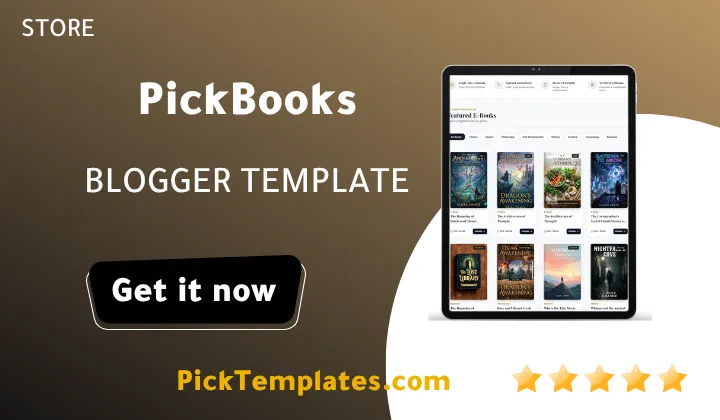
This is the main idea behind Pickbooks theme. The homepage behaves like a digital shelf. Each book appears as a card where the image comes first and the key details follow. Because everything runs on Blogger you keep full control over posts labels and static pages without any monthly platform fee.
How Pickbooks Presents Your Catalog
Here are the catalog features that matter most when you present books to buyers. Each point below affects how visitors browse and decide to order.
- Cover first cards that put the book image above every other detail so buyers recognise titles at a glance.
- Price and label areas that help visitors compare editions and categories without opening every post.
- Category labels that group fiction non fiction textbooks and children books into easy to find shelves.
- A clean header and menu that keep shop navigation simple on small phone screens.
- Full width sections that give covers more space on both desktop and mobile layouts.
Treat this list as a checklist for your own shop. Always compare it with the live demo before you commit to the layout.
Strategic tip for book sellers. Use covers with the same height and ratio across the whole catalog. Uniform images make a grid look professional and raise the chance that visitors keep scrolling to the next title.
Preparing Cover Images That Look Sharp
The template can only look as good as the images you feed it. Follow these steps for every new book post and your catalog will stay consistent as it grows.
- Export every cover at the same width and height ratio before you upload it to Blogger.
- Compress each file so it loads fast without visible blur on mobile screens.
- Write a clear file name and alt text that include the book title and the author name.
- Place the price and the main category label in the same position on every post.
- Open the homepage on a real phone and confirm that no cover is cropped badly.
Doing this once saves hours of fixing later. A tidy catalog also helps Google understand your book pages better.
If your shop leans toward bundles and cart behavior you can also compare Pickbooks with the Books Cart Blogger Template. It takes a different approach to the same niche and may suit stores that need more shopping features.
From Browsing to Buying
A beautiful catalog is only half of the job. The visitor must also know how to order. Most Blogger stores built with templates like this rely on a simple contact route such as WhatsApp or an email form instead of a full payment gateway. That keeps the setup light and cheap but it also means orders are handled by hand.
Decide early how you will confirm stock and delivery. Buyers who wait without an answer rarely come back. A short reply template and a clear delivery policy page will build trust faster than any design tweak.
Important note. Blogger does not give you customer accounts or automatic inventory. If you expect hundreds of daily orders you should plan for a dedicated platform later and treat Pickbooks as a lean starting point.
Strengths Worth Knowing
These are the points where Pickbooks performs well for a small bookstore. They come from the way the template is built and from the nature of Blogger hosting.
- A cover focused design that suits book selling better than a general blog theme.
- Free versions that let you start your store without spending any money.
- Blogger hosting that keeps running costs close to zero.
- A familiar post based workflow that beginners learn in one afternoon.
- A light structure that should load quickly when your images are optimized.
None of these strengths replace good photography and honest book descriptions. The template only frames your content.
Limitations You Should Accept Before Installing
No template is perfect and Pickbooks is no exception. Review these limits carefully so you do not feel surprised after launch.
- There is no built in payment gateway or real inventory system so stock must be tracked by hand.
- Blogger limits checkout accounts and customer logins so advanced store logic is out of reach.
- Large catalogs become hard to manage with labels alone.
- Only two versions exist so there is no premium edition with extra features.
- It is a 2026 release so community tutorials and user feedback are still limited.
If any of these points is a deal breaker for you it is better to know today. Many sellers accept them in exchange for zero hosting fees.
Who Should Use Pickbooks
Pickbooks fits independent authors who want to sell their own titles. It also fits small second hand book dealers and book bloggers who want to add affiliate links beside their reviews. Students who sell used textbooks to classmates can use it too. Large retailers with thousands of products should look at a hosted ecommerce platform instead.
Template Versions
There are two versions of Pickbooks. The first is a free Arabic version that was arabized by Picktemplates. The second is a free English version. Both were released without any copyright restrictions and there is no paid edition. You can use either one for your store and adjust it as you like.
Looking for more shop layouts after this review. Browse the full Blogger store templates category and compare them side by side.
Information
| Template Name | Pickbooks |
| Version | 1.0.0 |
| Creation Date | 2026 |
| Last Update | 2026 |
| Platform | Blogger |
| Author | Kalibnet |
Features
- Cover first catalog layout built for selling books
- Fully responsive design for phones tablets and desktops
- Clean and modern header with simple shop navigation
- Category labels for organizing fiction textbooks and kids books
- Clear price display area on every book card
- Full width sections that give book covers more room
- Lightweight structure that supports fast page loading
- Simple color and branding adjustments through Blogger theme settings
- Search friendly markup that helps book pages appear in Google
- Order friendly layout suited to WhatsApp or contact based sales
- Related books area that encourages visitors to buy more than one title
- Social sharing buttons for promoting new arrivals
- Clean single book page with a large cover and full description
- Compatible with Blogger widgets and AdSense placements
- Easy installation using the standard Blogger XML upload
- Free Arabic and English versions available without any copyright restrictions
Conclusion
Pickbooks Blogger Template is a focused and free way to turn Blogspot into a visual bookstore. Its strength is the cover first catalog that lets buyers browse titles quickly on any device.
It is not a complete shopping platform. You will handle orders and stock by hand and Blogger limits advanced store features. For small sellers authors and book reviewers those limits are usually acceptable.
Pickbooks is a smart choice if you want to validate a book business with almost no cost. Invest your time in consistent cover images and clear descriptions because they will influence your sales more than any setting inside the template. Once your orders grow beyond what you can manage by hand move to a full store platform.