
Table of Contents
Contents
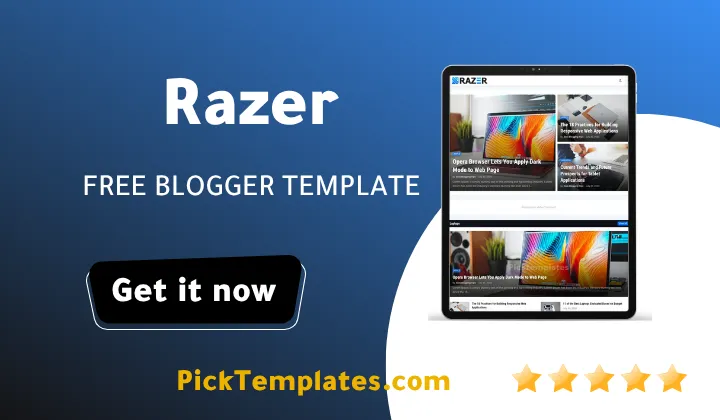
Hello and welcome. If you run a site that covers several unrelated topics under one roof and you want them to look organized instead of messy the short answer is that Razer blogger template from Templateify handles that job well. It launched in 2021 as a three column blog magazine layout and it still runs smoothly on a modern Blogger account today because it leans on shortcode driven widgets rather than heavy custom scripts.
Before going further it helps to know that two editions of this theme exist online. There is a free Arabic edition carrying its own copyright that was translated and adapted by the team at Picktemplates. There is also a free edition and a paid premium edition created directly by the original author Templateify. Every detail below describes the original English release. If your blog leans more toward personal storytelling than a tech news feed our Wesper Template review is worth a look too.
Why Razer Handles Several Categories Without Turning Into Chaos
The homepage of Razer Template is built from a set of content section shortcodes rather than one long river of posts. Each section pulls its own label so a technology roundup a smartphone comparison and a laptop buying guide can sit in the same view without bleeding into each other. This shortcode habit is the real reason the demo feels closer to a curated magazine front page than a typical blog feed.
The Building Blocks Behind Each Category Row
Every homepage row is really one of a handful of layout types that the Razer theme calls through a simple shortcode. Once you understand what each type looks like it becomes easy to plan which category deserves which shape.
- grid1 stacks square thumbnails in a clean row which suits a photo led category such as gadgets or travel
- grid2 doubles the row height so longer headlines from a review section stay fully readable
- block1 and block2 pair one large lead post with smaller side posts a shape borrowed from printed newspaper pages
- colLeft and colRight pin a narrow column that fits short opinion pieces or quick news bites
- video builds a feed made only from posts carrying a video label so multimedia content never mixes with plain articles
None of these require touching the theme code. You add a gadget choose the shortcode type and point it at a label and the section appears in that shape on its own.
For a similar side column heavy structure our Paperify Blogger Template guide is a fair point of comparison if you want to weigh two options side by side.
Keeping Reader Navigation Clear Across Sections
A magazine style site can quickly overwhelm a first time visitor if the menu tries to list every topic at once. Razer avoids that trap through a nested underscore system where a single underscore marks a first level dropdown item and a double underscore marks a second level item sitting inside it.
- A mega menu shortcode pulls a full grid of recent posts from any label directly inside the dropdown
- A slim topbar strip carries quick icon links to social profiles above the main header
- A header search icon opens as an overlay so it never pushes the rest of the layout down
- A floating back to top button appears once a visitor scrolls past the first screen
Together these pieces mean a reader can jump from a laptop review straight into a phone buying guide in two clicks without ever feeling lost.
A menu with six or seven visible items is easier to scan than one that lists every category you own so group smaller topics under a single dropdown instead of giving each one its own tab.
Sidebar and Footer Widgets That Reinforce the Magazine Feel
The sidebar carries a Popular Posts block a tag cloud labeled Main Tags a newsletter box and a live comments feed while the footer repeats the social row and adds a short about paragraph plus a secondary footer menu. These widgets are what make the site feel finished rather than a bare list of articles once every category page is filled in.
Setup Speed and Where Beginners Usually Get Stuck

Installation follows the standard Blogger routine of uploading the xml file setting the logo and then working through the theme options panel. Most of the friction beginners report comes from the shortcode syntax itself rather than the installation step since typing a label name incorrectly inside a content section shortcode simply returns an empty box with no warning. Once that habit is learned the rest of the setup moves quickly. The Customize panel under Theme also exposes a native dark mode toggle a boxed mode toggle and a left sidebar toggle so several structural choices never require opening the theme editor at all.
Where the Razer Theme Still Falls Short
No template is perfect and Razer Theme has a few limits worth knowing before you commit a live site to it.
- The free version ships without direct support so any customization question relies on public documentation only
- The layout depends on Blogger classic widgets which means moving to a different platform later requires rebuilding the menu and sections from scratch
- The shortcode heavy sections such as the mega menu or content blocks bring a short learning curve for someone who has never used a shortcode driven Blogger theme before
- The visual style follows a 2021 era grid card look so a brand chasing an extremely stripped down 2026 aesthetic may prefer a lighter alternative
None of these points are dealbreakers on their own but they are worth weighing against how much time you can spend on setup.
Quick Verdict
Razer earns its keep specifically as a home for sites that need several distinct topics to coexist on one front page without looking cluttered. The shortcode based content sections and the nested mega menu do most of the heavy lifting while the sidebar and footer widgets round out the magazine feel. If this style fits your project you can browse more picks inside our magazine template collection before making a final choice.
Information
| Template Name | Razer |
| Version | 1.0.0 |
| Creation Date | 31 May 2021 |
| Last Update | 31 May 2021 |
| Platform | Blogger |
| Author | Templateify |
Features
- How To Setup Razer Blogger Theme
- Fast Loading Performance
- Fully Responsive Design
- SEO Ready Structure
- Retina Ready Images
- Mega Menu With Shortcodes
- RTL Version Included
- Google AMP Support
- Drop Down Navigation
- Social Bookmark Icons
- WhatsApp Share Button
- Page Navigation Menu
- Author Box Widget
- Related Posts Widget
- Cookie Consent Notice
- One Right Sidebar Layout
Conclusion
Razer Blogger Template remains a solid pick for anyone building a multi topic magazine site on Blogger in 2026 rather than a single niche blog. The mix of shortcode driven content sections and a nested mega menu is what separates it from a plain three column theme.
Beginners should expect a short adjustment period around the shortcode syntax while advanced users will likely appreciate how much layout control is available without editing the theme code directly.
Expert opinion from Mouhssine Boukou with ten years of experience in Blogger theme development. This theme still holds up well for a magazine style project mainly because the content section shortcodes give real layout flexibility that most free Blogger themes never bother to include. The one thing I would tell any beginner is to plan your labels before touching the mega menu since a messy label structure is the single biggest reason these shortcode heavy themes end up looking cluttered instead of organized.
We have localized the free version of the Razer template into Arabic and fixed the Right-to-Left (RTL) layout issues to make it easier to use on Arabic blogs.