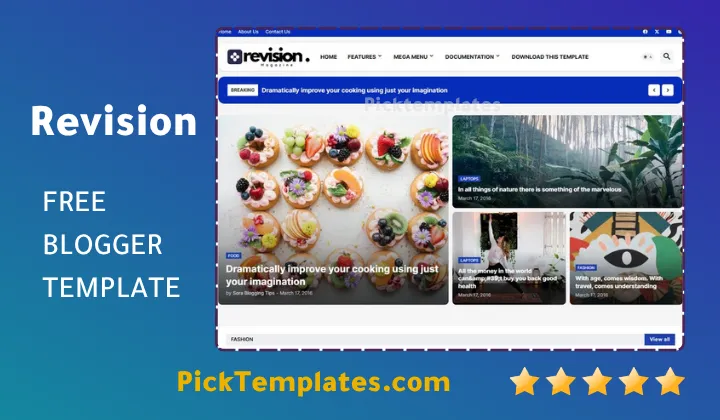
Revision Blogger Template 2026

Revision Blogger Template 2026 Free

Revision Blogger Template – Elevate Your Online Brand with Professionalism and Speed

Are you a content creator searching for a clean, sophisticated way to present your work, or a business owner looking for a reliable theme that doesn’t sacrifice speed for style? If your answer is yes, then the Revision Blogger Template is the ultimate solution tailored specifically for you! Developed by Templateify, this theme is built to bridge the gap between high-end aesthetics and technical performance. By combining a minimalist structure with powerful backend optimization, it provides an immediate sense of trust to your visitors, making it a favorite for those who want their words to carry weight in a crowded digital marketplace.

Are you ready to see how you can transform your blog into a high-ranking news portal or a stunning personal portfolio? Let’s get started! Whether you are focusing on finance, fashion, or general news, the Revision template helps you organize your content in a responsive and SEO-friendly manner. This Revision Blogger theme comes packed with premium features that we will explore in depth to help you maximize your site’s potential.

An Elegant Design Crafted for Versatility

The most striking element of the revision blogger template is its clean and multi-functional layout. It features a modern design that balances white space with vibrant accent colors like Violet, Green, and Red, ensuring that your content remains the primary focus. You can display your articles with high-quality post thumbnails and an eye-catching slideshow on the homepage that draws the reader’s eye immediately. In its pursuit of a polished, magazine-style look, it is highly comparable to the Flowin Blogger template, which also focuses on smooth transitions and a premium user experience.

The Revision Template is designed with versatility in mind, offering multiple color schemes to match your specific brand identity. The typography is sharp and readable, making it ideal for long-form news reports or quick fashion updates. If you are looking for more options within this style, you should definitely check out the magazine blogger templates category for similar high-performance layouts.

The design philosophy of the Revision blogger is centered on clarity and speed, offering a sophisticated canvas that allows your content to shine without technical distractions.

With its flexible grid and list options, you can use the Revision Templateify design to handle any content niche. From a simple personal blog to a complex news site, the template builds a strong foundation for your digital identity and helps you stand out among competitors.

Compatibility Across All Screens

The Revision template offers a seamless and highly responsive user experience on every device. Whether your audience is scrolling through your latest post on a smartphone during their commute, or reading on a wide desktop monitor at the office, the design adapts instantly to provide the best possible viewing experience.

Revision Blogger Template
Revision Blogger Template 2026

By utilizing advanced HTML5 and CSS3 technologies, the Revision theme works flawlessly across all modern browsers. This ensures that every element of your blog remains functional and visually consistent, much like the versatility found in the Blogin blogger template, which is another excellent choice for responsive design enthusiasts.

Having a responsive blog is no longer optional; it is a requirement for search engine success. The Revision Blogger template allows you to tap into the massive mobile-user market, providing them with a fast and comfortable browsing environment that encourages longer visit durations.

“In the era of mobile-first indexing, having a template that adapts perfectly to every screen size isn’t just a feature it’s the backbone of your blog’s growth and SEO success.”

By implementing the responsive features of the revision blogger, you can rest assured that your brand looks professional and polished at all times, enhancing your authority and making it easier for readers to navigate your content comfortably.

Optimized Mobile Performance

The mobile-first approach of the free revision blogger template ensures that performance is never compromised on smaller devices. The text, navigation menus, and images are resized automatically to fit the screen perfectly, eliminating the need for zooming and ensuring a smooth scroll.

This approach allows your visual and textual media to load efficiently, keeping your audience engaged even on slower data connections.

  1. Exceptional readability and navigation on all mobile phones.
  2. Quick touch-response for menus and interactive elements.
  3. Lightweight code for rapid mobile loading speeds.
  4. Consistent branding across mobile and desktop versions.

With its dedicated focus on mobile optimization, it is safe to say that revision template is a top-tier choice for creators who want to build a modern platform that reaches users everywhere.

Integrated Homepage Features

The Revision Blogger template includes a dynamic and feature-rich homepage designed to showcase your latest updates. You can easily customize the layout to highlight your most important categories and trending stories using the built-in widgets. 

Your homepage is the digital front door to your brand, so it needs to be both attractive and organized. Revision provides the tools to achieve this through its elegant Mega Menu and Featured Slider.

Enhancing Homepage Visibility

The Revision Template offers numerous ways to make your landing page more effective. You can toggle between different grid layouts, change the primary theme colors, and use the slideshow to emphasize your top-performing articles.

Use the Slideshow feature to spotlight your evergreen content or breaking news, ensuring that your best work is the first thing a visitor sees.

Also, pay close attention to your post thumbnails; the template uses high-resolution previews to entice readers to click through and explore your full articles.

Core Homepage Elements

To maximize engagement, your Revision-powered blog should include essential sections like:

  • Featured Slider ✔️ to highlight premium content or affiliate promotions.
  • Category Grid ✔️ to display posts from specific labels in an organized fashion.
  • Sidebar Widgets ✔️ for social media feeds, recent comments, and popular posts.
  • Mega Menu ✔️ to provide a sophisticated navigation experience for large websites.

You can rearrange these components to fit your niche, whether you are building a site for finance or a creative showcase. For more design inspiration, explore the portfolio blogger templates collection to see how visual grids can be used effectively.

Smart Sidebar Functionality

The revision template features a powerful Sidebar area where you can add various gadgets to keep your readers engaged. From “Trending Now” lists to email subscription boxes, the sidebar helps facilitate a deeper exploration of your blog’s archive.

The sidebar is a strategic tool in the Revision design that allows you to guide the reader’s journey. By placing relevant ad units or internal links here, you can increase both revenue and time-on-site.

The sidebar offers immense flexibility. Use it to showcase your social media presence or highlight your most popular categories to keep the bounce rate low.

Leverage the sidebar in the Revision blogger template to enhance the overall user experience and provide visitors with the information they need at a glance.

Multi-Section Navigation

The revision blogger template excels at organizing massive amounts of data into clear, navigable sections. Thanks to its Mega Menu support, you can categorize your posts in a way that makes sense, allowing users to find specific topics in seconds.

Whether you are creating sections for “Business,” “Tech,” or “Lifestyle,” the navigation remains clean and fast. This structure is similar to what many professional news sites use to manage their content flow efficiently.

With the multi-section navigation in Revision, you can build a logical architecture for your site. Your visitors will appreciate the ease of finding reviews and news, leading to higher loyalty.

If you plan to scale your blog with hundreds of articles, the Revision Templateify structure is built to handle that growth without slowing down or becoming cluttered.

  1. Divide content into niche-specific categories for better SEO.
  2. Use the Mega Menu to display thumbnails within the navigation bar.
  3. Reduce the “search time” for your readers with intuitive menus.

The multi-section capabilities make Revision the perfect choice for professional magazine owners who demand a high level of organization and a premium aesthetic.

Advanced Add-ons and Widgets

The revision theme comes with a full suite of integrated add-ons that boost your blog’s functionality. One of the best features is the built-in WhatsApp sharing button, which allows users to instantly send your articles to their contacts. Additionally, the theme is “Ads Ready,” meaning you can place monetization units in high-visibility areas without manual coding.

The template also supports various footer configurations, including a 3-column footer that is perfect for displaying “About Us” info, quick links, and recent posts. These built-in tools help you create a community around your blog by making interaction and sharing incredibly simple.

Utilize the built-in features of the Revision template to convert your visitors into sharing machines, ensuring your content reaches new audiences organically.

Unmatched Customization Options

A major advantage of the Revision Blogger template is its user-friendly customization. You don’t need to be a developer or have any coding skills to change the look of your site. Through the standard Blogger dashboard, you can adjust fonts, change the main color theme (from Violet to Blue or Green), and move widgets around using a simple drag-and-drop interface.

Whether you want a dark, professional look for a finance blog or a bright, energetic feel for a fashion site, Revision provides the flexibility to achieve your vision through the “Theme Designer” without touching a single line of CSS.

Revision gives you the creative freedom to personalize your blog, ensuring that your digital space is a unique reflection of your personality and professional goals.

Visual Identity Management

Using the Blogger theme Designer, you can effortlessly swap out your header logo, change background colors, and select from a library of web-safe fonts. This ensures your blog remains readable and visually appealing to your target demographic. 

The layout is also modular, meaning you can choose which sections to show or hide based on your current content strategy.

Personalized Functional Tools

You can also add custom tools like social media icons, author boxes, and related post sections with just a few clicks.

  • Showcase your social profiles to build a following.
  • Add an email newsletter form to capture leads.
  • Display related posts to increase your page views per visit.

By using the customizable revision theme, you create a professional environment that attracts the right readers and keeps them coming back.

SEO and Search Engine Dominance

The Revision Blogger template is meticulously engineered to be SEO-Friendly. It uses clean, lightweight code that allows search engines like Google to crawl and index your site effectively. Proper use of Schema markup and JSON-LD is included to help your site appear in rich results.

SEO is the lifeblood of organic growth. By starting with the Revision blogger template, you are giving your articles the best possible chance to rank high in search results from day one.

Furthermore, the template is optimized for speed. Fast-loading pages are a confirmed ranking factor, and Revision ensures that your readers won’t abandon your site due to slow loading times.

Technical SEO Features

Revision provides a solid semantic structure, using header tags correctly and allowing for easy meta-description management. It also supports breadcrumb navigation, which helps search engines understand your site’s hierarchy.

Use these built-in SEO tools to optimize every post with relevant keywords, helping you capture more traffic from your specific niche.

AMP and Mobile Indexing

With AMP support, the Revision template meets the highest standards for mobile performance. This ensures your blog is favored by Google’s “Mobile-First” indexing, giving you an edge over sites with outdated or slow themes.

  • Rapid page load times on all devices.
  • High compatibility with different browser engines.
  • Superior mobile user experience scores.

Choosing the Revision Blogger template means choosing a path to search engine success, helping you connect with a global audience of readers and potential customers.

Information

Template Name Revision
Version 1.0 V
Creation Date 2024
Last Update 2026
Platform Blogger
Developer Templateify

Features

  1. Modern and high-speed design for professional blogs
  2. 100% Responsive layout for mobile, tablet, and desktop
  3. Multi-color support including Violet, Red, and Blue
  4. SEO Ready with integrated Schema Markup
  5. Google AMP support for instant mobile loading
  6. Blogger Layout Version 3.0 (Easy Customization)
  7. Elegant Mega Menu and Dropdown navigation
  8. Ads Ready with optimized ad placement slots
  9. Advanced Breadcrumb navigation for better SEO
  10. Integrated Social Bookmark and WhatsApp sharing
  11. Professional Featured Post Slideshow
  12. Post Thumbnails and Grid/List view options
  13. 3-Column Footer and Sidebar widget support
  14. Clean coding standards (HTML5 & CSS3)
  15. Cross-browser compatibility for all users

Conclusion

The Revision blogger template stands out as a top-tier choice for anyone serious about their online presence. Its unique blend of professional design and technical efficiency makes it a powerful asset for bloggers and businesses alike. The clean layout combined with vibrant customization options ensures that your blog remains both visually stunning and incredibly fast, keeping visitors engaged from the moment they land on your homepage.

Another major strength of the Revision template is its focus on modern standards. From its SEO-ready framework to its full AMP compatibility, every aspect is designed to help you succeed in the competitive world of search engine rankings. Whether you are aiming to monetize with ads or build a personal brand, Revision provides the stability and performance needed to reach your goals.

Ultimately, the Revision Templateify design offers ease of use without compromising on quality. You can transform your site’s identity easily through the Blogger dashboard, making it a perfect fit for both beginners and experienced pros. If you are looking for a theme that combines beauty with brains, the Revision template is the ideal platform for your next big project.

FAQ


Is the Revision blogger Template 2026 Free download available?

Yes, the Revision template typically offers a free version with all the essential features, and a premium version for those who want advanced support and removal of footer credits.

Is the Revision Template good for Google AdSense?

Absolutely. The Revision Blogger template is “Ads Ready,” meaning it has pre-defined slots optimized for high click-through rates, making it perfect for monetization.

Can I use this template for a news or magazine website?

Yes, its Mega Menu, Grid layout, and multi-section structure make it an excellent choice for news, magazines, and content-heavy sites.

Does Revision support mobile devices and AMP?

Yes, the template is fully responsive across all screens and includes AMP support to ensure lightning-fast speeds for mobile users.

Do I need to know how to code to customize Revision?

No, you can customize almost every aspect of the theme directly through the Blogger Layout and Theme Designer menus without touching any code.

What makes Revision different from other Blogger themes?

Revision combines high-speed optimization with a professional magazine-style aesthetic and built-in SEO tools, giving you a competitive edge in search rankings.

Leave a Comment

Comments

No comments yet. Why don’t you start the discussion?

Leave a Reply

Your email address will not be published. Required fields are marked *