
Table of Contents
Contents
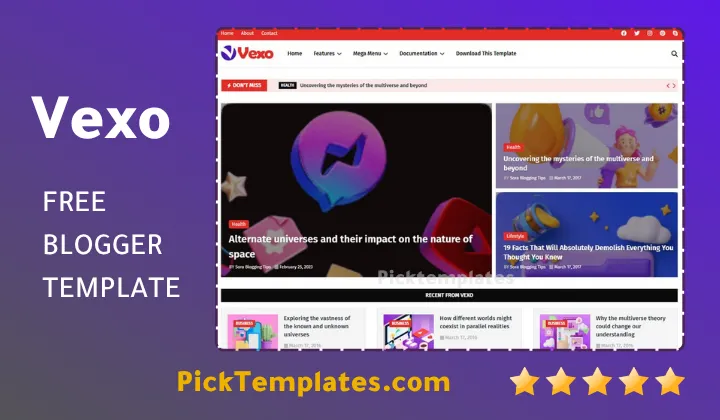
Welcome to our full guide on the vexo blogger template. If you only need a quick answer Vexo is a bold modern blogger theme built by templatesyard for tech blogs news portals gadget reviews and digital magazines. It ships with a homepage carousel a clean grid section fast loading code and search friendly markup out of the box. You can download the free copyright protected version test the limited free arabic release localized by picktemplates or move up to the paid professional edition for extra layout options and priority support.
This guide walks through every part of the theme from the homepage design down to the installation steps so you finish reading with a full picture before you commit your blog to it.
Inside the Vexo Blogger Theme
Visual Style and Color Options
Vexo leans into a punchy visual identity built for readers who scan headlines fast. The layout mixes bold typography with generous white space so featured stories stand out on the first scroll. Template author templatesyard shipped the theme with several ready made color schemes so publishers are not locked into a single brand palette.
The vexo theme currently ships with the following tone options.
- White
- Black
- Blue
- Red
- Yellow
- Green
- Violet
During our review swapping between these tones only touched the accent colors and left the reading experience untouched which is exactly what a busy blogger wants from a theme update. If your content leans softer and more lifestyle focused rather than tech news our breakdown of the Nurify Template covers a gentler editorial style worth comparing before you decide.
Homepage Carousel and Post Grid
The homepage opens with a slider that rotates through top stories then drops into an organized grid for the latest posts. This two layer structure keeps new visitors oriented while still giving long time readers a fast way to catch up on recent articles. Thumbnails load quickly and stay sharp on both desktop screens and smaller mobile displays.
Sidebar Widgets and Reader Engagement
The sidebar carries the toolkit a growing tech blog actually needs rather than filler. Trending posts pull attention toward your best performing content. Social icons sit near the top so readers can follow your channels without hunting through the footer. Label widgets group posts by topic which helps visitors dig deeper into your archive instead of bouncing after one article.
A sidebar only earns its space when every widget answers a question the reader already has. Vexo keeps that sidebar short on purpose rather than stuffing it with filler.
Single Post Layout and Reading Comfort
Once a reader clicks into an article theme switches to a wide spacious layout built for long form writing. Images breathe instead of feeling cramped against the text. Paragraph spacing stays generous which matters for tech tutorials and news pieces that often run past a thousand words.
Mobile Speed and Search Optimization
Vexo was built responsive from the ground up so the same layout adapts cleanly whether a visitor lands from a phone a tablet or a full desktop browser. The theme also ships AMP ready markup breadcrumb navigation and a clean heading structure which all support faster indexing on Google. Post thumbnails and ad ready zones are already wired into the code so monetization does not require a rebuild later.
Free users do not receive direct support from the developer so keep the setup guide open while configuring the theme for the first time.
If a slider feels like more motion than your audience needs our look at the Qten Blogger Template shows a calmer grid only alternative built along similar lines.
Who Should Use This Theme
Vexo fits several types of publishers rather than one narrow niche.
- Gadget review sites publishing frequent hands on posts
- Startup and coding blogs sharing tutorials and product news
- Digital news portals covering daily tech headlines
- Creators who want a magazine feel without a steep learning curve
Any of these publishers can be running with vexo template the same day they download it.
Strengths of the Vexo Template
- Fast loading code that keeps bounce rates low
- Sticky navigation menu that stays visible while scrolling
- Mega menu support for large content categories
- Drop down navigation for deep archives
- WhatsApp sharing built in for mobile heavy audiences
- Three column footer for extra links and widgets
These strengths are exactly why we recommend vexo for publishers who post several times a week.
Where Vexo Falls Short
- No direct developer support on the free version
- Bold colors may feel intense for calmer niches like wellness writing
- Built specifically for blogger and does not transfer to WordPress
- Newer release so fewer third party tutorials exist compared to older themes
None of these points are deal breakers but they are worth knowing before launch day.
Installation Steps
Setting the theme live only takes a few minutes once the file is downloaded.
- Download the xml theme file from an authorized source
- Open your Blogger dashboard and sign in
- Go to the Theme section in the left menu
- Click the small dropdown arrow beside Customize
- Select Restore then choose your Vexo xml file
- Save your changes and preview the live site
Once the preview loads correctly your blog is ready for its first post under the new design.
Vexo also sits inside our full magazine and news template collection if you want to compare it against other layouts built for the same type of audience.
Free Version Arabic Release and Paid Edition
Templatesyard released Vexo with a free copyright protected build available straight from the developer along with a full paid professional edition that unlocks extra sections and faster support. Picktemplates also prepared a limited free Arabic version by translating the interface so Arabic speaking bloggers can set up the theme without wrestling with English menus first.
Vexo earns its place among current Blogger themes through fast code a confident visual style and a layout built specifically for tech and news content. Whether you land on the free build the localized Arabic release or the paid edition the steps above should have your blog running within a few minutes.
Information
| Template Name | Vexo |
| Version | 1.0.0 |
| Creation Date | 8 April 2025 |
| Last Update | 8 April 2025 |
| Platform | Blogger / Blogspot |
| Author | Templatesyard |
Features
- How To Setup Vexo Blogger Template
- Fully responsive layout across phone tablet and desktop
- SEO ready markup built for stronger search visibility
- AMP support for faster mobile page loads
- Sticky navigation menu that stays visible while scrolling
- Mega menu built for large topic categories
- Drop down menu for deep archive navigation
- Breadcrumb navigation ready for clearer page structure
- Post thumbnails displayed automatically across the homepage
- Ads ready placement zones for monetization
- WhatsApp sharing button built into every post
- Social bookmark ready icons across the sidebar
- Three column footer for extra widgets and links
- Seven color schemes including blue red yellow green white black and violet
- Layout logic adapted from modern magazine style themes
- Blogger Layout Version 3.0 compatible structure
Conclusion
Vexo earns its spot among current blogger themes through a layout built around speed and clarity rather than decoration for its own sake. The carousel and grid combination gives editors a homepage that highlights top stories without slowing down the rest of the page.
Bloggers running tech news gadget reviews or coding tutorials will get the most value from the built in widgets and sharing tools. Anyone building a soft lifestyle blog may want a calmer template from our other reviews instead.
Expert Opinion (Mouhssine Boukou 10 years of experience) Vexo stands out among blogger themes because of how the underlying grid system distributes weight across each section. The carousel logic does not fight the browser render cycle the way older sliders often do which keeps first paint times low. I recommend this theme for tech and news publishers who need speed without giving up a bold visual identity. I would not pick it for a quiet personal diary blog since the color energy is built for high traffic content rather than soft storytelling.
We have localized the free version of the vexo template into Arabic and fixed the Right-to-Left (RTL) layout issues to make it easier to use on Arabic blogs.