
Table of Contents
Contents
Welcome. If you are wondering whether the Pickbio blogger template biolink generator deserves a spot in your workflow the short answer is yes especially if you are tired of a single clickable slot in your Instagram or TikTok bio. Pickbio turns that one link into a full self hosted landing page on Blogger with no monthly fee attached.
Before going deeper it is worth knowing this tool has a sibling worth comparing. The Pickspot blogger template takes a slightly different visual direction so glancing at both before you commit only takes a minute and saves a redo later.
Why Pickbio Feels Different From a Basic Link Stack
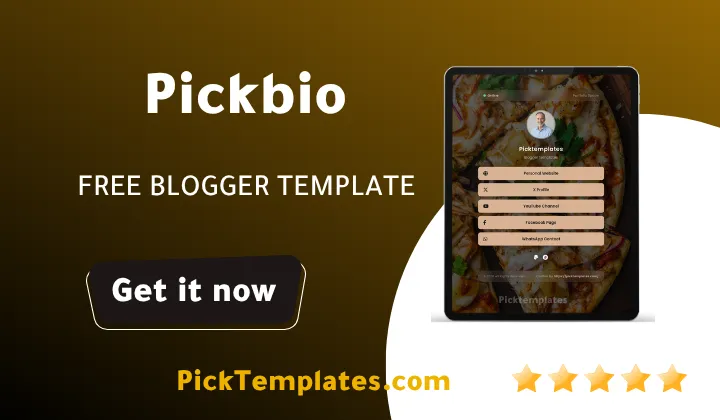
Most bio link pages are just buttons piled on top of each other. Pickbio instead treats the profile section as the actual hero of the page. A high resolution photo slot clean typography and a small pulsing status dot work together to signal that a real active person is behind the page rather than an abandoned link dump.
Blogger BioLink Generator
Fill in the details below to generate your custom professional Blogger Profile template.
Icons are pulled from FontAwesome 6.5.1 so newer platforms such as Threads and X show their current correct logo instead of an outdated placeholder. It sounds like a minor detail yet it is exactly the kind of polish that separates a finished product from one that was rushed out the door.
What You Actually Fill In Inside the Generator
Before opening the generator it helps to know which fields map to which visible block since every input you type lands somewhere specific on the final page.
- Profile photo display name and a short searchable bio line
- One primary call to action button for your newest post or offer
- Unlimited optional social icons that vanish automatically when left blank
- Payment and donation icons covering PayPal Stripe Apple Pay and Bitcoin
- Custom footer text plus an author credit line pointing back to your main site
Anything you skip simply disappears from the finished page instead of leaving an awkward empty gap behind for visitors to notice.
Getting Pickbio Live on Your Blogger Account
Publishing the generated code takes only a few minutes and does not require any coding background so even a first time blogger can follow along without getting stuck.
- Open the Pickbio generator and complete every field you want visible
- Copy the finished code block once the live preview looks right
- Open your Blogger dashboard and head into the Theme section
- Choose Edit HTML and paste the new code over the existing theme
- Save the theme and refresh your site to confirm every button works
Once those five steps are finished the page is fully live and there is nothing else left to configure on the backend.
A bio page earns only a few seconds of attention from a new visitor so keep your top link focused on the single biggest goal you have right now instead of listing every project you have ever touched.
Speed Is Where Pickbio Quietly Wins
The template is built with a mobile first structure so images and scripts are trimmed down and load fast even on a shaky mobile connection. That matters because a slow bio page loses curious visitors within the first couple of seconds before they ever see what you offer. If you want to compare a slightly different card style built on the same lightweight foundation the Pickbiocard blogger template is worth a look too.
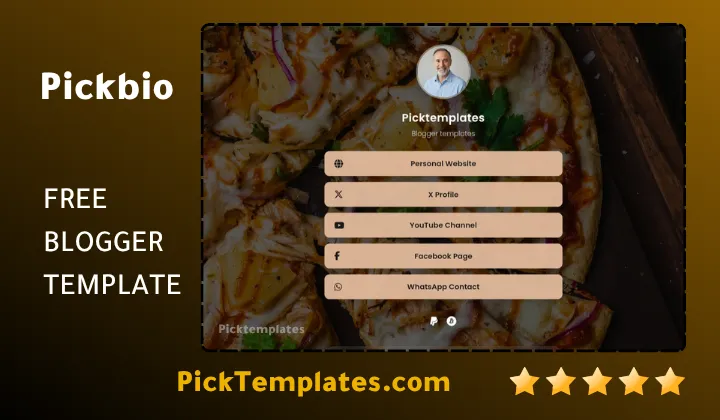
Layout shift during loading is kept close to zero and button response feels instant on both a budget Android phone and a newer iPhone. Adaptive contrast also keeps text readable whether someone is scrolling under bright sunlight or checking your link late at night in a dark room.
Turning a Free Bio Page Into a Small Revenue Channel
The dedicated wallet section is one of the more practical additions in this generator. Payment icons appear as neat circular buttons that sit quietly at the bottom of the page rather than shouting for attention.
- PayPal and Stripe for straightforward client payments
- Apple Pay for a familiar one tap checkout on iPhone
- A Bitcoin address field for creators who accept crypto tips
None of these icons interrupt the personal feel of the page yet they quietly open a direct path from a curious follower to a paying client or supporter.
Why This Page Can Actually Show Up in Google Search
A large share of bio link tools rely so heavily on scripts that search engines struggle to read them at all. Pickbio is built with semantic HTML instead so a page built around your name can genuinely rank for branded searches over time. Writing a descriptive bio line such as UI UX Designer and Portfolio Consultant instead of a single vague word gives search engines more relevant text to work with and helps the right visitors find you through organic search rather than social discovery alone.
Where Pickbio Wins and Where It Still Has Room to Grow
No single template fits every creator perfectly so a balanced look at both sides is more useful here than a wall of one sided praise.
- Genuinely free hosting since the page lives entirely on your own Blogger account
- Clean readable code that search engines can crawl and index properly
- Built in payment icons that open monetization from the very first day
- Easy color and accent adjustments without needing to write custom CSS
On the other side the visual language stays intentionally minimal so a creator chasing a bold maximalist look may want to browse a different option first.
If Pickbio ends up not being the exact right fit the full biolink template collection holds several other free Blogger based styles worth comparing before you settle on one.
Information
| Template Name | Pickbio |
| Version | 1.0.0 |
| Creation Date | 2026 |
| Last Update | 2026 |
| Platform | Blogger |
| Author | Kalibnet |
Features
- Free self hosted landing page built directly on your own Blogger account
- Profile first header with high resolution photo support
- Pulsing online status dot for an active feel
- FontAwesome 6.5.1 icons covering current platforms including Threads
- Fully responsive layout for phone tablet and desktop screens
- Mobile first code structure built for near instant loading
- Zero layout shift for a smoother browsing feel
- Unlimited optional social buttons that hide automatically when empty
- Full width primary button plus a compact secondary icon row
- Built in wallet section for PayPal Stripe Apple Pay and Bitcoin
- Automatic URL cleanup for pasted links with extra parameters
- Custom footer branding with author credit control
- Semantic HTML structure that supports real search engine indexing
- Editable bio field designed for keyword rich descriptions
- Support for external widgets such as newsletter forms and tracking pixels
- Simple copy and paste install through the Blogger Edit HTML panel
Conclusion
Pickbio earns its place among free Blogger biolink tools by focusing on the details that actually affect real visitors such as loading speed clean typography and a profile that feels alive rather than static.
Creators who want a fast honest and fully owned alternative to paid bio link platforms will find very little missing here and plenty of room to grow the page as their audience expands.
Mouhssine Boukou with ten years of experience building and reviewing digital templates puts it plainly. Pickbio is one of the rare free tools that does not feel like a compromise. The code is clean the loading time is genuinely fast and the monetization options give creators a real reason to send traffic to this page instead of straight to social media. The only caveat worth keeping in mind is that heavy customization beyond colors and text will require comfort editing raw HTML inside Blogger.