
Table of Contents
Contents
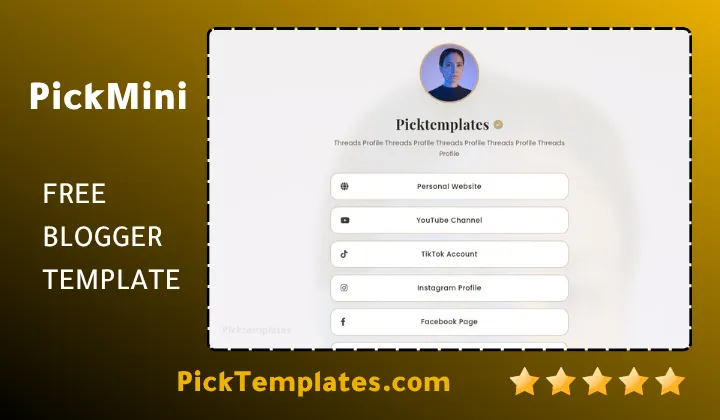
Welcome friend. If you are asking whether the Pickmini blogger template biolink generator deserves a spot on your Blogger account the short answer is yes especially if you care about page speed as much as you care about design. Pickmini is a free biolink layout built with a lean code structure so your bio page opens fast on any phone and never feels heavy to your visitors.
Most biolink tools quietly add extra scripts and animations until the page starts to feel sluggish. Pickmini takes the opposite approach and keeps every element purposeful. Before we go further it helps to see how a tab based layout compares so take a look at the Picktab blogger template biolink generator if you want a structure built around organized sections rather than a single scrolling profile.
Why A Lightweight Codebase Makes Pickmini A Serious Contender
Speed is not a cosmetic feature. It decides whether a visitor actually reaches your links or leaves before the page finishes loading. Pickmini was clearly built with that reality in mind and the code reflects it. There are no unnecessary libraries pulling down your load time and no bulky frameworks fighting for control of the page.
A Framework That Refuses To Slow You Down
The template relies on plain CSS3 and FontAwesome 6.5.1 icons pulled from a fast content delivery network. That single choice removes a huge amount of weight compared to biolink tools that load full icon packs or multiple font families. When you open the page on a mobile connection the difference is noticeable within the first second.
Blogger Bio-Link Generator
Fill in the details below to generate your custom professional Blogger Profile template.
What stands out once the template is live is how little the page shifts around while it loads. Many free layouts show a blank flash or a sudden jump as fonts and icons arrive late. Pickmini avoids that stutter because every element reserves its space from the first paint which keeps the whole profile feeling stable the moment a visitor taps the link in your bio.
Anyone who has managed a Blogger profile before Pickmini can appreciate a few practical setup habits that keep the page running smoothly once it goes live.
- Start by pasting the generated code into a fresh backup theme so your original layout stays safe while you experiment.
- Fill in only the social fields you actually use so the page stays visually clean and loads only the icons it needs.
- Compress your profile photo before uploading it since an oversized image is the most common reason a biolink page feels slow.
- Test the page on a mid range phone rather than a flagship device to get an honest sense of real world speed.
- Preview the shared link on another platform to confirm the meta preview image and title appear correctly.
Following that order before publishing saves you from the trial and error most beginners go through during their first Blogger customization.
A biolink page only earns a second look if the first three seconds feel effortless. Trim what your visitor does not need and let the page breathe.
What Happens When Extra Weight Gets Removed
Google has repeatedly stressed that page speed and mobile usability sit at the center of how sites get ranked and discovered. A template built with semantic HTML like Pickmini gives search engines something readable to index rather than a wall of scripts. That matters if you want your name or brand to actually surface when someone searches for it.
If your workflow also involves showcasing finished projects alongside your bio links a tree style layout might complement Pickmini nicely so it is worth comparing it with the Picktree blogger template biolink generator before you settle on a final structure.
Always edit the Blogger HTML through the Theme section rather than the Layout gadget editor. Editing through the wrong panel is a common beginner mistake that can break the pulsing status dot or the icon alignment.
Installing Pickmini Inside Blogger Without Guesswork
Setup takes only a few minutes once the code is generated. Open your Blogger dashboard and head to the Theme tab then choose Edit HTML and paste the full code block in place of your current theme. Save the changes and your new profile page becomes live immediately with no plugin and no external hosting required.
Before you publish it helps to review the parts of the page that most affect how visitors perceive your brand in the first few seconds they spend on it.
- Your profile photo quality since a blurry or stretched image undercuts an otherwise polished layout.
- Your biography wording since specific descriptive language helps both readers and search engines understand what you do.
- Your primary call to action link since it should sit above every secondary social icon.
- Your footer branding since a clean and accurate footer signals professionalism to new visitors.
Checking each of these points before you go live prevents the small mistakes that quietly hurt first impressions later on.
Where Pickmini Sits Next To Heavier Biolink Tools
Compared with hosted services that charge monthly fees Pickmini gives you full ownership of the page and the traffic it generates. There is no vendor lock in and no forced branding pushing your visitors toward another company. The tradeoff is that you take on the small responsibility of maintaining your own Blogger theme rather than relying on a dashboard someone else controls.
That tradeoff is worth naming honestly. Pickmini does not include a built in analytics dashboard so you will need to connect Google Analytics yourself if you want click data. It also does not offer a drag and drop visual builder so anyone uncomfortable editing HTML directly may need a short learning curve before customization feels natural.
None of that changes the core value the template delivers. A creator switching from a paid hosted biolink service usually notices two things right away once Pickmini is live. The page opens noticeably faster on mobile data and every click stays fully under their own control since nothing routes through a third party dashboard that could change its pricing or its policies later on.
Even with those limitations the balance leans strongly in favor of creators who value speed and long term control over convenience. A wider set of biolink structures worth comparing against Pickmini sits inside the full Blogger biolink template collection if you want to weigh a few layouts side by side before committing.
Pickmini earns its place among the faster biolink options available for Blogger right now. It respects your visitor’s time and your own ownership of the page which is exactly what a professional bio link should do.
Information
| Template Name | Pickspot |
| Version | 1.0.0 |
| Creation Date | 2026 |
| Last Update | 2026 |
| Platform | Blogger |
| Author | Kalibnet |
Features
- Fully free download with no subscription required
- Optimized single page biolink layout built for Blogger
- Fast loading lightweight code structure
- FontAwesome 6.5.1 icon library included
- Mobile first responsive design for every screen size
- Support for major social platforms including Instagram YouTube and Discord
- Dedicated payment and donation icons for PayPal Stripe and Bitcoin
- Editable biography section built for personal branding
- Semantic HTML structure that helps search engine indexing
- Pulsing status indicator for an active profile feel
- Custom footer branding with no forced watermark
- Optional fields so unused platforms stay hidden
- Smooth CSS3 transitions across all sections
- Compatible with Google Analytics and tracking scripts
- Clean meta tags ready for social sharing previews
- Simple copy paste installation through the Blogger theme editor
Conclusion
Pickmini succeeds because it does not try to be everything at once. It focuses on speed clean code and a personal branding layout that puts your photo and biography at the center of the experience. For creators freelancers and small business owners who want a fast professional bio page without paying a monthly fee it is one of the stronger free options built specifically for Blogger.
The template is not perfect for everyone. Anyone expecting a drag and drop builder or a built in analytics panel will need to look elsewhere or connect their own tools. It also rewards users who are comfortable making small edits inside the Blogger HTML editor rather than relying entirely on a settings menu. Those points matter less once you see how quickly the page loads and how clean the resulting profile looks on a phone screen.
Mouhssine Boukou who has spent ten years reviewing web templates for creators and small brands puts it plainly. Pickmini is one of the few free biolink templates that actually feels fast rather than just claiming to be fast and that alone makes it worth the few minutes it takes to install.