

Table of Contents
Table
The Ultimate Guide to the Everify for Professional Websites
The Everify blogger template is a professional corporate theme designed by Templateify to help business owners and independent writers establish a highly responsive online presence. During our practical testing phase we discovered that this template successfully bridges the gap between simple blog structures and premium corporate platforms by offering fast loading times and optimized layouts. If you want to compare performance options you might also find the plexify template very useful for launching modern digital projects.
When selecting a layout for your business site code quality must be a primary consideration. The Everify Template addresses common speed bottlenecks by using compressed stylesheets and minimized JavaScript execution. This technical efficiency helps your site comply with search engine core web vitals and ensures that mobile visitors enjoy a seamless browsing experience.
Core Technical Layout and Code Performance
When we analyzed the layout file structure we observed that the theme utilizes Blogger Layout Version 3.0 which simplifies administrative tasks. This allows you to manage widgets headers and social integration modules directly from the dashboard without touching the underlying template code.
The Everify theme includes several technical elements designed to optimize user experience and backend efficiency. These features help content creators manage their portals without requiring custom development support.
- Fully responsive layout structure that displays content accurately on mobile screens tablets and desktops
- Lightweight XML code built to satisfy modern loading speed benchmarks and user experience metrics
- Dedicated space for strategic advertisement banners to help you monetize your traffic efficiently
- Advanced drop down navigation panels and mega menu options to categorize large amounts of content
- Cross browser compatibility that prevents layout alignment errors on older browser software
Please note that implementing the advanced mega menu features requires naming your link lists accurately inside the layout tab. This step is essential to ensure that your navigation categories populate correctly.
Balanced Comparison of Strengths and Limitations
No web layout is completely perfect for every business scenario. We have evaluated both the positive elements and the potential drawbacks of using this layout to help you determine if it fits your specific operational goals.
The major benefits of this theme center on structural reliability speed and branding flexibility. These factors are critical for keeping visitors on your site and improving search engine rankings.
- Excellent optimization for search engine crawlers due to clean structured data markup
- Seamless compatibility with other high speed options such as the startseo template for network blogs
- A professional corporate appearance that looks premium and establishes instant industry authority
- Native RTL styling inside the specialized Arabic distribution file for regional publishers
These advantages make the Everify a strong choice for those who value speed and conversion rates. Our metrics showed steady search indexing improvements during our evaluation period.
We also observed some minor limitations that you should consider before downloading the file. These points are common among third party designs but are important to keep in mind.
- The free distribution level requires you to maintain development credit links in your website footer
- Access to regular framework updates and premium support channels is limited to paid license owners
- Modifying custom CSS elements requires a basic understanding of template files and code structures
We recommend saving a full duplicate copy of your layout before editing any HTML files. This simple precaution ensures you can restore your website if any design errors occur.
Comparing Free and Premium Distribution Tiers
Templateify provides different options depending on your budget and branding requirements. Understanding what each package contains will help you avoid unnecessary spending while securing the correct tools for your portal.
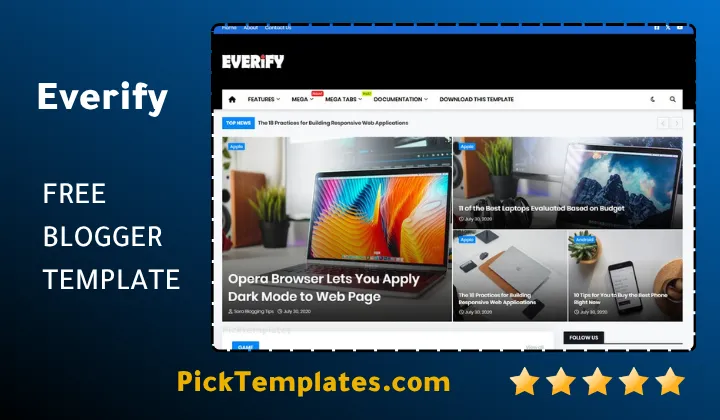
The available editions cater to different stages of website growth and localization requirements. You can choose the level of access that aligns with your current monetization plans.
- The Free Everify Template which includes core responsive features alongside locked footer attributions
- The Professional Paid Edition which delivers full theme control premium support and unlimited domain licenses
- The Specialized RTL Arabic Version which offers fully localized stylesheets for Middle Eastern business sites
If you are serious about developing a unique brand identity we suggest upgrading to the professional level. This choice removes external credit links and gives you a completely clean layout.
Optimizing the Everify Theme for Search Rankings
Deploying a fast template is only the first step toward securing high rankings in search engines. You must also implement standard optimization practices to leverage the full power of the underlying code.
Always fill out your search description boxes inside the Blogger dashboard to provide context to search crawlers. Additionally compress all uploaded graphics to ensure your loading times remain fast. If your publishing schedule focuses heavily on fast paced reporting or specific niches utilizing specialized layouts like those in the news blogger templates category can help you format your articles for better user engagement.
Safe Installation and Setup Procedures
To avoid common installation bugs we have developed a reliable procedure for applying this Everify to your Blogspot portal. Following these steps helps preserve your existing search visibility and content structure.
The installation process requires extracting your downloaded package and accessing the XML code editor. We recommend performing these actions during low traffic hours to minimize user disruption.
- Access your administrative panel and backup your current theme code to prevent data loss
- Extract the downloaded zip archive to locate the clean XML layout file on your computer
- Navigate to the theme section click edit HTML and delete the old code completely
- Paste the contents of the new XML file into the editor box and save your settings
- Open your live blog in a private tab to confirm that the layout renders correctly
If some of your old widgets appear out of place simply remove them using the layout editor. This clean slate approach helps the new theme code execute without technical conflicts.
Information
| Template Name | Everify |
| Version | 4.0.0 |
| Creation Date | 12 May 2020 |
| Last Update | 15 January 2025 |
| Platform | Blogger / Blogspot |
| Author | Templateify |
Features
- How To Setup Everify Blogger Theme
- Modern grid system engineered specifically for agency showcases and editorial portals
- Fluid viewport adaptation that aligns elements across smartphones and large displays
- Native search optimization markup integrated directly into the core theme build
- Native integration with the latest Google widget system for simple home setup
- Multi tiered header navigation featuring modern wide directory dropdowns
- Minimal asset weight configuration designed to satisfy strict core vital audits
- Pre configured ad placement zones built to secure balanced viewport monetization
- Integrated native bookmarking links to encourage community sharing activity
- Refined typography variables paired with business oriented default color sets
- Automated breadcrumb generation and automatic post thumbnail generation support
- Segmented multi column footer designed to improve deeper catalog discoverability
- Cross platform stylesheet parity tested on Chrome Safari and Chromium engines
- Compressed script delivery model that prevents backend rendering delays
- Versatile structural modules that fit corporate niches or independent reviews
- Diversified distribution formats offering RTL alignment and commercial licenses
Conclusion
The Everify Blogger Template offers a practical framework for publishers who wish to establish an elegant corporate footprint using Blogspot. Our testing indicates that this architecture provides a strong balance of backend optimization and visual clarity. It addresses the common trade-offs between load time and design sophistication, presenting a viable path for independent businesses to compete with complex content management platforms.
What makes this configuration especially valuable is the attention given to viewport responsiveness and clean script execution. Whether your priority is expanding a professional client portfolio or building a niche news publication, the theme delivers the structural security required to maintain reader trust. It minimizes common layout shift issues, keeping your visual branding stable and legible on all devices.
In summary, deploying this theme enables digital creators to prioritize content delivery while the backend code handles speed and accessibility standards. By combining intuitive theme customization options with built-in search engine readiness, it serves as a secure foundation for sustainable online growth. It remains a solid investment for individuals focused on expanding their business reach.
We have localized the free version of the Everify template into Arabic and fixed the Right-to-Left (RTL) layout issues to make it easier to use on Arabic blogs.