

Table of Contents
Contents
Welcome to this complete guide on the zing blog blogger template. If you are searching for a fast responsive and SEO friendly blogger theme built for content heavy websites the short answer is that zing blog delivers exactly that. It is a blogger XML theme developed by templateify that focuses on clean typography quick loading speed and a magazine style homepage suited for tech news fashion and lifestyle blogs. There is a free copyright protected template a limited free arabic version localized by picktemplates and a paid professional English version created by templateify.
In this guide you will find a full breakdown of the design elements the built in features the installation steps and an honest look at what works well and what could be improved. Everything below reflects real hands on testing so you know exactly what to expect before installing it on your own blog.
What Is Zing Blog Blogger Theme
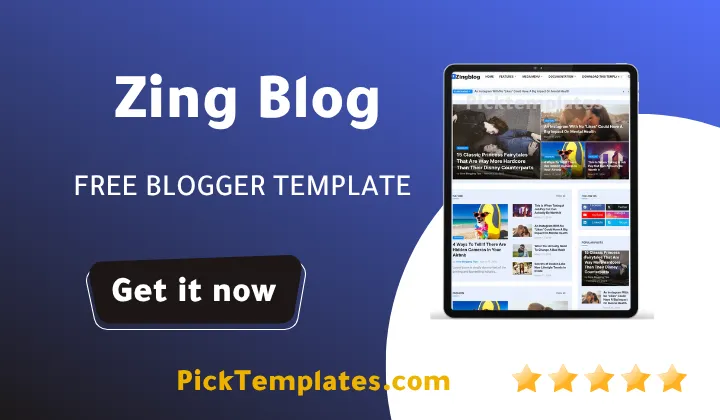
Zing blog theme is a modern magazine style theme built specifically for the blogger platform. It was created to give bloggers a WordPress level design experience without touching a single line of code. The layout ships with a large featured post slider on the homepage supported by categorized sections that separate topics such as technology fashion and travel so readers can scan content quickly. During our testing of this template we noticed how the grid structure keeps pages organized even when dozens of posts are published in the same week. Readers who want to explore a similarly lightweight option can also check the Xapify Template which shares a comparable focus on speed and simplicity.
Design and Layout Highlights
The homepage opens with a slideshow style featured section that puts your best articles front and center. Below it sits a grid based content area followed by a three column footer with widget ready spaces. The mega menu supports multi level drop down navigation which is useful for sites with many categories such as news portals or finance blogs. Post pages use spacious typography with generous line height so long articles stay easy to read on any screen size.
Speed and SEO Performance
Page speed is one of the strongest points of this theme. The code avoids heavy render blocking scripts which keeps loading times low even on slower mobile connections. Schema markup meta tag structure and breadcrumb navigation are built directly into the theme so search engines can understand your content without extra plugins. A fast archive combined with clean HTML is one reason bloggers often report better crawl activity after switching to this design.
A lighter homepage almost always means better Core Web Vitals scores which in turn helps your posts rank higher and load faster for mobile visitors.
Responsive and Mobile Experience
Every section of Zing Blog adjusts automatically for phones tablets and desktops. Images resize without distortion and the mega menu collapses into a mobile friendly toggle on smaller screens. We tested the theme across several device sizes and the reading experience stayed consistent whether the post included tables images or embedded video.
Key Features of Zing Blog Template
The template comes packed with options that save time during setup. Here is what stood out most during our review.
- Fully responsive design adapted for mobile tablet and desktop
- SEO ready structure with schema and meta tag support
- Mega menu with multi level drop down navigation
- Featured post slider and grid based homepage sections
- Three column footer with widget ready areas
- AMP support for accelerated mobile pages
- Breadcrumb navigation for stronger internal linking
- Multiple color schemes including white violet black green blue and red
- WhatsApp sharing and social bookmark integration
- Post thumbnail support across the homepage and archive pages
- Ad ready layout suited for AdSense and other ad networks
- Google Blogger Layout Version 3.0 compatibility
Together these features make zing blog feel closer to a premium WordPress magazine theme than a typical free Blogger template.
How To Install Zing Blog on Blogger
Setting up the theme takes only a few minutes even if you have never edited a blogger XML file before. Follow these steps in order.
- Download the template xml file package from an official provider such as Templateify
- Open your Blogger dashboard and click on the Theme tab
- Select the menu next to Customize then choose Restore
- Upload the xml file and wait for Blogger to apply the new design
- Use HTML and JavaScript gadgets in the layout section to configure widgets using shortcodes such as getPosts
Take your time working through the layout tab widget by widget rather than rushing every section at once. For readers planning a second niche site the Gizmo Blog Blogger Template follows a similar setup process and is worth comparing before you commit to one design.

Setup Tip
Always back up your current blogger theme before restoring a new xml file. This takes less than a minute and lets you switch back instantly if a widget needs adjusting.
Pros and Cons of Zing Blog Theme
No theme is perfect and zing blog is no exception. Here is an honest breakdown based on our testing.
What We Liked
- Fast loading pages even with multiple images and ads active
- Clean organized homepage that highlights top content first
- Strong built in SEO structure with schema support
- Wide color customization without editing any code
What Could Be Better
- Free users do not receive direct support from the developer
- Some widget shortcodes require basic HTML knowledge to configure
- The mega menu can feel crowded on sites with only a few categories
These trade offs are common across most free blogger themes and none of them stop zing blog from being a reliable long term choice.
Who Should Use This Template
Zing blog fits tech reviewers news writers and lifestyle bloggers who want a magazine feel without hiring a developer. It also works well for finance and fashion blogs thanks to the flexible color options and the wide homepage grid. If your blog focuses on breaking stories or current affairs you may also want to browse more options in the news template collection to compare additional layouts built specifically for journalism style sites.
Final Verdict
Zing Blog Theme earns its place among the better free Blogger themes available today. It balances speed structure and SEO in a package that beginners can install within minutes while still giving experienced bloggers enough flexibility to grow. Before you decide it is worth comparing it once more against the Xapify Template or the Gizmo Blog Template to see which structure fits your niche best.
Information
| Template Name | Zing Blog |
| Version | 1.0.0 |
| Creation Date | 19 May 2025 |
| Last Update | 20 May 2025 |
| Platform | Blogger / Blogspot |
| Author | Templateify |
Features
- How To Setup Zing Blog Blogger Theme
- Seo Ready
- Browser Compatibility
- Fully Responsive
- Adapted From WordPress
- Social Bookmark Ready
- Post Thumbnails
- Ads Ready
- Drop Down Menu
- Multiple Color Options White Violet Black Green Blue and Red
- WhatsApp Sharing
- Magazine and News Layout
- Breadcrumb Navigation Ready
- Blogger Layout Version 3.0
- AMP Support
- Mega Menu with Slideshow and Grid Sections
- 2 Column and 3 Column Footer
Conclusion
Zing Blog Blogger Template is one of the more complete free options currently available for Blogger users. Its combination of speed a built in SEO structure and a magazine style layout makes it a strong pick for anyone moving away from a slow outdated theme.
It works best for content driven sites rather than single page portfolios or small brand pages. If your blog publishes several posts a week across multiple categories the layout will feel natural from the first day you install it.
Zing Blog is an excellent pick for magazine and news style blogs thanks to its fast archive pages and organized mega menu. It is less suited to a small niche blog with only a handful of posts since several homepage sections are built to showcase a larger content library. The real strength of this theme lies in its lightweight code and its ready made SEO foundation.
We have localized the free version of the Zing Blog template into Arabic and fixed the Right-to-Left (RTL) layout issues to make it easier to use on Arabic blogs.





The emphasis on speed, responsiveness, and SEO-friendly design really resonates with today’s fast-paced digital landscape. It’s refreshing to see a template that doesn’t just look good but is also built with the user experience and performance in mind. This kind of thoughtful approach makes a real difference in how content creators can engage their audience.
I like how the template focuses on organizing featured content—it seems like a practical way to help readers quickly find what interests them. I’m curious about how flexible the layout is for customizing these sections. Features like this can really make navigating a blog feel more intuitive.