

Table of Contents
Contents
Welcome to this complete guide about castify blogger template. If you are searching for a fast SEO friendly magazine style theme for blogger this template covers a featured post slider multiple ad zones dark mode and a mega menu right out of the box. Below you get every detail needed to decide install and customize the theme without searching anywhere else.
This guide walks through the design and layout the core features the installation steps the free and paid versions an honest look at the pros and cons and who this theme actually fits best.
What Is Castify Blogger Theme
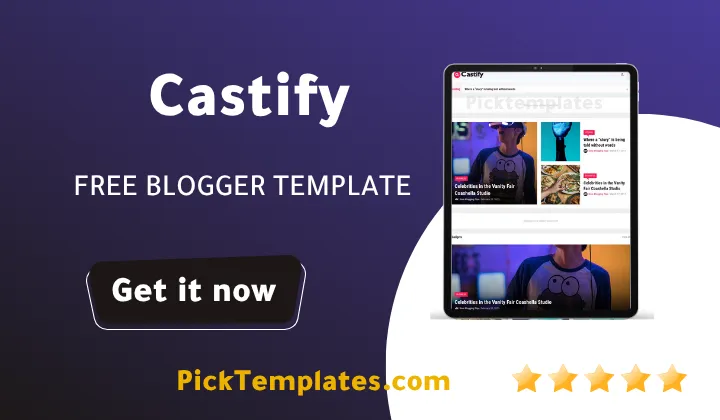
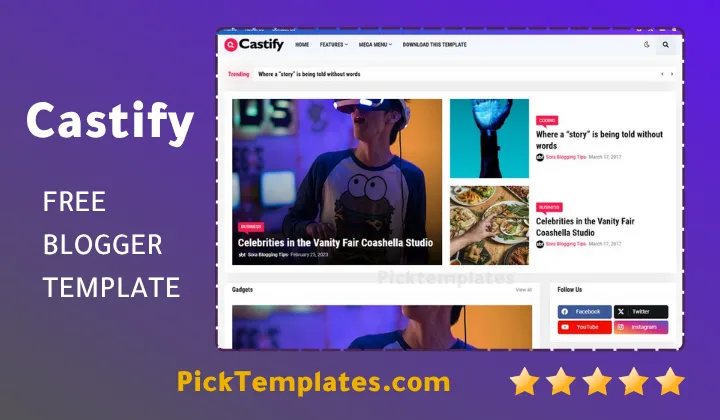
Castify is a magazine style blogger theme built by templateify for news sites tech blogs and content heavy publishers. The layout opens with a full width featured slider then moves into a clean grid of recent posts with thumbnails author names dates and comment counts. Readers looking for a similar news focused layout can also check the Newslog Template which shares a comparable editorial structure.
Design And Layout Overview
During our testing of this template the homepage felt organized rather than cluttered. The three column post grid balances whitespace and content density well. A sidebar carries trending posts categories and a newsletter box while ad units sit naturally between article blocks instead of interrupting the reading flow. Individual post pages keep the same spacious feel with clear headings and social sharing buttons placed right under the title. Typography stays crisp at every screen width which matters a lot for a theme aimed at news style publishing.
A theme built for readers loads fast keeps ads out of the way and still looks sharp on a small phone screen. Castify manages all three at once.
Key Features That Make Castify Stand Out
Castify theme ships with a long feature list built specifically for content publishers who need speed and monetization space working together.
- Fully responsive mobile first design
- Ajax powered mega menu navigation
- One click dark mode toggle
- Seven distinct content display blocks
- Live news ticker widget
- Eight plus dedicated advertisement zones
- Built in table of contents plugin
- Advanced related posts module
- Native cookie consent banner
- Support for Blogger Disqus and Facebook comments
Every feature above works right after installation with no extra plugin needed.
Free Arabic Version Vs Free And Paid English Versions
There is a limited free arabic version of castify and this version was localized and arabized by picktemplates for readers who prefer working in arabic. The original free and paid english versions were created by templateify the official template author. The paid version unlocks the full feature set listed above along with priority support while the free version stays limited and does not include support.
Note
Free users do not get direct support. If something breaks after installing the free file the fix has to come from community forums or by upgrading to the paid package.
How To Install Castify On Your Blogger Site
Setting up Castify takes only a few minutes once the template file is downloaded.
- Download the template package as an XML file from an authorized provider
- Open the Blogger dashboard and go to the Theme tab
- Click the arrow next to Customize and choose Restore or Upload
- Select the XML file and confirm the upload
- Open Layout to configure widgets like related posts social buttons and ad slots
Once uploaded give the theme a minute to fully load before checking the live preview.
If a heavier news layout with a different visual rhythm sounds more appealing the Selary Blogger Template is worth comparing before making a final choice.
Pros And Cons Of Castify Theme
No template fits every project so here is an honest breakdown from actual use.
- Fast loading speed even with multiple ad units active
- Clean SEO friendly code structure
- Mega menu makes large category lists easy to browse
- Dark mode adds a modern touch many news readers expect
- Free version offers no support if something goes wrong
- Heavy widget use can slow older devices slightly
- Full customization still benefits from basic HTML knowledge
Weighing these points against actual project needs makes the decision easier.
Who Should Use This Template
Castify fits news publishers tech reviewers and magazine style bloggers best. Anyone building a dedicated news blogger template collection will find castify a strong entry point thanks to its ticker widget and multi block homepage. Personal diary style blogs or small portfolio sites may find the feature set heavier than needed.
Final Thoughts On Castify Template
Castify earns its place among the stronger blogger themes released in 2025 by combining speed monetization space and a genuinely readable layout. The setup stays simple even for a first time Blogger user and the paid version removes the only real limitation which is missing support on the free file. Readers comparing options before committing may also want to revisit the Newslog theme covered earlier in this guide alongside Selary for a broader picture of what news style Blogger themes offer today.
Information
| Template Name | Castify |
| Version | 1.0.0 |
| Creation Date | 14 July 2025 |
| Last Update | 14 July 2025 |
| Platform | Blogger |
| Author | Templateify |
Features
- How To Setup Castify Blogger Template
- Fully responsive design for every screen size
- RTL language support included
- Boxed and full width layout modes
- One click dark mode toggle
- Featured post slider on homepage
- Seven unique content display blocks
- Live news ticker widget
- Eight plus dedicated ad placement zones
- SEO optimized clean code architecture
- Built in table of contents plugin
- Advanced related posts module
- Native cookie consent banner
- Blogger Disqus and Facebook comment support
- Breadcrumb navigation ready
- AMP support for faster mobile pages
Conclusion
Picking a Blogger theme for a content heavy site is not a small decision. Castify solves the two biggest pain points publishers usually face which are slow load times and awkward ad placement. The mega menu keeps large category lists organized while the built in table of contents plugin helps long articles stay easy to scan on mobile screens.
For anyone weighing a paid upgrade the jump from the free file mainly buys direct support and access to every widget listed above. Teams publishing daily news content will likely see that investment pay off quickly through better retention and lower bounce rates.
Castify performs best on sites publishing a steady stream of short to medium length articles such as news portals and tech blogs. I would not recommend it for a slow paced personal journal since the multi block homepage needs frequent fresh posts to look its best. Its real strength sits in clean markup and how quickly the homepage renders even with several ad units active.
We have localized the free version of the Castify template into Arabic and fixed the Right-to-Left (RTL) layout issues to make it easier to use on Arabic blogs.





Thanks 🙏👍