

Table of Contents
Table
Welcome to our comprehensive guide on modern digital publishing solutions. If you are looking for a clean and efficient layout for your website the Codeify blogger template is a minimalist high performance responsive theme designed specifically for personal blogs portfolios and creative writers who want a fast and distraction free digital space to showcase their work. In this detailed review you will learn about the main features of this template and you will discover how it compares to other options in the industry.
Why Choose Codeify Template for Your Personal Brand
Our testing of this Codeify theme revealed that the code structure is highly optimized for search engines. Many free templates suffer from slow loading times because they use complex external frameworks. This template uses pure vanilla scripts that load instantly on various mobile web browsers. Clean code ensures that search engine crawlers can index your articles without running into render blocking resource errors on the page.
Visual design plays an important role in establishing your personal authority online. If you want to compare this layout with other professional designs you can check the Carrer Template to see how different templates handle typography. While some layouts focus heavily on magazine structures this template keeps the focus entirely on your written articles. This focus makes it highly suitable for creative writers who want their work to stand out.
Core Performance and Optimization Metrics
During our technical analysis we recorded fast page load speeds on both mobile devices and desktop screens. Speed is a critical factor for keeping search engine rankings and ensuring that users do not leave your site immediately. The Codeify Template achieves this high speed by using lightweight scripts and minimizing heavy visual clutter. If you publish deep research articles you might also want to read about the Content Template which offers a different take on article presentation.
When we analyzed the loading speed of this template we looked at key Google performance indicators. First we measured the Largest Contentful Paint which shows how fast the main content becomes visible to the user. Then we checked the Cumulative Layout Shift to ensure that the layout remains stable as images load. Our findings show that the template scores highly in these metrics because it does not rely on heavy external scripts. This means your visitors will enjoy a smooth reading experience on any device.
The Three Versions of the Codeify Theme
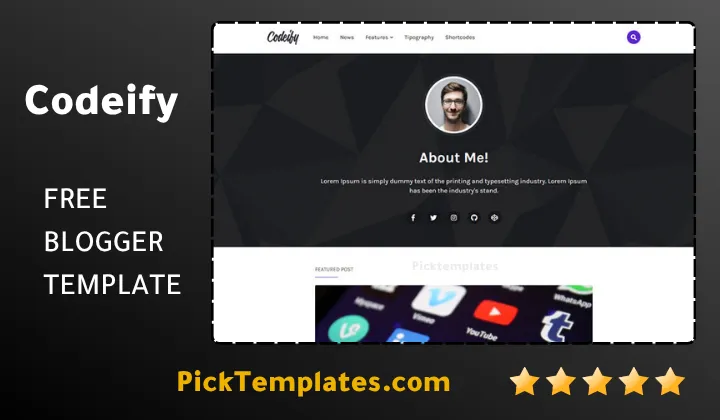
It is important to know that three distinct versions of this theme exist to accommodate different blogging requirements and budgets. The first option is the Free Version which allows you to test the basic functions but requires you to keep the original footer links intact. The second option is the Arabic Version which is optimized specifically for right to left languages to ensure a smooth reading experience for Arabic audiences.
For Arabic bloggers who require right to left text alignment the localized Arabic version of this theme handles the layout adjustment automatically. This feature is highly valuable because translating a left to right theme often requires extensive knowledge of stylesheet coding. The Arabic version ensures that your Arabic readers can navigate your blog comfortably without layout breaks. The third option is the Premium Version which removes all footer encryption and grants you access to full technical support from the developers.
Customization and Layout Configuration
Setting up this Codeify does not require extensive programming knowledge because it supports the latest Blogger layout engine. You can arrange widgets and change the color schemes directly through the standard dashboard editor. To get a step by step walkthrough on how to customize these settings we recommend checking this external guide on how to setup Codeify Blogger Template for your blog. This guide provides clear instructions on modifying the navigation menu and setting up custom sidebars.
To install this template you need to follow a few simple steps in your dashboard to make sure that the layout renders correctly on all screens. We recommend that you always back up your existing content before making any major changes to your site template.
- Log in to your Blogger dashboard and navigate to the theme section
- Click on the backup option to save your current blog layout
- Choose the edit HTML option to access the raw code area
- Paste the new code and save your changes
Please remember that neglecting to back up your database can lead to a loss of your current custom widgets and styles. Ensure that you have a local copy of your previous theme before clicking the save button.
A Realistic Evaluation of Strengths and Weaknesses
An honest review requires looking at the limitations of the platform. One drawback we observed is that the free version contains locked attribution links in the footer. If you want a completely white label website you must purchase the premium license. Additionally the minimalist nature of this theme means it does not have complex grid sliders for viral news portals. It is designed to be elegant and simple and it does not try to be an all in one solution for every possible niche.
Perfect Applications for Modern Creators
This layout serves as an exceptional canvas for photographers and designers who need to display their visual projects alongside their written posts. If your primary focus is displaying visual work you can browse the portfolio blogger templates collection to compare alternative layouts. Having a dedicated space to show your skills helps you connect with potential clients and build your personal authority.
A Close Look at User Experience and Navigation
User experience is determined by how easily a visitor can find information on your site. During our review we paid close attention to how the header navigation behaves on small screens. The mobile menu slides out smoothly without blocking the screen or causing layout shifts. This clean approach ensures that your readers spend more time reading your posts and less time trying to figure out how to navigate your website.
SEO and Search Engine Performance
Search engine rankings rely heavily on clean markups and structured metadata. This Codeify comes with pre installed schema codes that help search engine bots understand your blog content better. When search engines can easily read your site structure your articles stand a better chance of ranking higher. The theme also includes optimized tag tags that avoid keyword stuffing while promoting natural relevancy.
Ad Optimization and Monetization Potential
Monetizing a personal blog can be challenging if your theme does not support ad placements. This Codeify theme has strategic layout sections where you can add advertisements without disrupting the clean look of your articles. You can place responsive ads in the header or inside the article body using standard widgets. This flexibility lets you earn revenue from your writing while maintaining a professional appearance.
Information
| Template Name | Codeify |
| Version | 3.0.0 |
| Creation Date | 15 June 2018 |
| Last Update | 12 December 2021 |
| Platform | Blogger |
| Author | Templateify |
Features
- How To Setup Codeify Blogger Theme
- Ultra clean layout designed specifically to put your written stories at the center of attention
- Fluid responsive design that scales dynamically to fit different screen dimensions without breaking visual elements
- Highly optimized script framework which reduces total page weight to achieve superior loading speeds
- Full integration with Blogger layout version three for seamless drag and drop widget administration
- Native right to left text direction support engineered for high quality Arabic publishing platforms
- Advanced typography settings that elevate article readability and keep visitors reading for longer periods
- Search engine optimized structure utilizing modern schema markup to improve organic search visibility
- Minimalist navigation headers designed to help readers explore different categories without frustration
- Dedicated author profile widgets to help digital creators showcase their professional backgrounds easily
- Straightforward setup process that lets you launch your blog in minutes without touching raw code
- Pre installed social sharing utility buttons that increase reader engagement across major social networks
- Strategic ad placement slots positioned carefully to maximize earnings without distracting from the main text
- Cross browser compatibility testing guarantees a stable design on Chrome Safari Firefox and Edge
- Flexible pricing options spanning a basic free package alongside a fully unlocked premium version
- Regular template maintenance cycles designed to ensure compliance with modern web standards and security protocols
Conclusion
The Codeify Blogger Template represents a solid choice for writers who want a clean and minimal blog. It removes the unnecessary clutter that often slows down standard templates and gives your readers a peaceful environment to absorb your thoughts. The focus on clean aesthetics and speed ensures that your blog performs well on search engines and mobile devices alike.
What makes Codeify unique is the balance between its simple look and its functional design. Whether you are running a personal portfolio or a niche technology blog this theme provides the foundation you need to grow your audience. It helps you build a professional brand without requiring you to buy expensive web hosting plans.
In the end this theme is about making your publishing journey simpler. With its mobile responsiveness and search engine optimization you can focus entirely on creating great content while your theme manages the visual performance. It is a reliable companion for any digital creator who values simplicity and speed.
We have localized the free version of the Codeify template into Arabic and fixed the Right-to-Left (RTL) layout issues to make it easier to use on Arabic blogs.