

Table of Contents
Contents
Welcome friend. If you are trying to decide whether inews blogger template is worth your time here is the short answer. Yes it is a strong pick for anyone running a news site magazine or content heavy blog on blogger. Inews gives you a grid style homepage breaking news sections dark mode support RTL compatibility and SEO friendly code right out of the box. Stick around because this guide covers everything from the real strengths of the theme to its weak spots and how the free arabic version compares to the paid professional build.
What Is iNews Blogger Theme
Inews is a blogger theme built by templateify with news portals online magazines and personal blogs in mind. The layout is clean and the code is light which matters a lot once your traffic starts climbing. If your niche is closer to lifestyle or a minimal personal journal you might prefer something calmer such as the Lightify Template instead but for anything news or magazine related iNews earns its place at the top of the list.
During our review of this theme what stood out first was how organized the homepage feels. Sections for featured stories trending posts and category blocks sit next to each other without looking cluttered which is a common problem with many free news themes.
Design And Homepage Layout
The homepage grid is the backbone of theme. It gives you dedicated space for breaking news featured articles and category highlights so readers can scan the page and find what they want in seconds. A slideshow at the top lets you push your biggest stories front and center.
Dark Mode And RTL Support
Inews includes a built in dark mode switch which readers now expect from any modern publishing site. It also fully supports right to left languages such as Arabic Hebrew and Persian. Text alignment and spacing adjust automatically so your Arabic or Hebrew edition reads just as naturally as the English one.
A theme is only as fast as the code behind it so run template through a page speed checker right after your first setup pass and again after you add your logo and widgets.
Core Features Worth Knowing About
Beyond the homepage inews theme packs in a long list of practical tools. Here are the ones that matter most for a working news blog.
- SEO ready structure with clean markup
- Fully responsive design for phones tablets and desktops
- Ads ready sections built for Google AdSense placement
- Mega menu for large category lists
- Breadcrumb navigation for better user orientation
- Post thumbnails and drop down menus
- WhatsApp and social sharing buttons
- Three column footer with widget support
- Multiple color skins including white violet black green blue and red
- AMP support for faster mobile loading
If you want to compare inews against another feature packed multipurpose option before you commit take a look at the Plexify Blogger Template as a second reference point.
Please Note
The free version of iNews Template does not come with direct support from Templateify. Lean on the setup documentation first and only consider the paid version if you need one on one help.
Free Arabic Version Versus Paid Professional Version
There are three real ways to get this theme. The first is a free copyright protected template built by templateify. The second is a limited free Arabic version which was translated and arabized by the picktemplates team so Arabic speaking publishers can use it without paying anything upfront. The third is the paid professional version created and maintained directly by templateify which unlocks the full feature set along with cleaner licensing for commercial projects.
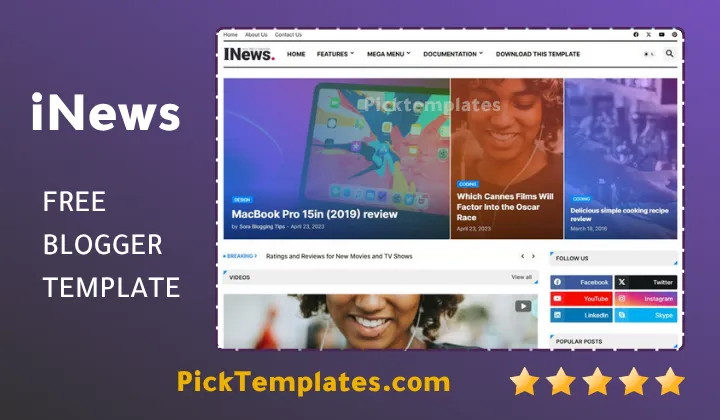
If you are just testing the waters with a small blog the free build is more than enough. Once your site starts generating real traffic or income the paid version pays for itself through better support and fewer limitations.
Setting Up Your Blog With iNews
Installing inews follows the usual Blogger routine. You download the XML file upload it through your Blogger theme settings then work through the documentation to connect your logo menu and widgets. During our own setup the process took under an hour once the placeholder content was cleared out.
For a full walkthrough with screenshots the guide on how to set up the template covers each menu option step by step which is especially useful if this is your first time working with a Blogger XML theme.
Pros And Cons Of iNews Template
No theme is perfect and inews is no exception. Here is a balanced look at what works and what could be better.
- Pro Fast loading grid layout built for high traffic news sites
- Pro Genuine RTL support rather than a basic mirrored layout
- Pro Wide color and category options for different niches
- Con No direct support attached to the free version
- Con The mega menu needs manual editing for very large category lists
- Con New users may need a few passes through the documentation before everything clicks
Who Should Use This Template
Inews fits general news portals niche publications tech review sites and personal blogs that publish frequently. If your content calendar is packed and you need a homepage that can organize dozens of posts without feeling messy this theme was built for exactly that job. Publishers who want more options in the same category can browse the full News Blogger Templates collection for alternatives with a similar focus.
Overall inews earns its spot for anyone serious about running a fast organized and SEO friendly news blog on the Blogger platform.
Information
| Template Name | iNews |
| Version | 1.0.0 |
| Creation Date | 17 February 2025 |
| Last Update | 17 February 2025 |
| Platform | Blogger |
| Author | Templateify |
Features
- How To Setup iNews Blogger Template
- SEO Ready structure with clean markup
- Full browser compatibility across modern browsers
- Fully responsive on phones tablets and desktops
- Adapted from a WordPress style news layout
- Social bookmark ready sharing buttons
- Post thumbnails on every homepage section
- Ads ready placements for AdSense
- Drop down menu navigation
- Six color skins white violet black green blue and red
- WhatsApp sharing button built in
- Breadcrumb navigation ready
- Built on Blogger Layout Version 3.0
- AMP support for faster mobile pages
- Mega menu for large category lists
- Home slideshow and grid based sections
- Three column footer with widget support
Conclusion
Stripped down to its core inews works because it treats the homepage as a routing system rather than a static page. Every block on the grid exists to move a reader from one story to the next without friction and that single design choice is what separates a theme built for publishing at scale from one built only to look nice in a demo.
Choose the free build if you are still shaping your editorial direction. Move to the paid professional version once your publishing schedule becomes daily and you need faster support along with a cleaner license for commercial use.
Inews holds up well under a heavy publishing schedule and the RTL handling is genuinely solid rather than a bolted on afterthought. Where I would slow readers down is expectations around support. The free tier leaves you with the documentation alone so budget extra setup time if this is your first Blogger theme. For a fast organized multi author news site it remains one of the more dependable choices in its category.
We have localized the free version of the inews template into Arabic and fixed the Right-to-Left (RTL) layout issues to make it easier to use on Arabic blogs.