

Table of Contents
Contents
Welcome friend if you are looking for a fast and professional blogger theme for your online store you have landed on the right guide. The s market blogger template is a modern eCommerce design built for sellers who want a clean grid layout smooth navigation and strong SEO foundations without touching a single line of code.
There is a free copyright protected version of this theme a limited free arabic version that was translated and adapted by the picktemplates team and a paid professional edition created by soratemplates the original template author. The paid edition removes the footer credit link and unlocks extra customization options while the free versions are enough to test the design before committing to a purchase.
In this guide we walk through every feature the installation steps our honest opinion after testing the theme and the most common questions readers ask before downloading it.
Why S Market Stands Out Among Store Themes
Most free blogger themes look outdated the moment you open them on a phone. S market avoids that problem with a grid based homepage that adapts instantly to any screen size. Product thumbnails stay sharp category labels stay readable and the overall layout keeps shoppers focused on what they came for which is the products themselves.
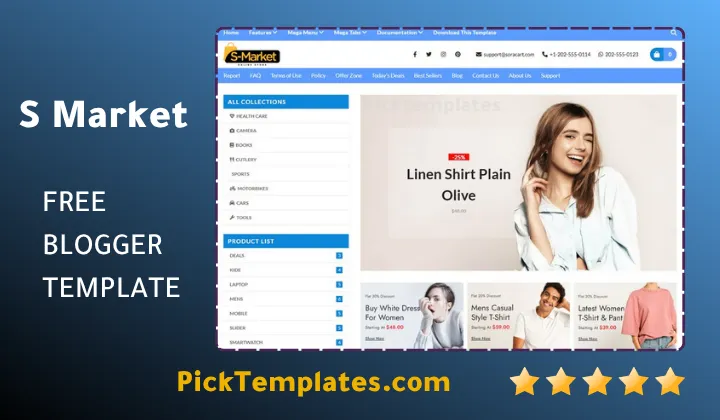
Homepage Layout And Product Grid
The homepage is split into clear sections featured products trending items and special deals. Store owners who prefer a minimal aesthetic similar to what you find on our FashionCart Template will feel right at home here since both themes share the same focus on large product imagery over cluttered text.
Sidebar Filters And Top Menu
A categorized sidebar sits next to the product grid letting visitors filter by type price or collection. Paired with a drop down top menu this setup reduces the number of clicks a shopper needs before reaching checkout which directly affects conversion rate on any retail blog.
Key Features Included In S Market
During our testing we counted a long list of built in tools that normally cost extra on other marketplaces. Here is what ships with the theme out of the box.
- Fully responsive layout for mobile tablet and desktop
- SEO ready markup with fast loading scripts
- Mega menu and mega tabs for large catalogs
- Email subscription widget for building a mailing list
- Social bookmark and WhatsApp sharing buttons
- Three column footer with widget support
- Slideshow banner for promotions and seasonal deals
- Post thumbnails and Google AMP compatibility
- Multi color scheme options adapted from WordPress design trends
Tip from our review process. Keep your product images close to a square ratio before uploading since the grid crops rectangular photos and can cut off important details.
Design And User Experience
The blue toned color palette gives the store a trustworthy corporate feel that works well for electronics fashion and general retail niches. Buttons call to action banners and price tags are placed with enough spacing that the page never feels crowded even when a category holds dozens of products.
Quick Note
S market theme does not include a native shopping cart or payment gateway since blogger itself has no backend for transactions. Most sellers link the buy button to WhatsApp a contact form or an external payment processor instead.
SEO Performance And Loading Speed
Search visibility was one of the main goals behind this build. The code is lightweight the scripts load asynchronously and heading tags follow a logical order which search engines reward with better crawl efficiency. Combined with the built in blog section store owners can publish product guides and reviews that pull in organic traffic long after the initial launch.
How To Install S Market On Blogger
- Download the XML template file from a trusted source
- Log in to your Blogger dashboard and open the Theme tab
- Click the dropdown next to Customize then choose Restore or Backup
- Upload the XML file and wait for the confirmation message
- Visit Layout to arrange widgets and add your own logo
New sellers who want a broader look at store friendly designs before making a final decision can also browse our full collection of Blogger store templates to compare layouts side by side.
Pros And Cons After Testing
What We Liked
- Clean product focused grid that loads quickly
- Strong SEO foundation with proper heading structure
- Generous footer and widget areas for extra content
- Free version is enough to trial the full design
What Could Be Better
- No built in payment or cart system since this is a blogger limitation not just the theme
- Free users receive no direct support from the author
- Color customization on the free tier is more limited than the paid edition
- Beginners may need to read the setup documentation carefully before editing widgets
If your store needs a simpler checkout flow with fewer catalog sections our EasyCart Blogger Template is worth comparing since it trades some of the mega menu complexity for a faster setup process aimed at smaller shops.
Frequently Asked Questions
Is S Market free to use
Yes a free copyright protected version is available for download along with a limited free Arabic edition prepared by Picktemplates. A paid version without footer credits is also sold by the original author for sellers who want full branding control.
Does S Market include a shopping cart
No native cart exists because Blogger does not support backend transactions. Store owners typically connect buttons to WhatsApp email or an external payment link.
Is the theme mobile friendly
Yes the entire layout is built on a responsive grid that adjusts automatically across phones tablets and desktops.
Can beginners install this theme without coding knowledge
Yes the installation only requires uploading an XML file through the blogger dashboard which takes a few minutes even for first time users.
S Market template gives online sellers a professional starting point without the usual price tag attached to premium eCommerce themes. Between the responsive grid strong SEO foundation and flexible widget areas it earns its place among the better free store designs available for Blogger today.
Information
| Template Name | S Market |
| Version | 1.0.0 |
| Creation Date | 01 March 2025 |
| Last Update | 01 March 2025 |
| Platform | Blogger |
| Author | Soratemplates |
Features
- How To Setup S Market Blogger Template
- Responsive design adapted for every screen size
- Grid based homepage built for product display
- SEO friendly code structure throughout
- Fast loading performance on mobile and desktop
- Mega menu navigation system for large catalogs
- Mega tabs section for organizing categories
- Drop down category menu for quick browsing
- Multi color scheme support for branding
- Email subscription widget for growing an audience
- Social bookmark integration across major platforms
- WhatsApp sharing button built directly into posts
- Three column footer layout with widget areas
- Post thumbnail support for cleaner listings
- Google AMP compatibility for faster mobile pages
- Slideshow banner section for promotions
- Ads ready placement zones for monetization
Conclusion
S Market earns its spot among the strongest free eCommerce themes built for blogger creators who want a store that looks premium without a premium price tag. The grid based homepage keeps shoppers focused while the SEO friendly markup gives every product page a fair chance at ranking in search results.
Sellers who need heavier catalogs and a mega menu structure will get the most value here while smaller boutiques might prefer a lighter alternative from our other store template picks. Either way S Market remains a dependable foundation for anyone entering the Blogger commerce space this year.
From our review team the biggest strength of this template is its balance between visual appeal and lightweight code. The only real limitation is the missing native cart system though that applies to nearly every blogger based store theme rather than S Market specifically.
We have localized the free version of the s-market template into Arabic and fixed the Right-to-Left (RTL) layout issues to make it easier to use on Arabic blogs.