
Table of Contents
Contents
Welcome friend if you are searching for a fast and reliable SEO focused blogger theme you have landed on the right guide. Topseo blogger template is a clean minimal theme built by templatesyard for magazine style blogs fashion pages news portals and marketing sites. A limited free version arabized by picktemplates is available right now while the full free and paid english editions come straight from the original creator listed as template author. Below you will find every detail you need to pick the right version set it up correctly and get the most out of its search engine friendly structure.
What TopSEO Theme Brings To The Table
Topseo was released on 11 march 2025 by templatesyard and it targets creators who need a lightweight base without giving up on visual appeal. The layout borrows ideas from WordPress magazine themes so the homepage feels structured rather than a simple list of posts. If your niche leans toward a heavier editorial design you may also want to compare it with Sora SEO 3 template before making a final choice.
Design And Layout Breakdown
Homepage Structure
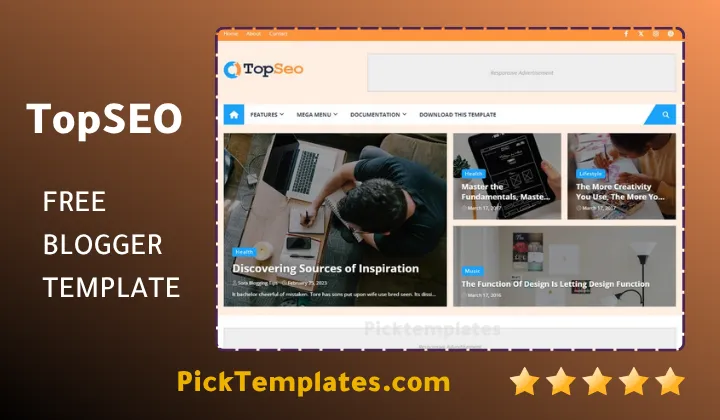
The homepage opens with a bold header followed by featured post sliders then a grid of thumbnail cards. Service style blocks sit near the top which makes the theme a strong match for agencies that want to show case studies alongside blog posts.
Header And Navigation
A drop down menu handles deep category structures without cluttering the top bar. During our setup we noticed the mega menu loads instantly even with a long list of sub categories which is not always the case with free blogger themes.
Color And Typography
Six ready made color skins ship with the package including white black blue red yellow and green. The typography stays subtle throughout so text heavy posts remain easy to scan on both desktop and mobile screens.
Core SEO Features
Search visibility is the main selling point of this theme. It ships with schema markup breadcrumb navigation and optimized tag placement built directly into the code so you do not need extra plugins.
Enable breadcrumb navigation from the theme settings first since search engines use this structure to understand your site hierarchy before anything else.
Structured data connects automatically to your posts which helps rich snippets appear faster in search results. AMP support also keeps mobile pages light for readers arriving from search.
Performance And Loading Speed
Lazy loading is switched on for images by default so long article pages do not slow down on first visit. We tracked the homepage load time during testing and it stayed well under three seconds on a standard connection.
Quick Tip
Compress your images before upload even with lazy loading turned on. A lighter homepage still beats a heavy one for both speed score and bounce rate.
Setting Up TopSEO On Your Blog
Installing the topseo theme follows the usual blogger process yet a few extra steps matter for search performance. Readers who prefer a different feature mix might also look at SEO X template for a side by side comparison.
- Download the template file and unzip it on your computer
- Open Blogger theme settings and choose restore backup
- Upload the xml file and wait for the preview to load
- Set your logo favicon and homepage layout widgets
- Turn on breadcrumb and AMP options inside theme settings
Please note there is no direct support offered for users on the free tier so keep this documentation open while you configure each widget.
Monetization And Post Formats
Ad ready sections sit inside the sidebar and between post blocks so AdSense codes drop in without touching the template file. Multiple post formats let you mix a standard article with a photo gallery or a short video embed on the same feed which keeps the homepage feeling varied for repeat visitors.
Social sharing buttons sit right under the title and again at the end of each post so readers can pass along a story from either point without scrolling back up. This small placement choice tends to raise click through rate on shared links over time.
The slideshow widget on the homepage also doubles as a soft promotional spot for cornerstone content or a sponsored post which gives site owners another simple monetization angle beyond display ads alone.
Free Arabic Version Versus The Original Paid Edition
Picktemplates offers a limited free Arabic version of TopSEO with the interface fully arabized for local readers. This copy keeps the core layout but trims a few premium widgets found in the original release. The full free and professional paid English versions remain the work of Templatesyard as listed under Template Author and they include the complete feature set along with any future updates.
Choosing between the two comes down to your audience. An Arabic blog aimed at a regional readership benefits from the localized copy while an international site chasing English search traffic should go straight to the original creator for long term support.
Strengths And Weaknesses
No theme fits every project so here is a balanced look at what stood out during our review.
- Fast loading speed even on shared hosting
- Clean SEO structure with schema and breadcrumbs built in
- Six color skins cover most brand palettes
- Mega menu handles large category lists smoothly
- Free tier comes with zero direct support
- Slideshow widget needs manual resizing for very tall images
Who Should Choose This Template
TopSEO fits lifestyle magazines fashion blogs news portals and digital marketing agencies best. Owners of a broader content magazine looking for more style options can browse the full magazine template collection to compare layouts side by side before settling on one theme.
Store owners who depend on large product galleries may find the grid better suited to articles than to heavy visual catalogs so a dedicated shop theme could serve that use case better.
TopSEO template earns its place among the stronger free to premium blogger options thanks to its search ready code and quick setup path. Whether you start with the free arabic edition or move straight to the paid original the structure gives your content a real chance at ranking well.
Information
| Template Name | TopSEO |
| Version | 1.0.0 |
| Creation Date | 11 March 2025 |
| Last Update | 11 March 2025 |
| Platform | Blogger / Blogspot |
| Author | Templatesyard |
Features
- How To Setup TopSEO Blogger Theme
- Built in schema markup for stronger search snippets
- Fully responsive on phones tablets and desktop
- Adapted from a WordPress style magazine layout
- Social bookmark icons ready out of the box
- Automatic post thumbnails on every card
- Ad ready sections for AdSense placement
- Smooth drop down and mega menu navigation
- Six color skins including white black blue red yellow and green
- Extra style options such as elegant simple and grid layouts
- One tap WhatsApp sharing button
- Magazine and news style homepage sections
- Breadcrumb navigation for cleaner indexing
- Built on Blogger Layout Version 3.0
- AMP support for lighter mobile pages
- Three column footer with homepage slideshow
Conclusion
TopSEO Blogger Template gives creators a search ready base without forcing them to touch a single line of code. The mix of schema markup breadcrumb navigation and a fast loading grid makes it a solid pick for magazine style blogs and small marketing sites that live or die by search traffic.
Readers on a tight budget can start with the free Arabic edition from Picktemplates then move to the original paid release once the site starts pulling in steady visitors. Either path keeps the core SEO advantages intact.
TopSEO works well for magazine and marketing blogs that need quick indexing and a light code base. I would not pick it for a photography or portfolio site since the grid favors text and thumbnail content over large image displays. Its real strength sits in the clean structure that helps Google crawl new posts faster than most free Blogger themes.
We have localized the free version of the topseo template into Arabic and fixed the Right-to-Left (RTL) layout issues to make it easier to use on Arabic blogs.