

Table of Contents
Contents
Welcome to this review. If you are short on time here is the answer you need. Nubia blogger template is a solid free choice for anyone building a general interest or news style blog that mixes several topics on one homepage. Its three column structure and colorful sliding menu give a busy magazine feed a sense of order that many free themes struggle to pull off.
We spent time going through the live demo page by page to see how the theme actually behaves once real posts start piling up in different categories. A theme like Beautly Blogger Template takes a softer lifestyle-focused approach and comparing the two helped us see exactly what makes Nubia theme stand out for multi topic publishing.
Bringing Several Content Categories Into One Clean Feed
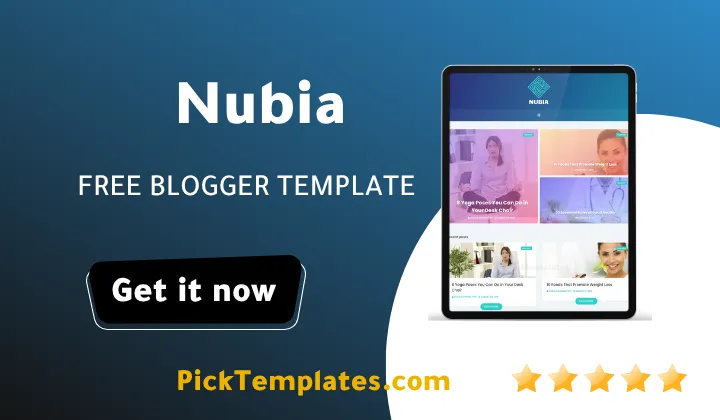
The biggest challenge for any magazine style blog is showing posts from very different sections without the page turning into visual noise. Nubia solves this through a repeating card pattern. Every post thumbnail carries a small category tag in the corner so a reader scrolling past a technology post and a photography post right after it never loses track of what section they are looking at.
This matters more than it sounds. A blog that covers business tips one day and travel photography the next needs a homepage that treats both subjects with equal visual weight. Nubia Template does this by keeping every thumbnail the same size and every title the same font weight no matter which label sits above it.
Homepage Layout And Post Cards
The homepage itself runs on a three column grid with a large featured slider sitting above the fold. Below that the post cards line up in neat rows and a load more button at the bottom keeps the page from becoming an endless scroll on first visit. This kind of pacing works well for a blog owner who wants to feature a mix of trending posts and older evergreen content side by side.
Speed matters just as much as looks for a magazine style layout carrying dozens of thumbnails on a single page. Nubia keeps its image handling reasonably light and pages loaded quickly during testing even with a full grid of posts showing at once. Photographers and travel bloggers who upload very large image files should still compress those images before uploading since no theme can fully offset oversized source files on its own.
On phones and tablets the logo and menu block moves to the top of the page instead of sitting in its usual side position. Test this view early during setup so your header does not look cramped on smaller screens.
Menu And Navigation Behavior
Instead of a normal top bar Nubia opens its full menu from the left edge of the screen when a reader taps the menu icon. This gives you room for a longer navigation list without pushing your header height up. It also supports nested drop down items so a busy site with several sub categories under one main topic still stays easy to browse.
A few practical points stood out while testing the navigation and layout system across different screen sizes and content types.
- Category labels stay visible on every thumbnail across the homepage and archive pages
- The left side menu supports multi level drop downs for larger content libraries
- Post thumbnails keep a fixed ratio so the grid never looks uneven
- The featured slider can hold a handful of top stories above the main feed
- Sidebar widgets sit in a single right column keeping the reading area wide
Together these small details are what make Nubia feel closer to an actual magazine layout than to a plain blog theme built from a generic starter template.
Set your category labels before you import any demo content. Nubia leans on those labels for its visual organization so a clear naming plan from day one will save you a lot of manual cleanup later.
Where Nubia Falls Short
No free theme is perfect and Nubia has a few rough edges worth knowing about before you commit. The widget styling on the sidebar looks a little dated next to newer Blogger themes released in the past couple of years. Font choices also lean plain in body text and some blog owners will want to bring in a custom heading font through their own dashboard settings to freshen things up.
The theme also carries some AMP support built in which is a nice touch for mobile speed. Still if your blog leans heavily on video embeds or audio players you may find the media handling less flexible than on a theme built specifically for multimedia content. A visually driven alternative such as Neesi Blogger Template might suit that use case better if photography or video is your main content type.
Setup itself is fairly direct once you know the order of steps to follow and once your demo content has been fully replaced with your own material.
- Back up your current Blogger theme before uploading anything new
- Upload the Nubia XML file through the Blogger theme settings page
- Set your category labels first so the homepage cards sort correctly
- Replace the demo slider images with your own featured post images
- Configure the right sidebar widgets and remove any unused demo gadgets
Following that order keeps you from having to redo work later once real content and real images are already published across your blog.
Free Version And English Version Details
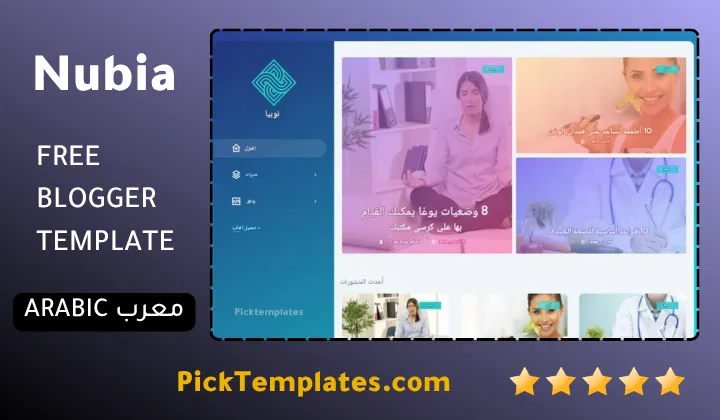
There are two versions of this template worth knowing about. A free Arabic language copy protected by copyright was translated and adapted by the Picktemplates team for readers who prefer working in Arabic. Alongside that a free English version and a paid premium English version were both built and are maintained by the original author SoraTemplates.
Picking between them mostly comes down to which language your dashboard workflow is easier in since the core layout and features stay the same across both editions and neither one loses the category based homepage structure covered above.
Nubia is a strong starting point if your blog needs to hold several content types under one roof without looking cluttered. For more options built around this same magazine style approach take a look at our full collection of magazine Blogger templates before making your final pick.
Information
| Template Name | Nubia |
| Version | 2.0.0 |
| Creation Date | 20 April 2020 |
| Last Update | 30 January 2022 |
| Platform | Blogspot |
| Author | Soratemplates |
Features
- How To Setup Nubia Blogger Template
- Three Column Magazine Style Layout
- Colorful Fluid Background Design
- Horizontal Menu Opening From The Left
- Fully Responsive Across Phones And Tablets
- Fast Loading Clean Code Structure
- SEO Ready Out Of The Box
- Retina Ready Images For Sharp Screens
- Drop Down Menu For Deeper Navigation
- Social Bookmark Buttons Built In
- WhatsApp Sharing Button Included
- Page Navigation Menu For Easy Browsing
- Post Thumbnails On Every Card
- One Right Sidebar For Widgets
- AMP Support For Faster Mobile Pages
- Slideshow Widget For Featured Posts
- Minimalist News And Technology Focused Design
Conclusion
Nubia earns its place among free magazine themes for Blogger because it manages to keep a busy homepage looking organized. The three column layout gives every post room to breathe and the category labels on each thumbnail make scanning fast for returning readers.
If you run a general interest blog that covers more than one topic this theme saves you the trouble of building a custom homepage from scratch. Just remember to swap out the demo images and widgets before launch so your site does not end up looking like a copy of the live demo.
Mouhssine Boukou who has spent 10 years testing Blogger themes puts it plainly. He says Nubia is not the flashiest magazine theme available today but it is one of the most dependable free options for a blogger who wants structure over decoration and that trade off is worth it for most new magazine style sites.
We have localized the free version of the Nubia template into Arabic and fixed the Right-to-Left (RTL) layout issues to make it easier to use on Arabic blogs.





The text has a meditative clarity. Each idea is rendered with care and precision, offering insight without rush, and a space for contemplation and quiet reflection.