
Table of Contents
Contents
Welcome. If you want a stylish magazine layout for blogger that looks modern on mobile and desktop. Trendy magazine blogger template is a strong option for fashion lifestyle beauty and news blogs. The free version is useful for testing. The free arabic version is a limited translation by picktemplates. The other versions are created by the template author templatesyard. If you want full use and fewer limits. Choose the paid professional version.
Trendy Magazine Template review and practical guide
This guide explains what the trendy magazine theme does well. Where it falls short. Who should use it. And how to avoid common setup mistakes. If you prefer a softer fashion style before deciding. You can also compare it with Sofy Blogger Template.
What this template does well
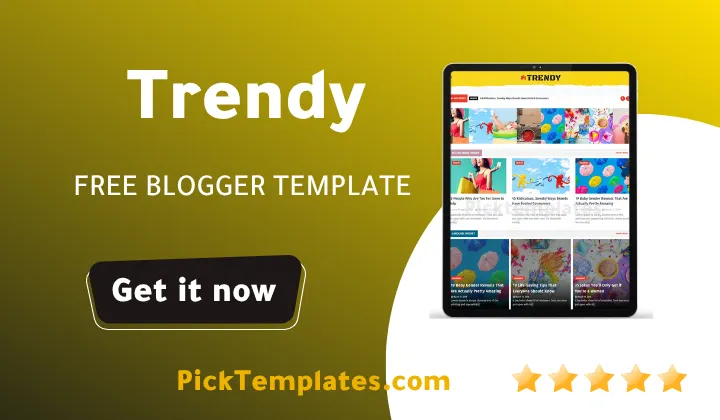
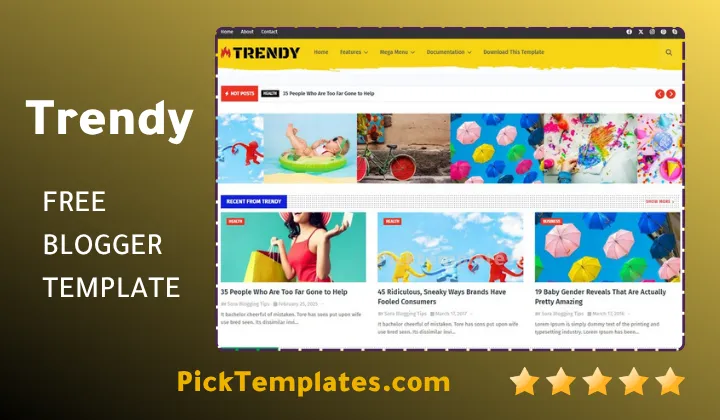
The theme gives blogger a homepage that feels closer to a modern WordPress magazine layout than a basic blog. It supports featured sliders grid sections post thumbnails ad blocks breadcrumb navigation and a responsive structure that keeps articles easy to scan.
- Responsive layout for phones tablets and desktops.
- Clean post cards that fit image heavy niches.
- Mega menu and drop down navigation for category driven sites.
- Useful areas for ads social links and popular posts.
- SEO friendly structure with breadcrumb support.
Among free blogger templates this one stands out when your content depends on strong visuals. Beauty blogs fashion edits online magazines and tech news sites benefit the most because the layout highlights categories and featured images without feeling outdated.
Who should use it and who should skip it
Use trendy magazine template if you publish often and need a homepage that can carry many categories at once. It fits fashion beauty lifestyle photography health tips and digital news. It also works well for personal brands that publish tutorials or trend roundups.
Skip it if your site is mostly plain text or if you need store style product pages. It is also not the best fit for local business landing pages. The design is built for articles first. Not for catalogs or service funnels.
What we found during testing
During our test on a clean blogger install we found the first setup was straightforward once the widget labels matched the homepage blocks. The mobile view stayed strong and readable. The slider and grid sections looked polished with the right image ratio. The main challenge was homepage density. Too many widgets can make the first screen feel busy.
Tip. Start with the slider one featured grid and one sidebar block. Add more sections only after the homepage stays clear on mobile.
Image quality matters more than usual here. If your thumbnails use mixed sizes the homepage loses its neat look. We recommend one image ratio for all featured and recent posts. That keeps the trendy magazine balanced and more professional.
Free version versus Arabic version versus paid version
The current release shown by the author is v1.0.0 from 06 January 2025. Before you download it. Know the difference between the available versions.
- The free version is copyright protected. It is useful for testing the design and learning the widget structure. Free users should not expect support.
- The free Arabic version is a limited translated edition by Picktemplates. It helps Arabic publishers start faster but it is still a limited release.
- The paid professional version is the safest choice for real projects. It gives you the intended experience from the original creator. The official paid and original versions are created by Templatesyard.
Important. If your blog will carry ads client work or long term branding. Use the paid file and keep a full backup before any edits.
Main features that matter in daily publishing
Feature lists often sound impressive but only a few items really change your workflow. These are the parts that make a practical difference in day to day use.
- Featured slideshow for top stories or seasonal content.
- Three column footer for labels links and extra widgets.
- Ads ready sections that fit Blogger monetization.
- WhatsApp sharing and social tools for mobile traffic.
- Pinterest style image sharing and room for Instagram widgets.
- Minimal typography that keeps long posts readable.
- AMP ready presentation according to the feature list. Test it again after adding scripts or external widgets.
The structure is flexible enough for many niches. Still the visual style is strongest when the site uses fresh images and short category labels. If you want a cleaner alternative with less homepage density. You can compare it with Vexo Blogger Template.
Pros and cons
A fair review is more useful than empty praise. Here is the short version after testing the layout.
- Pros. Modern design that feels current on both desktop and mobile.
- Pros. Good fit for fashion beauty lifestyle tech and magazine publishing.
- Pros. Strong use of images categories and featured content.
- Pros. Helpful ad spots and social elements for growth.
- Cons. The homepage can look crowded if every section is enabled.
- Cons. New users may need time to understand widget placement.
- Cons. Free users do not get support.
- Cons. Not ideal for stores directories or very simple journals.
Setup advice for better results
The homepage logic feels closer to a multi section magazine than a basic blogger blog. That is good for publishers but it means setup choices matter.
- Install it on a test blog first.
- Set your menu labels before importing many posts.
- Use one thumbnail ratio across featured and recent posts.
- Keep the top of the homepage focused on your best categories.
- Test mobile speed after every new widget or script.
- Save a backup before editing HTML or changing major sections.
Note. We recommend this template for beauty blogs fashion news celebrity roundups and gadget magazines. We do not recommend it for recipe sites that need complex card layouts unless you plan custom edits.
Final verdict
Trendy magazine blogger theme is a smart choice if you want a magazine style blogger site that looks polished without becoming hard to manage. Its biggest strength is the balance between visual impact and simple publishing. Its main weakness is that beginners can overload the homepage. The free template is enough for testing. The paid version is the better option for a serious brand.
If you are still comparing layouts before your final choice. Browse more magazine Blogger templates and compare how each design handles categories images and ads. That makes it easier to see whether Trendy is the right long term fit for your content.
Information
| Template Name | Trendy Magazine |
| Version | 1.0.0 |
| Creation Date | 06 January 2025 |
| Last Update | 06 January 2025 |
| Platform | Blogger / Blogspot |
| Author | Templatesyard |
Features
- How To Setup Trendy Blogger Template
- Responsive design that stays clear on phones tablets and desktops
- Magazine homepage blocks for featured stories and recent posts
- Clean typography that keeps attention on the article body
- Mega menu and drop down navigation for large category sites
- Post thumbnails that improve browsing speed for readers
- Ad ready sections for banners sponsored blocks and simple monetization
- Breadcrumb support for cleaner internal movement between pages
- Social sharing buttons with mobile friendly behavior
- Three column footer for labels links and extra widgets
- Fast front page feel when images are optimized well
- SEO aware structure that supports crawlable content flow
- Blogger Layout Version 3.0 support for easier arrangement
- Stylish color logic suited to beauty and lifestyle branding
- Good fit for fashion health tech and online magazine niches
- Grid sections that look better with consistent thumbnail ratios
- Homepage design that rewards careful widget placement
- Best results appear when the first screen stays focused and clean
Conclusion
Trendy Magazine Blogger Template works best for publishers who need a modern front page with clear categories and strong featured images. It turns a simple Blogger site into a more editorial looking publication without making daily posting difficult.
The free release is helpful for evaluation. The limited Arabic version by Picktemplates is useful for Arabic users. The original professional release by Templatesyard is the safer long term choice when you need the complete build and fewer restrictions.
Expert opinion by Mouhssine Boukou with 10 years of experience. After reviewing the layout logic and mobile behavior. I see Trendy as a strong option for fashion beauty and digital magazine sites. I would not use it for a local store or a heavy directory. Its real strength is clean content hierarchy and solid visual balance on Blogger.
We have localized the free version of the Trendy template into Arabic and fixed the Right-to-Left (RTL) layout issues to make it easier to use on Arabic blogs.